Skip to content

Welcome to Planet KDE

This is a feed aggregator that collects what the contributors to the KDE community are writing on their respective blogs, in different languages

Saturday, 3 January 2026

Welcome to a new issue of This Week in Plasma!

Plasma developers are starting to trickle back from their vacations, and are polishing up and merging work that was nearing completion late last year. Among them are some impactful accessibility features, plus lots more holiday goodies!

Also, allow us to thank everyone who donated to KDE’s 2025 end-of-year fundraiser. Thanks to all of you, we raised an additional €385,000 for KDE e.V. — a staggering, awe-inspiring sum of money! KDE e.V. will put it to good use keeping KDE financially and technically sustainable for years to come.

Finally, please welcome to TWiP John Veness, who has helped out with this week's post! Contributions here are warmly appreciated.

Anyway, let’s check out the work:

Notable New Features

Plasma 6.6.0

The “Slow Keys” accessibility feature has been implemented for Plasma’s Wayland session! (Martin Riethmayer, KDE bug #490826)

The Zoom effect now has a mode where the pointer never leaves the center of the physical screen. (Ritchie Frodomar, KDE bug #513145)

The Emoji Selector app now lets you choose a preferred skin tone for emojis of hands and people. (Tobias Ozór, plasma-desktop MR #3399)

Emoji Selector app showing skin tone chooser menu

It’s now possible to disable the visible timeout indicators on notifications if they stress you out. (Anton Birkel, KDE bug #411613)

Option on System Settings’ Notifications page to disable notification timeout indicators

Notable UI Improvements

Plasma 6.5.5

When Discover prompts you to search the internet for an app that it couldn’t find, the search string now includes the correct OS name if you’re not using a Linux-based OS. (Jaimukund Bhan, KDE bug #513366)

Plasma 6.6.0

Using a game controller will now count as “activity”, stopping the system from automatically going to sleep or locking the screen. (Yelsin Sepulveda, KDE bug #328987)

When a laptop is plugged in or unplugged while asleep, it now wakes up being aware of the current state. (Nate Graham, KDE bug #507203)

System Settings’ Touchscreen page now hides itself when there are no touchscreens connected. (Nicolas Fella, KDE bug #513566)

The screen chooser OSD now has a button to open the full System Settings page if none of the built-in options are relevant. (Kai Uwe Broulik, kscreen MR #442)

Button in screen chooser OSD to configure screen settings in more detail

Creating a sticky note on the desktop via middle-click paste now focuses the text area immediately, ready for editing. (Kai Uwe Broulik, kdeplasma-addons MR #967)

Subtly improved the appearance of overlay badges on Plasma widgets, particularly the ones in the system tray. (Noah Davis, plasma-workspace MR #6118)

Nicer-looking widget badges

In the Application Dashboard launcher widget, category highlights now span the full width of the area, making it more visually consistent. (Christoph Wolk, plasma-desktop MR #3408)

The Large Icons Task Switcher style now does a better job of showing a large number of icons by wrapping them onto multiple rows rather than scrolling horizontally. (Christoph Wolk, KDE bug #513436)

Notable Bug Fixes

Plasma 6.5.5

Fixed an issue that made some Plasma popups inappropriately stay open when they lost focus. (Aleksey Rochev, KDE bug #511187)

Plasma 6.6.0

Possibly fixed one of the most common panel-related Plasma crashes. (David Edmundson, plasma-workspace MR #6086)

Fixed an issue in Spectacle that could make some toolbars in Rectangular Region mode appear off-screen when using a multi-monitor setup where not all screens share a baseline. (Mario Roß, KDE bug #468794)

Fixed a bug that could make the “New!” badge on newly-installed apps in Kickoff overflow for apps with very long names. (Christoph Wolk, KDE bug #513272)

Fixed a weird issue that could make the Task Manager start a drag-and-drop operation when double-clicking a task right on the screen edge. (Aleksey Rochev, KDE bug #501922)

Notable in Performance & Technical

Plasma 6.6.0

Improved and fixed support for OpenBSD in multiple places. (Rafael Sadowski, KPipeWire MR #229, KInfoCenter MR #284, Solid MR #228)

How You Can Help

“This Week in Plasma” needs your help! Publishing these posts is time-consuming and needs community assistance to be sustainable. Right now there are two ways to help:

Work can be coordinated in the relevant Matrix room.

Beyond that, you can help KDE by directly getting involved in any other projects. Donating time is actually more impactful than donating money. Each contributor makes a huge difference in KDE — you are not a number or a cog in a machine! You don’t have to be a programmer, either; many other opportunities exist.

You can also help out by making a donation! This helps cover operational costs, salaries, travel expenses for contributors, and in general just keep KDE bringing Free Software to the world.

To get a new Plasma feature or a bugfix mentioned here

Push a commit to the relevant merge request on invent.kde.org.

Friday, 2 January 2026

This is a recipe post. I’ve written this one down before, in 2010, but this time I used a scale and some measurements that make more sense in the Netherlands. Carrot cake in the Netherlands still elicits exactly two reactions: vies he? and oh, yummy!. That rabbit still doesn’t get it.

For a vegan cake, use vegan egg (chia seed + some water). Kid[0] makes it that way sometimes, but I have not tried it myself.

Stir together:

  • 200g grated carrots (about 4 winterwortelen)
  • 120g brown sugar
  • 10g koek en spekulaaskruiden (a standard-ish mix in the Netherlands, mostly cinnamon and some clove and ginger)
  • a pinch of salt
  • 80g oil (if I hadn’t weighed this on a scale I would have said “nine goulou-goulous from the usual bottle”)

Then beat in:

  • 3 eggs
  • 60g raisins (optional)
  • 80g sunflower seeds (optional)

Finally, stir in:

  • 250g self-raising flour (zelfrijzend bakmeel, which is cheaper than flour in my supermarket)

This is enough for a small-ish pie dish or baking dish. I have a 24x24cm square tray that is way too big. The batter spreads too thin and it ends up baking too dry. A smaller tray is better.

The batter looks dreadful and runny when you pour it in the baking dish. Bake at 180℃ for 35 minutes or so.

And we’ve finally reached 2026! I wish you all lots of nice Free Software contributions and good news regarding sustainability. Let’s go for my web review for the week 2026-01.


How We Lost Communication to Entertainment

Tags: tech, social-media, communication, community

Indeed, social media even the fediverse isn’t really about communication or community, it’s about consuming content.

https://ploum.net/2025-12-15-communication-entertainment.html


I’m brave enough to say it: Linux is good now

Tags: tech, linux, foss, gaming

Another call for gamers to switch to Linux. Let’s see if the numbers are following in 2026.

https://www.pcgamer.com/software/linux/im-brave-enough-to-say-it-linux-is-good-now-and-if-you-want-to-feel-like-you-actually-own-your-pc-make-2026-the-year-of-linux-on-your-desktop/


Europe gets serious about cutting US digital umbilical cord

Tags: tech, politics, business, europe

Looks like Europe is finally waking up. It needs to pick up the pace now.

https://www.theregister.com/2025/12/22/europe_gets_serious_about_cutting/


A post-American, enshittification-resistant internet

Tags: tech, business, politics, DRM, attention-economy, privacy, gafam, ai, machine-learning, gpt, copilot, technical-debt

Probably one of the most important talks of 39C3. It’s a powerful call to action for the European Union to wake up and do the right thing to ensure digital sovereignty for itself and everyone else in the world. The time is definitely right due to the unexpected allies to be found along the way. It’d be a way to turn the currently bad geopolitical landscape into a bunch of positive opportunities.

https://media.ccc.de/v/39c3-a-post-american-enshittification-resistant-internet


Beyond the Machine

Tags: tech, ai, machine-learning, gpt, philosophy, music, art, programming

Long but interesting piece. There’s indeed a lot to say about our relationships to tools in general and generative AI in particular. It’s disheartening how it made obvious that collaborative initiatives are diminishing. In any case, ambivalence abounds in this text… for sure we can’t trust the self-appointed stewards of the latest wave of such tools. The parallel with Spirited Away at the end of the article is very well chosen in my opinion. The context in which technologies are born and applied matters so much.

https://frankchimero.com/blog/2025/beyond-the-machine/


Thanks AI!

Tags: tech, ai, machine-learning, gpt, copilot, criticism

I think Rich Hickey hit that nail on the head.

https://gist.github.com/richhickey/ea94e3741ff0a4e3af55b9fe6287887f


My first meshtastic network

Tags: tech, radio, distributed, meshstatic

This is really fun tech. I need to find time to experiment with it.

https://rickcarlino.com/notes/electronics/my-first-meshtastic-network.html


Gaming Couch – Play Couch Co-Op Games Instantly

Tags: tech, gaming, indie, web

Looks like a neat option for quick party games.

https://gamingcouch.com/


Email Privacy Tester

Tags: tech, email, security, tools

This looms like a handy help to check your email client is doing the right thing and is not leaking information.

https://www.emailprivacytester.com/about


Bluetooth Headphone Jacking: Full Disclosure of Airoha RACE Vulnerabilities

Tags: tech, bluetooth, security

This is definitely a bad one, there seem to be quite a few popular devices affected. And there might be more devices affected of course.

https://insinuator.net/2025/12/bluetooth-headphone-jacking-full-disclosure-of-airoha-race-vulnerabilities/


A Modern Recommender Model Architecture

Tags: tech, ai, machine-learning, data-science

Very comprehensive resource to make your own recommender model.

https://cprimozic.net/blog/anime-recommender-model-architecture/


How uv got so fast

Tags: tech, rust, python, design, performance

Unsurprisingly, this is mostly not related to the use of Rust. The design choices are what male uv so fast.

https://nesbitt.io/2025/12/26/how-uv-got-so-fast.html


witr: Why is this running?

Tags: tech, processes, system, tools

Early days for this little system tool. I really like the idea though.

https://github.com/pranshuparmar/witr


TIL: Restarting systemd services on sustained CPU abuse

Tags: tech, system, processes, systemd

Might be an interesting pattern to avoid a service going awry.

https://taoofmac.com/space/til/2025/12/28/1400


Huge binaries

Tags: tech, system, assembly, hardware, cpu

Nice little introduction in the fascinating world of very large binaries.

https://fzakaria.com/2025/12/28/huge-binaries


On the Brokenness of File Locking

Tags: tech, linux, filesystem

It’s been written a while ago now… and it’s admittedly still a mess. Be sure to read the addendum as well.

https://0pointer.de/blog/projects/locking


Everything you never wanted to know about file locking

Tags: tech, unix, linux, filesystem, python

The situation about file locking is really complicated in the Unix systems family.

https://chris.improbable.org/2010/12/16/everything-you-never-wanted-to-know-about-file-locking/


By how much does your memory allocator overallocate?

Tags: tech, system, memory

A good reminder that allocators generally do more than you expect.

https://lemire.me/blog/2025/12/30/by-how-much-does-your-memory-allocator-overallocates/


The production bug that made me care about undefined behavior

Tags: tech, c++, memory

Careful of undefined behaviours. They can be reached fairly quickly. Especially in C++ and its initialisation maze.

https://gaultier.github.io/blog/the_production_bug_that_made_me_care_about_undefined_behavior.html


Software taketh away faster than hardware giveth: Why C++ programmers keep growing fast despite competition, safety, and AI

Tags: tech, c++, community, safety

This piece is (unsurprisingly) biased. Still there’s some truth there. C++ is here to stay, like it or not. The safety issues are overblown and are getting addressed. Now where the article is lacking is that the language has other issues. Also, will profiles ever become a real thing?

https://herbsutter.com/2025/12/30/software-taketh-away-faster-than-hardware-giveth-why-c-programmers-keep-growing-fast-despite-competition-safety-and-ai/


The Second Great Error Model Convergence

Tags: tech, exceptions, failure, go, zig, rust, type-systems

This is indeed interesting to see how the landscape evolved around error handling. There’s clearly a tension between exceptions and the result types we’ve seen popping up everywhere now.

https://matklad.github.io/2025/12/29/second-error-model-convergence.html


Rust Errors Without Dependencies

Tags: tech, rust, failure, exceptions

A bit too unapologetic regarding Rust API choices for my taste. Still, it gives a good idea on how error handling works in Rust.

https://vincents.dev/blog/rust-errors-without-dependencies/


TIL: serde’s borrowing can be treacherous

Tags: tech, rust, serialization, failure

You assumed you could deserialise in a zero copy fashion? Are you really sure about that? Think twice.

https://yossarian.net/til/post/serde-s-borrowing-can-be-treacherous/


Scratchapixel

Tags: tech, 3d, graphics, learning

Looks like a nice resource to get started with graphics and 3D.

https://www.scratchapixel.com/


A silly diffuse shading model

Tags: tech, 3d, graphics, shader

It’s not that silly. It can come in useful in some cases, for artistic or debug reasons.

https://lisyarus.github.io/blog/posts/a-silly-diffuse-shading-model.html


You can’t design software you don’t work on

Tags: tech, design, architecture

I’m not sure I fully align with this piece. The core tenet of generic design advice vs concrete design advice makes sense though.

https://www.seangoedecke.com/you-cant-design-software-you-dont-work-on/


The 9 indispensable DEBUGGING RULES

Tags: tech, debugging

A good summary on the important rules to follow to debug something.

https://tpierrain.blogspot.com/2010/11/9-indispensable-debugging-rules.html


Pair Programming – What Works, What Breaks, & What’s Next

Tags: tech, pairing, team

Interesting insights about pair programming.

https://spin.atomicobject.com/ten-years-of-pair-programming/


The Rime of the Ancient Maintainer

Tags: tech, maintenance, sustainability

This is a good praise for the work of maintainers. They’re fighting off entropy and this should be well regarded.

https://www.joanwestenberg.com/the-rime-of-the-ancient-maintainer/


Definition of Ready

Tags: tech, agile, product-management, tests

The definition of ready can be a big help avoiding too many questions about stories as they are implemented. They should be clear before hand.

https://blog.gdinwiddie.com/2014/03/27/definition-of-ready/


The Humanizing Work Guide to Splitting User Stories

Tags: tech, agile, project-management, product-management

This is a very good resource on the different ways to split user stories.

https://www.humanizingwork.com/the-humanizing-work-guide-to-splitting-user-stories/


Stop Using Story Points

Tags: tech, agile, estimates, project-management

Estimates are always the weak spot in project management in my opinion. Story points are generally confusing and there are better ways.

https://www.industriallogic.com/blog/stop-using-story-points/


Bye for now!

Thursday, 1 January 2026

They say never underestimate the bandwidth of a station-wagon full of tapes, but a USB 3.2 NVMe enclosure with a 1TB stick in it is pretty slick, also. I’ve been moving it back-and-forth between FreeBSD machines to get everything updated, and here’s some notes (for my future-self, mostly).

ZPool is cool

The stick has a GPT on it, and then a couple of partitions. I followed the example in the gpart(8) manpage under GPT. That creates a boot-partition, some swap, and a UFS partition – as if you want to create a bootable FreeBSD disk.

After that I put a rest-of-the-disk partition of type freebsd-zfs. Using glabel(8) I labeled that partition as zjail (ZFS pools traditionally start with the letter Z, and this one is going to be mostly-for-jails).

Then zpool can be used to create a pool from that labeled partition.

gpart add -t freebsd-zfs da0
glabel label zjail da0p4 
zpool create zjail label/zjail

Sure, it’s not got any redundancy, nothing special, but it’s 1TB I can carry around, and it’s easier than configuring NFS drives and/or WiFi on the laptop. To use the space, zpool import zjail (just don’t forget to zpool export zjail before shutting down).

etcupdate, ugh

Initially, I had a zjail/src filesystem, and under that some directories like src/ and ports/. It is possible to buildworld and buildkernel there, but etcupdate (which is a tool that updates the things in /etc/ based on the newly-built world) needs extra handholding for that, and the error message isn’t very informative. I forget what it is, even, because I ended up re-creating ZFS filesystems zjail/data/src and zjail/data/ports and then setting the mountpoint property for them to mount them in the traditional locations.

AMD graphics

The graphics drivers in FreeBSD are imported from Linux. There are some kernel shims, but basically we run the same graphics stack. However, the shim code is some tricky PCI-wrangling, and in my case with FreeBSD 15.0 I could get a text console, but loading the graphics drivers with kldload amdgpu would panic the kernel.

There are issues #391 and #393 which look similar to the panic that I would see. Bjorn has a proposed patch which simplifies the PCI-wrangling a little (to my eyes, anyway). I applied the patch and rebuilt “all the things”, after which both slightly-older (drm-66-kmod) and newer (drm-latest-kmod, which corresponds to Linux 6.9) drivers seem to work.

I imagine some fixes will land soon, because “AMD graphics just doesn’t work” does not seem like a long-term sustainable situation. With the fixes applied, I have a working graphics stack, so …

KDE Plasma Wayland on FreeBSD 15

Assuming the graphics stack works, then KDE Plasma can be installed with pkg install plasma6-plasma . You can’t do much with only Plasma and no applications at all, so pkg install konsole is recommended as well.

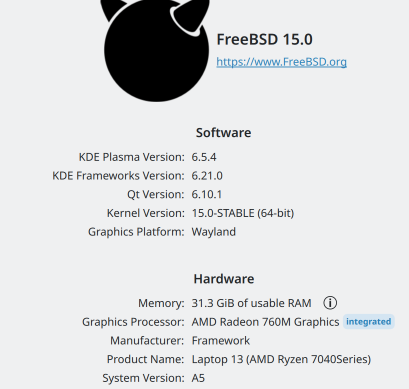
After that “it just works”, at least for the way that I use KDE Plasma. It takes a few clicks to change the settings to what I actually want (e.g. CTRL is next to the letter A) but after that it’s … just the usual KDE Plasma session, which looks like this in KInfoCenter:

KDE Plasma Wayland session information on FreeBSD 15

This is a recipe post. Allergens: contains gluten, lactose, and alcohol.

The oliebol is a Dutch thing for new year’s eve. From mid-November you can find stalls in front of supermarkets, at the home-improvement store, outside the mattress store, in squares everywhere. The oliebollenkraam. And then the boxes of Koopman’s Oliebollen Mix start blocking the aisles at the supermarket, and the 5 litre jugs of frying oil appear on shelves. More information about oliebollen (and how as a food-product they’re not limited to the Netherlands) can be found on the internet.

It’s a thing.

At new year’s eve, the neighbours at the end of my little street get together – Adriaan, Adriaan, Antoon, and whoever else shows up – to fry oliebollen under my car port. Each year our getup gets a little more fancy, with better screening from the wind, improved lighting, what have you. There’s a fire to keep us warm, music (Snob 2000 is a good pick), and whatever weird-ass alcoholic beverages we’ve collected this year. Slovenian “Punch” liqueur? Elster kruitenbitter? Maracuja cream? Lychee fizz? Pour it.

Here’s what I made this year, since I don’t use the boxes of mix. The mix is good enough, but there’s some joy to be had in do-it-yourself. Besides, as a daily baker-of-bread I have everything in-house anyway. Recipe is good for about 20 boils, depending on the size of the spoon used to spoon the batter into the deep-fryer.

Volkoren Herfstbok Oliebollen

Wets:

  • 250ml Grolsch Herfstbok, warmed up in the microwave (about 1min at 600W)
  • 250ml milk, also warmed up

Drys:

  • pinch of salt
  • 8g (a small scoop) brown sugar
  • 6g (a heaping teaspoon) dry yeast
  • 250g whole wheat flour (for bread; the local windmill adds a little extra gluten and ascorbic acid)
  • 250g white flour (patentbloem from the supermarket)

Lumps:

  • 125g of raisins or currants, soaked in warm water and then drained

Mix the wets. Mix the drys. Mix the drys into the wets and stir to a smooth(-ish) batter. Stir in the lumps. Let rise for at hour or a little more at 40℃. Fry spoonfuls (I have a small soup-ladle that yields a nice size) at 180℃ for 5 minutes, flipping them in the hot oil after about 3 minutes to brown them nicely on both sides.

Wednesday, 31 December 2025

Here comes Kaidan 0.14.0! It includes some great new features and fixes!

Most of the work has been funded by NLnet via NGI Zero Entrust and NGI Zero Commons Fund with public money provided by the European Commission.

Advanced Media Sharing

It is now possible to select media to be shared while being offline. Once you are connected, all media is automatically uploaded. Even downloads can be enqueued to be started as soon as you are online. In addition, ongoing transfers are canceled on disconnecting and automatically restarted once connected again. Up- and downloads can be manually canceled and restarted as well.

Offline media sharing queue

Filtering XMPP Providers for Account Creation

Kaidan’s manual registration now allows to filter all XMPP providers by various properties. For example, you can choose whether only providers are shown that store their data in a specific country or whose service runs on renewable energy. That is possible because Kaidan uses the data from XMPP Providers.

Provider filtering

Highlighted Messages

Messages are now precisely highlighted on various actions. A border is displayed around a message if you open its context menu, search it, or jump to if from a reply. That makes it possible to quickly see the relevant message.

Highlighted message

XMPP URIs

If you received an XMPP URI such as xmpp:[email protected], you can paste it directly into the field for adding a new contact. There is no need to remove any characters that are required to be machine-readable. The same applies to XMPP group chat URIs.

Changelog

There are several other improvements. Have a look at the following changelog for more details.

Features:

  • Keep draft messages on top of pinned/unpinned chat list items (pehg)
  • Optimize thumbnail creation (fazevedo)
  • Display border around searched/referenced message instead of bar (melvo)
  • Display border around message if its context menu is shown (melvo)
  • Highlight message’s avatar if hovered (melvo)
  • Display provider chat (used for welcome messages and service announcements) as such (melvo)
  • Always display same name and proper avatar initials for notes chats (melvo)
  • Allow to cancel downloads/uploads (fazevedo)
  • Allow to restart canceled uploads (fazevedo)
  • Allow to resend failed message via context menu (melvo)
  • Retrieve support addresses from server instead of provider list (XEP-0157: Contact Addresses for XMPP Services, XEP-0128: Service Discovery Extensions) (melvo)
  • Allow adding contact by entering XMPP URI (including authentication of OMEMO 2 keys) (melvo)
  • Allow joining group chat by entering XMPP URI (melvo)
  • Add option for allowing SASL PLAIN (needed for servers using LDAP) to custom connection settings (melvo)
  • Add filtering options to choose provider for registration (melvo)
  • Cancel file transfers on disconnecting from server (fazevedo)
  • Add support for offline media sharing queue (fazevedo)
  • Restart downloads canceled on logout once logged in (melvo)
  • Remove all related data on message removal (such as reactions and media) (melvo)

Bugfixes:

  • Fix displaying message reaction details (melvo)
  • Fix adding unneeded separator on mention after new line (melvo)
  • Wrap hint for actions needing user to be connected to server (melvo)
  • Fix displaying icons on Windows (pehg)
  • Fix adding new line at cursor position (melvo)
  • Ensure that own encryption devices are not removed if notes chat is removed (melvo)

Notes:

  • Kaidan requires KIconThemes (for Windows) now
  • Kaidan requires Qt6GuiPrivate (for Qt 6.10 or above) now
  • Kaidan requires Qt 6.7 now
  • Kaidan requires QXmpp 1.13 now

Download

Or install Kaidan for your distribution:

Packaging status

Last week on Dec 26 we had the yearly family admin day and a day later 39C3 (the 39th Computer Chao Congress) started. I usually try to watch interesting talks about security, reverse engineering and hardware. Most if not all I wanted to join are available as recordings and I will add a list of the ones I enjoyed most.

While watching the talk about the End-of-10 campaign (I have met Joseph at Akademy 2024 in person) I was reminded at one spot to my job as family admin. When the presenters referred to the administration of a Linux system compared to a Windows one. I got reminded of chats with folks in my town who talked about “re-installing Windows” a few times during the year because something was broken. I don’t remember when I last re-installed one of the family computers.

Bringing Linux closer to the family already started many years ago. I started out using Linux already in the last millennium. My wife at the time used a Windows 2000 system. At some point (seems to be usual for Windows systems) I needed to install a fresh system. That was the time, when I installed OpenOffice and told my wife that this is the word processor to be used in the future. Of course, she asked why I hadn’t installed the MS Suite, but when you tell someone with legal training that we don’t have a license, that answers the question without further inquiry. So it was Windows 2000 with OpenOffice as word processro and spreadsheet program and Pegasus Mail as mail reader.

At some point the hard drive of this computer broke and I was lucky to be able to rescue the most important files off of it. Because I did not have a replacement drive at hand, I simply setup a TFTP bootable Linux system keeping all the files on the network drive on the Linux server in my house. This allowed me to use the same box but without a hard drive. So this hard drive crash in the early 2000s allowed me to introduce my wife to Linux.

When my kids got into the age to go to grammar school, they have seen me working on the computer during our summer vacation and also wanted to play with it. Since I did not have games with me, I installed KTouch, a typewriter trainer for learning to touch type for them. They had a lot of fun and actually learned how to touch type in the following weeks.

Later on, when they got their own computers, it was clear to install a Linux system, because they were already used to it. They liked writing stories of all kinds and used LibreOffice for it. I had a few arguments with teachers at their school why we don’t have the usual widespread tools. I remember one time though, when my daughter came home and reported, that they now have new white boards at school. Due to German bureaucracy, the hardware was financed but the money for application software licenses (beyond the operating system) was not included in the budget. So one of the teachers simply installed free software like the OpenOffice suite and the problem was solved. Well, only to some extent, because the other teachers did not know how to operate this software. This was the time, when my daughter – out of the sudden – gained a big advantage.

Later, she enrolled in university to study computer science and bought herself a new computer. A Samsung Book 2 with a pre-installed operating system (guess which one). She was playing around with it for some time when she came to me and said “Daddy, please install some real software on it. I can’t use it the way it is”. I had a bit of a hard time to find the right Linux distro which already supported it at the time but we got it working. And she was more than happy when we ported all the data from her old laptop over. Today, five years later, she is still using it after a few updates of the operating system. Oh, 3 months after she enrolled, she withdrew again to start a career as paramedic.

My mom on the other hand, uses Linux also for more than 15 years now. At one point, she told me that she needs a new computer and asked if I could provide support for it. I told her, that I would only provide support if we will install Linux on the computer. At first, she was a bit scared, but today she is happy that I can provide even remote support from the other end of the world and that things are simply working.

All in all, coming back to the End-of-10 campaign, I see that I am not affected by all of this. All – well most of all – of my family members are already using Linux for a long time. Of course I made sure to install KDE as the desktop environment and that they have KMyMoney to maintain their finances

Thanks for reading until here. The post got longer than expected. And since I promised to leave links to the 39C3 talks (and one from 37C3 and 38C3 each which need to be watched in series) here they come:

37C3

38C3

39C3

All 39C3 recordings.

Tuesday, 30 December 2025

My initial post on Ni! OS gained more interest than I expected. Any time I jokingly do something, people react to it more than when I do something serious. :)

As a reminder, KDE Ni! OS is not a distribution, but a configuration for NixOS that aims at providing a ready-made immutable system for KDE users and developers with similar features to those of proper immutable KDE distributions.

If the Google search AI tells you it is a distribution, do not trust it:

Google thinks Ni! OS is a distribution

Further, if the Google search AI tells you Ni! OS is a code name for KDE Linux, do not trust it:

Google thinks Ni! OS is a code name for KDE Linux

Repository

The project got a repository at invent.kde.org which is currently in a very rough/bare state. Could be useful to existing NixOS users, but has a long way to go to become a proper resource on how to install and use Ni! OS.

NixOS has its own (quite cool, if you ask me) logo which doesn’t suite the comical image Ni! OS is trying to achieve.

For this reason, Ni! OS now has a proper custom logo – representing a – a shrubbery!one that looks nice, and not too expensive.

Ni! OS Logo

It is also meant to represent the way NixOS achieves immutability. Many packages are present on the system, but hidden from the plain sight as they belong to the previous system versions or are just hidden-from-the-user dependencies of other packages.

After my talk about TeX syntax-highlighting font at TUG2025 conference, then vice-president of TeX Users Group, Boris Veytsman approached me with a proposal to develop a Math counterpart for the beautiful Arsenal font designed by Andrij Shevchenko.

What followed was a deep dive into the TeXbook to learn about math font parameters, OpenType Math specification, and related documentation & resources. Fortunately, FontForge has really good support for editing Math tables; and the base font used (KpMath-Sans by Daniel Flippo) already had all the critical parameters set (which needed slight adjustments). I started the development of Arsenal Math by integrating the glyphs for Latin letters, Arabic numerals, some symbols etc. and with proper scaling & stem thickness corrections, for regular, bold, italic and bolditalic variants, plus math calligraphic letters. In addition, a lot of Math kerning (known as ‘cut-ins’ in OpenType parlance) was added to improve the spacing.

Fig. 1: Arsenal Math specimen, contributed by CVR.

Being an OpenType font — XeTeX, LuaTeX or some Unicode math typesetting engine (e.g. MS Word) is required to use Arsenal Math. Boris did testing and provided many feedback, and Vaishnavy Murthy graciously reviewed the glyph changes I made. The CTAN admins were quite helpful to get the font accepted into the repository. There is a style file and fontspec file supplied with the fonts to make the usage easy. The sources are available at RIT fonts repository.

Boris also donated funding for the project, but he had already paid me many folds by mailing The TeXbook autographed by Donald Knuth for me, so I requested the LaTeX devfund team to use funding for another project. Karl Berry suggested to write an article about the development process, which is published in the issue 46:3 of the TUGboat journal, and has a lot more technical details.

Fig. 2: The TeXbook autographed by Don Knuth for me.

The learning experience of Math typesetting internals, and contributing to the TeX ecosystem has been a fulfilling spare-time work for me in 2025. Many thanks to all those involved!

Monday, 29 December 2025

We achieved significant milestones during 2025 on the Ocean design system for Plasma. Here is a video recap of all of the things that happened.