-
-
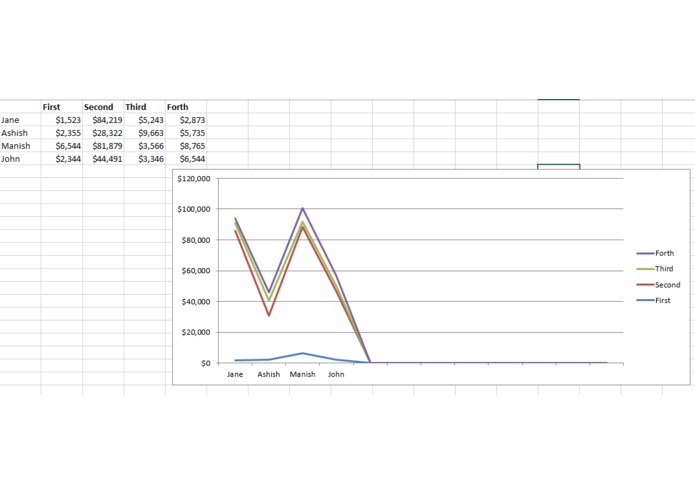
Custom activity demo in workflow that creates the chart from excel data
-

ZIMA, your personal assistant


Inspiration
Most of the times we face this in real life that the laptop that we carry goes down on battery, or we forget some file in our PC which is in our Office/Home.
It was required that we could get some files like sales figures, reports that we have already prepared from our PC to our mobile while on the move. Also from our mobile we could give commands to our PC to prepare charts, reports etc, while we moving, and get back on the mobile as attachment.
What it does
It send an email, which is received by outlook configured on the PC. These emails are read by the UiPath automation framework and then it takes the appropriate action based on the subject/body it receives in the email. Like
- Send any file from PC as attachment
- Prepare the excel report
- Prepare any chart from excel data received in email body etc.
How I built it
- Used the Outlook to configure the email.
- Used the c#/.NET to build custom activities for creating chart
- Using Uipath, which keeps reading the emails activities get activated and response is sent by email
Challenges I ran into
It was planned and thought very deeply, but still got many challenges like:
- How to Open and manipulate the excel activities
- How to send the file back as attachment
- How to decide the commands which should be easy to use
Accomplishments that I'm proud of
- Workflow, that could be very beneficial for the organizations
- This could be useful for colleges/students
- Used the Excel application scope to build custom activities, so excel manipulation tasks were streamlined.
What I learned
- Integration of Uipath with Outlook
- Integration with Excel
- Designing an automation workflow
- Creating charts using custom activities
What's next for Zima workflow
- Want to make it work by voice.
- Incorporate more an more commands
Want to deploy it in an organization for easily assessing the:
- Salary slips
- Leave details
- Business reporting
- Access employee PF
- Project statuses etc.


Log in or sign up for Devpost to join the conversation.