-
-
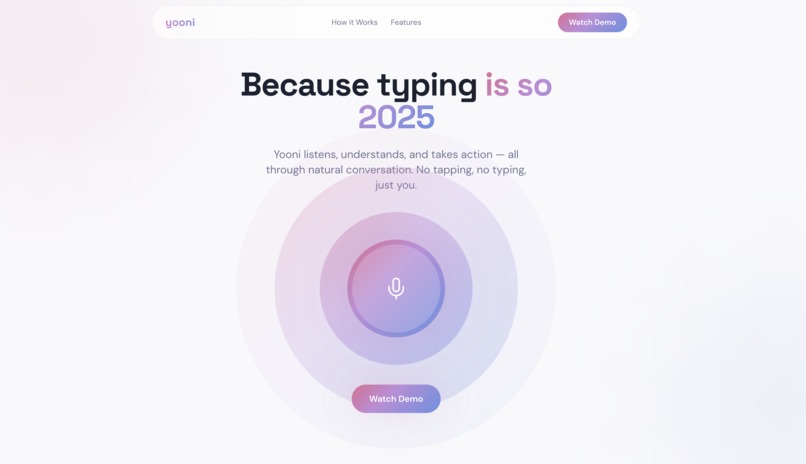
Landing Page
-
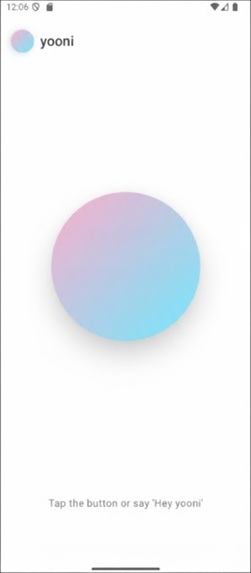
Conversation UI


For a product overview video, visit link
Inspiration
We asked Siri to call us an uber. It replied with "Hey Uber". This got us thinking, even well funded AI voice assistants have quite a long way to go. We want something that can actually get things done. We wanted an agent that can control our devices and do our boring tasks like booking our ubers, ordering us food and spam texting our ex so we didn't have to. We saw the potential of "Blue" (YC S25) but not only are they not yet on the market after almost a year, we also realized a closed ecosystem limits innovation and privacy. We wanted to build an open-source, privacy-first alternative that gives users full control over their own devices using affordable, off-the-shelf hardware.
What it does
Yooni is an open-source voice agent that controls your mobile device to complete real-world tasks, not just productivity tools. Yooni can buy you concert tickets, it can buy your favorite meal on instacart, it can get you a lyft, it can do anything you can do on your phone.
Natural Voice Interaction
- Speak naturally to Yooni (e.g., "Order my usual from DoorDash" or "Text mom I'll be there in 10")
- Real-time speech-to-text using Whisper and ultra-low latency response
- Conversational memory to handle follow-up questions and refinements
On-Device Control
- Android: Uses accessibility services and programmatic control to view your screen, tap buttons, swipe, and type text directly in your apps
- Agent Logic: Understands app layouts and navigates through complex flows (like finding a specific email or changing a setting) without needing special API integrations
- iOS: Planned support via mobile-use
Privacy & Safety
- Transparent Execution: Yooni explains what it's about to do before taking action
- Human-in-the-Loop: Asks for explicit confirmation before sensitive actions (like sending money or messages)
- Open Source: No black box—the agent logic is fully auditable and extendable by the community
- Local Inference: Compatible with self-hosted voice and multimodal LLMs
Intelligent Planning
- Breaks down vague requests into precise, actionable steps
- Verifies screen state before and after actions to ensure success
- Handles errors gracefully by retrying or asking for clarification
How we built it
We built Yooni as a distributed system to handle the heavy lifting of agentic reasoning while keeping the mobile app lightweight.
- Android App (Kotlin & Jetpack Compose): The frontend is a native Android app that handles voice input (OpenAI Whisper), speech synthesis (TTS), and the user interface. It captures the user's intent and displays the agent's thought process.
- Brain (Python & Gemini): The core intelligence runs on a backend (prototyped on a Raspberry Pi/local server) using Python. In production, this can run on significantly smaller edge devices, making it convenient for users to handle. We utilize Google's Gemini 3 Pro Preview for the high-level reasoning and planning, transforming vague voice commands into precise, step-by-step navigation instructions.
- Mobile Control (Mobile-Use): We improved and integrated mobile-use, an open-source framework that allows our agent to interface with the Android operating system, enabling it to "see" the screen hierarchy and simulate touch events.
- Networking: The Android app and the Python brain communicate via HTTP/WebSockets to stream audio and commands in real-time.
- Hardware Portability: We cross-compile from an NVIDIA/ASUS Ascent GX10 to support older, widely available hardware—so the community can run Yooni without expensive devices.
Challenges we ran into
- Latency vs. Accuracy: Balancing the speed of voice response with the time it takes for the agent to analyze a screen and decide on a tap was tough. We had to optimize our prompt engineering to get faster, reliable actions.
- Android Permissions: Gaining the necessary accessibility permissions to control other apps programmatically is (rightfully) difficult on Android. We spent a lot of time navigating the security model to allow Yooni to act on the user's behalf safely.
- Audio Handling: Implementing a robust "wake word" style experience and handling raw audio streams between Kotlin and Python required debugging low-level byte streams and format conversions (PCM to WAV).
- Old Hardware: Working with an 11-year-old Raspberry Pi to run state-of-the-art mobile agents was a challenge - we used an NVIDIA-provided ASUS Ascent GX110 to cross-compile binaries for it.
Accomplishments that we're proud of
- End-to-End Voice to Action: We successfully demoed a flow where a simple voice command triggers a real, physical interaction in a third-party app on the phone.
- Open Source Foundation: We built this on top of open standards, meaning anyone can fork Yooni and add support for their favorite apps or custom workflows.
- Sleek UI: We built a modern, responsive UI in Jetpack Compose with custom animations (breathing agent circle) that makes the AI feel alive and responsive.
- Privacy-First Architecture: By design, Yooni is transparent. It doesn't act in a "black box"; the user sees the plan and approves critical steps.
What we learned
- Agentic Workflows are Hard: "Planning" is easy for LLMs, but "executing" reliably in a dynamic environment like a smartphone OS is incredibly complex. Screen states change, popups appear, and loading times vary.
- Voice UI requires Trust: Users need constant feedback. We learned that visual cues (like the breathing animation and text logs) are essential to let the user know the agent is "thinking" or "working," otherwise they think it froze.
- The Power of Accessibility Services: Android's accessibility layer is incredibly powerful for automation, far beyond just screen reading.
What's next for Yooni
- Voice Authentication: Built-in speaker verification ensures only your voice can command Yooni, preventing unauthorized access even if someone else has your phone.
- On-Device Processing: Moving the LLM inference entirely to the device (using models like Gemini Nano or Llama 3 quantized) for offline capability and ultimate privacy.
- Visual Understanding: Improving the screen parsing with vision-language models (VLMs) to understand custom UI elements that standard accessibility services miss (like game menus).
- Proactive Help: Yooni learning your habits and suggesting tasks (e.g., "It's 6 PM, should I order dinner?").



Log in or sign up for Devpost to join the conversation.