-
-
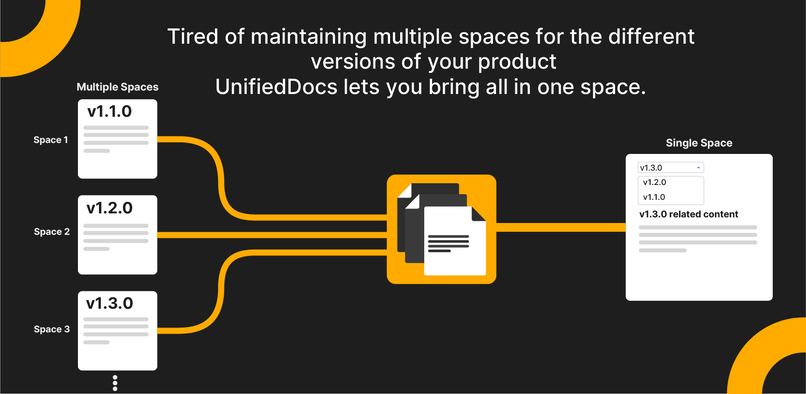
UnifiedDocs converts scattered version spaces into a single organized hub.
-
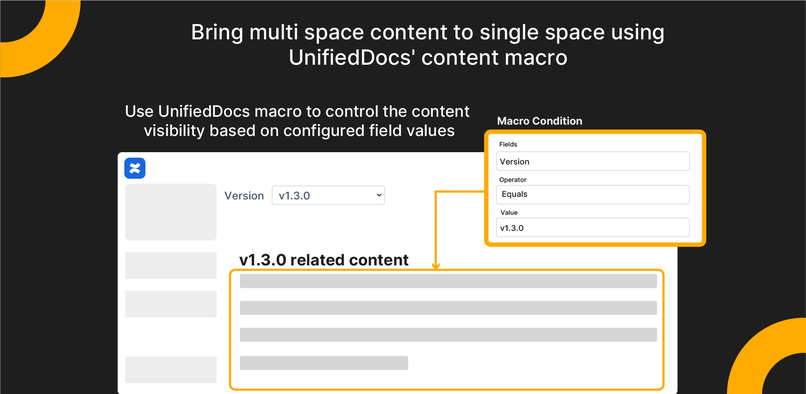
Add Unified Docs macros to Confluence pages and create content that updates automatically when fields change.
-
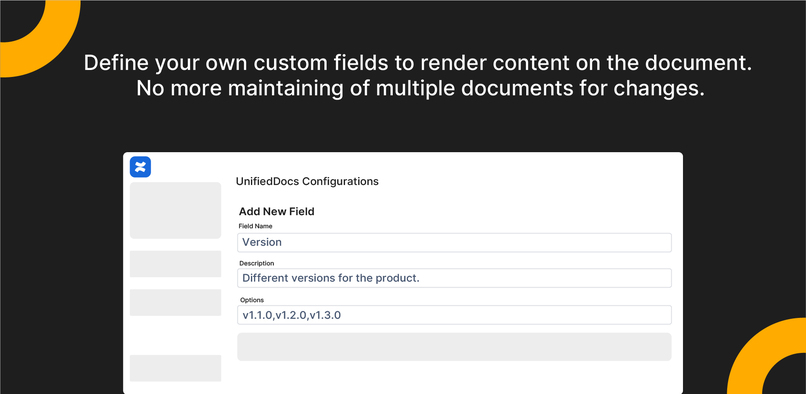
Define your own custom fields to render content on the document. No more maintaining multiple documents for changes.
-
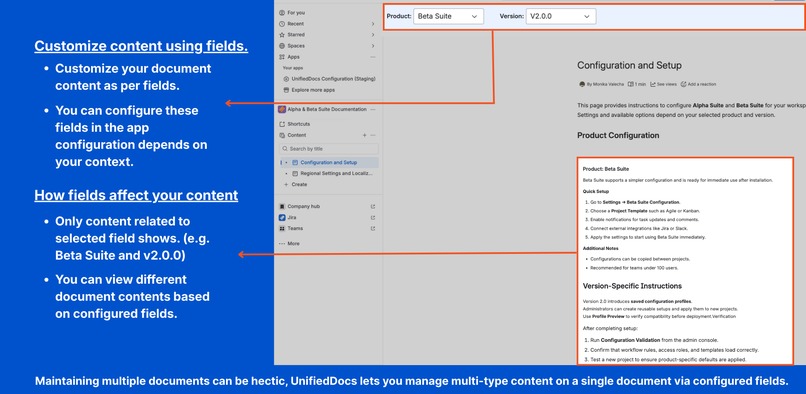
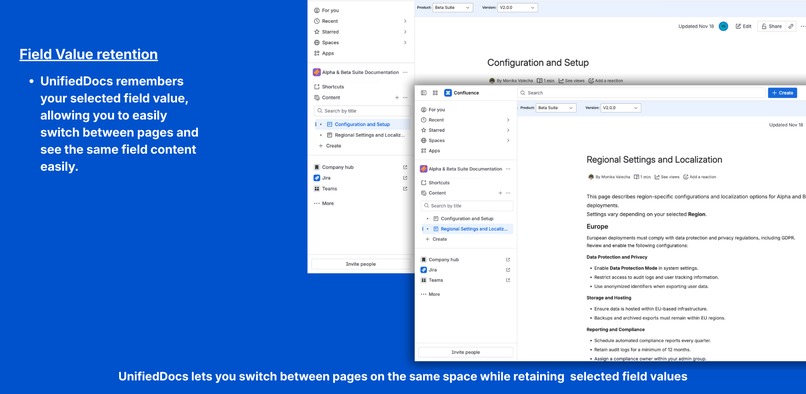
View a single page that adapts instantly based on selected context, showing only the content relevant to the current selection.
-
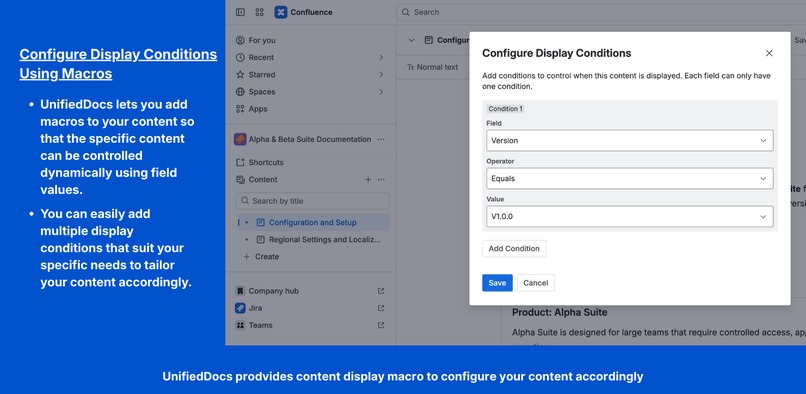
Apply display conditions directly within pages to control when specific sections are shown based on selected field values.
-
Manage shared fields in one place and control how content is displayed across documentation using configurable field options.
-
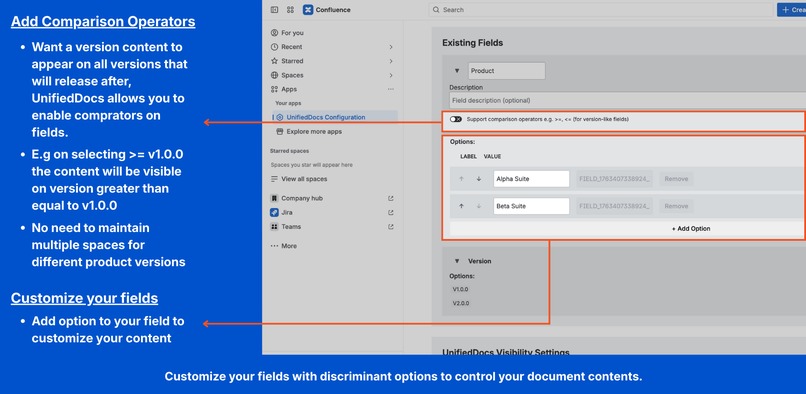
Configure field options and enable comparison operators to support conditional content across evolving documentation needs.
-
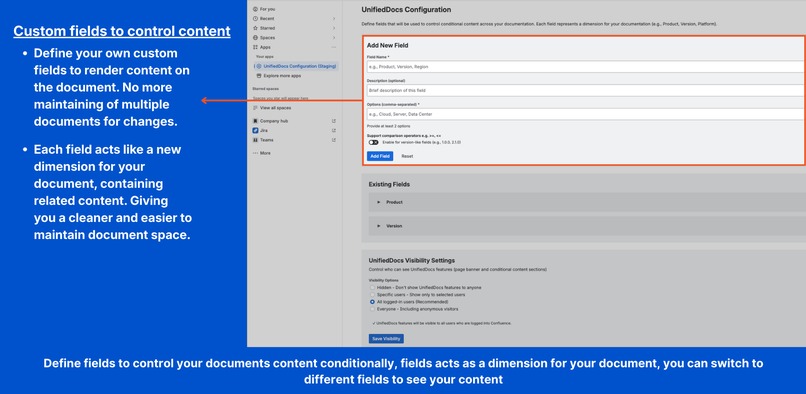
Create custom fields to structure documentation and control how content appears under different conditions.
-
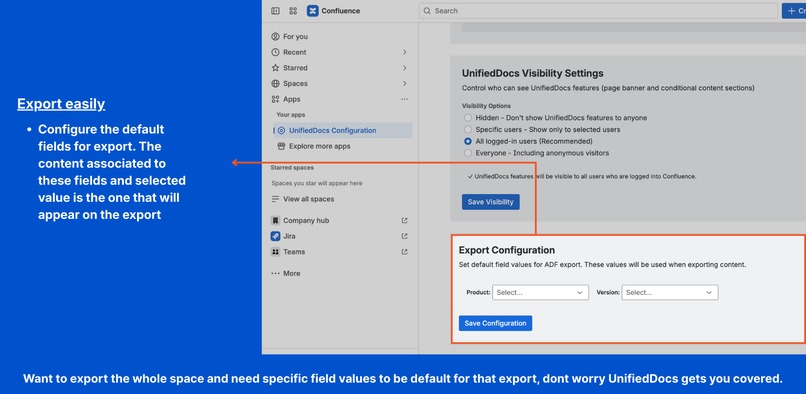
Define default field values for exports to ensure generated documentation reflects the correct context every time.
-
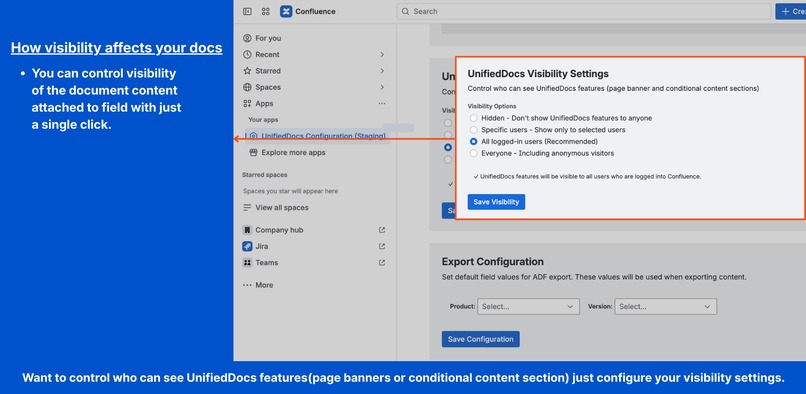
Control who can see contextual documentation features, ensuring content visibility aligns with access and audience needs.


Inspiration
UnifiedDocs grew out of a very practical documentation problem we kept running into.
As products evolved, documentation naturally followed version by version. The simplest approach was to duplicate existing pages or entire spaces and make incremental updates for each new release. Over time, this became the standard way of working.
The problem appeared when small changes were introduced. A minor update to a common section, such as access requirements, supported scope, or escalation details—meant tracking down and updating the same content across multiple versioned spaces. It was easy to miss an update, and difficult to be confident that all versions were truly in sync.
What made this more challenging was that the structure itself wasn’t wrong. Teams needed version-specific documentation, but they also needed shared content to stay consistent. Reorganizing documentation or enforcing strict templates wasn’t realistic, especially for teams already managing active releases.
UnifiedDocs was created to address this gap. The goal was not to replace existing documentation practices, but to enhance them, by allowing teams to maintain a single source of truth while still supporting version-specific behavior. One page, multiple contexts, without restructuring spaces or changing how teams already work.
What it does
UnifiedDocs helps teams manage documentation that adapts to different contexts within Confluence.
Single source of truth
- Common documentation is written once and reused across multiple contexts
- Avoids duplication caused by maintaining separate pages or spaces
Context-aware content
- Content sections appear or hide based on selected field values
- Readers can switch context directly on the page to view relevant information
Centralized configuration
- Fields are configured from a dedicated settings page
- Administrators can add, edit or delete fields as documentation evolves
- Visibility preferences control who can access UnifiedDocs features
Simplified maintenance
- Shared updates are applied in one place
- Reduces the risk of outdated or inconsistent documentation
Seamless Confluence integration
- Works with existing spaces and page structures
- Supports extending documentation by adding new fields without changing existing pages
For the full guide, see Getting started with UnifiedDocs
How we built it
UnifiedDocs was built as a Confluence app on Atlassian Forge with a focus on native integration and controlled configuration.
Platform and UI
- Built on Atlassian Forge
- UI implemented using Forge UI Kit
- Confluence macros used to embed conditional content into pages
- Forge Storage used to persist fields, options, and conditional rules reliably
Configuration and controls
- Global and Space configuration screens to define fields and options
- Support for editing and deleting fields without breaking existing usage
- Visibility settings to control access to UnifiedDocs features
Export support
- Export output generated in ADF (Atlassian Document Format)
- Export defaults configurable to standardize generated documentation packages
Challenges we ran into
UnifiedDocs appears simple on the surface, but building a reliable and flexible system inside Confluence came with several challenges.
Balancing flexibility with control
Different teams structure documentation differently. Some rely heavily on versions, others on environment, audience, or release stage. Designing a system that supports multiple contexts without becoming overly complex required careful trade-offs, especially around how fields and conditions are defined.
Making configuration safe for change
Documentation evolves over time. Fields get renamed, options change, and older contexts become irrelevant. One of the key challenges was ensuring that changes in configuration did not break existing pages or cause content to disappear unexpectedly.
Ensuring predictable content rendering
Conditional content must behave consistently for both authors and readers. We spent significant time refining how conditional sections are evaluated and rendered to avoid confusion, layout issues, or unclear page states when context changes.
Working within Confluence and Forge constraints
Confluence pages are not designed for dynamic content by default. Implementing contextual behavior entirely within Forge and UI Kit—without external services—required careful handling of state, performance, and page lifecycle events.
Accomplishments that we're proud of
UnifiedDocs started as a small idea, but it resulted in a meaningful shift in how teams approach documentation in Confluence.
Reduced real-world documentation overhead
By introducing a single-source, context-aware documentation model, UnifiedDocs eliminates the need to maintain multiple near-identical pages or spaces. Teams no longer have to chase the same update across versions, which directly reduces maintenance effort and documentation drift.
Practical configuration without disruption
One of the outcomes we’re most proud of is the configuration experience. Fields can be added, modified, reordered, or removed without breaking existing pages. This allows teams to evolve their documentation structure over time instead of locking themselves into rigid setups.
Native Confluence experience
UnifiedDocs feels like part of Confluence rather than an external system layered on top. Authors work with macros they already understand, readers interact through a simple page banner, and administrators manage everything from a centralized settings screen. There’s no separate interface to learn.
Zero external data footprint
The entire solution runs on Atlassian Forge using UI Kit, with no external services or data storage. This makes UnifiedDocs suitable for teams with strict security and compliance requirements while still supporting complex documentation scenarios.
Solving a real, recurring problem
Most importantly, UnifiedDocs addresses a problem teams repeatedly face but often accept as unavoidable. Seeing teams replace multiple versioned spaces with a single, adaptable documentation hub validated that the problem—and the solution—were both real.
Accurate exports based on selected configurations
UnifiedDocs prepares ADF content based on the field options defined in the export settings, ensuring exported documentation reflects the exact configuration selected by the user.
What we learned
Building UnifiedDocs reinforced several product and engineering lessons that shaped how we think about documentation tools.
Documentation problems scale quietly
What starts as a simple copy-and-edit workflow becomes difficult to manage as products evolve. Small inconsistencies compound over time, and teams often underestimate how much effort is spent keeping documentation aligned across contexts.
Structure matters more than volume
Most documentation issues weren’t caused by lack of content, but by lack of structure. When common and context-specific information are clearly separated, documentation becomes easier to maintain and easier to trust.
Configuration must evolve safely
Teams rarely get their documentation model right on the first attempt. Allowing fields and options to change over time—without breaking existing pages—proved to be more important than supporting complex rules upfront.
Simplicity drives adoption
Authors and readers are more likely to use a solution that fits naturally into their existing workflow. Keeping UnifiedDocs native to Confluence, with minimal UI and predictable behavior, reduced friction and improved acceptance.
Forge encourages disciplined design
Working entirely within Atlassian Forge pushed us to design with security, isolation, and clarity in mind. The constraints helped keep the solution focused, reliable, and aligned with enterprise expectations.
What's next for UnifiedDocs - Dynamic Documentation for Confluence
UnifiedDocs will continue to evolve toward more powerful and flexible documentation workflows while maintaining clarity and control.
URL-based field selection (deep linking)
Introduce URL parameters that capture selected field values such as version, region, or platform.
This will allow users to:
- Share links that open pages with specific context already applied
- Bookmark frequently used content combinations
- Embed context-specific documentation views in other tools
Visual diff viewer across contexts
Add side-by-side and inline comparison views to highlight differences between any two field selections.
This will enable teams to compare documentation across environments, releases, or audiences without switching pages.
Space-level field permission controls
Introduce granular permissions for managing UnifiedDocs fields at the space level.
This will help administrators:
- Maintain consistent configurations across large Confluence instances
- Prevent accidental changes to shared fields
- Apply governance controls while still allowing local flexibility
Built With
- cloud
- confluence
- forge
- javascript
- react
- rest-api


Log in or sign up for Devpost to join the conversation.