-
-
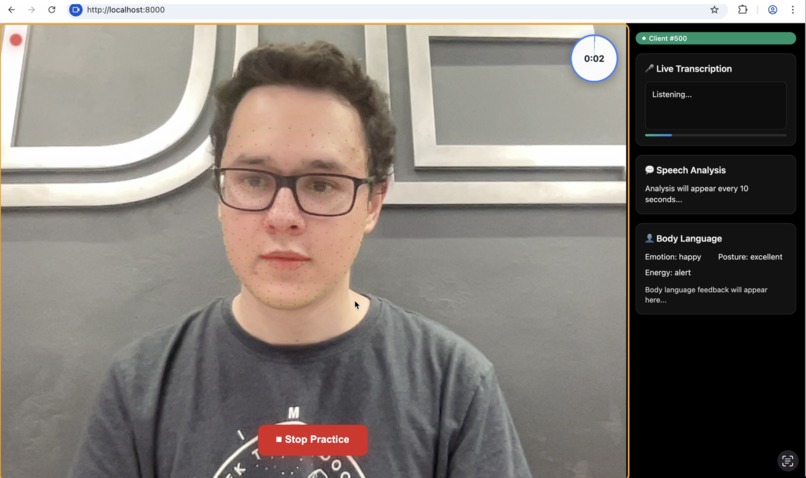
Face Mesh
-
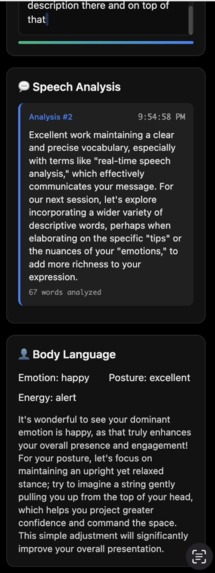
More Results
-
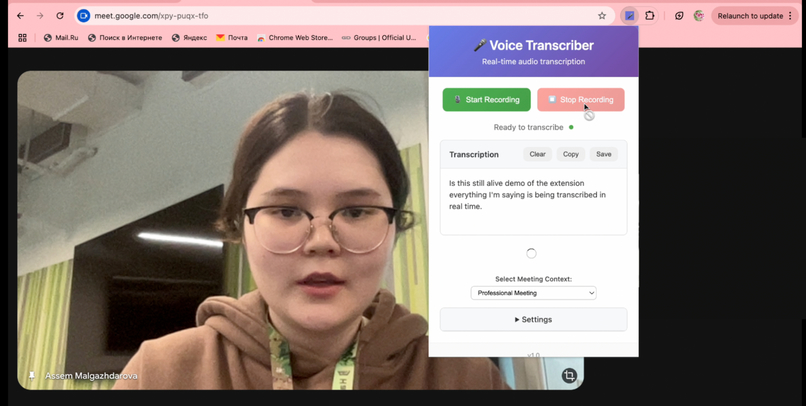
Chrome Extension
-
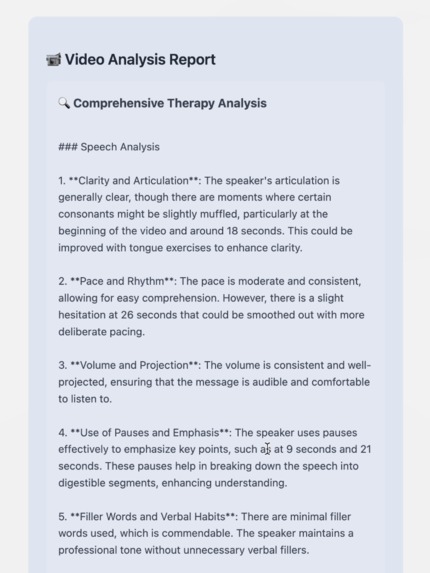
TwelveLabs Results
-
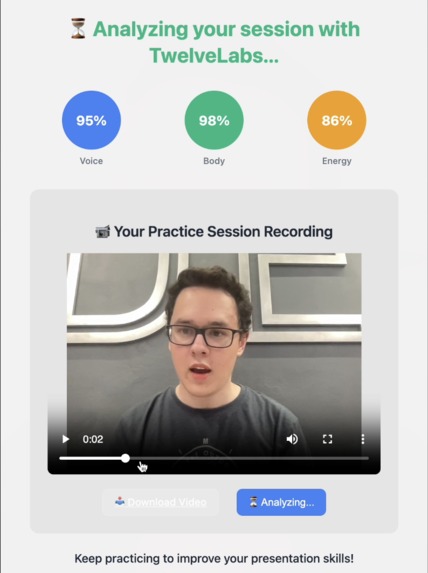
Results TwelveLabs


Tonalysis
Inspiration
Tone, facial expressions, body language and non-verbal communication can be difficult to understand and manage, due to their subjective nature and the unwritten rules they rely on that people may not always be aware of. This can make communicating effectively a challenge, especially for people who are introverted, socially anxious or neurodivergent.
We created Tonalysis to help people better understand their own non-verbal signals, whether or not they are conscious of them, and learn how to use these signals to ensure they’re giving the impression they intend and are being understood. Over time, observing and identifying their own non-verbal cues using Tonalysis could also help people to recognize them in others, allowing them to better understand the people around them.
What It Does
Tonalysis – AI Speech & Body Language Analysis Platform
Tonalysis is a real-time web-based non-verbal communication analysis and coaching platform with the following features:
- Voice tone, speech clarity, and pace detection using AI-powered transcription
- Facial expressions, posture, and energy level interpretation using MediaPipe
- Real-time analysis and psychology-backed suggestions provided by Google Gemini
- In-depth analysis of the complete recording using TwelveLabs
It combines several indicators of tone, both auditory and visual, to provide a well-supported overview of the impression the user displays when they speak and insightful, psychology-backed suggestions on how they can communicate more effectively.
Tonalysis Lite Chrome Extension
A lightweight, voice-only version of Tonalysis designed to be used during virtual meetings, providing:
- Real-time speech-to-text using Web Speech API
- Real-time analysis and improvement suggestions for non-verbal cues, like the Tonalysis full version
- Multi-language support and auto-punctuation
- Floating overlay for page-level transcription (YouTube, docs, etc.)
- Copy, save, and manage transcriptions directly in-browser
- Keyboard shortcuts for ease of use
With both these options, Tonalysis can be used either for in-depth analysis using multiple factors, both auditory and visual, or can be integrated into virtual meetings through the lighter but convenient Chrome extension.
How We Built It
Tonalysis was built with a FastAPI backend over secure WebSockets that can run MediaPipe FaceMesh to track 468 facial landmarks to spot emotions, posture shifts and signs of fatigue. Meanwhile, the browser’s WebSpeech API transcribes your words every 10 seconds, with those word snippets being analyzed by Gemini, which returns advice on clarity, pacing, filler words and overall confidence.
Moreover, we built a video analysis pipeline that converts WebM recordings to MP4 using FFmpeg before uploading to TwelveLabs, where AI provides detailed insights covering speech clarity, body language, energy levels, and actionable recommendations with timestamps at the end of the entire video recording.
What We Learned
- We learned how to integrate the Google Gemini API in a real-time system
- We used TwelveLabs, a technology none of us had previous experience with, to analyze and extract insights from video and audio data
- We learned how to use MediaPipe to map face and body landmarks and analyze them
Challenges We Ran Into
- We faced challenges with real-time feedback delays
- We encountered an issue in which the AI feedback repeated itself, but were able to fix both
Accomplishments We’re Proud Of
- We achieved real-time multimodal analysis (voice + face/body language) in a browser-based interface
- We created a functional coaching loop using Gemini that provides actionable advice in an engaging, user-friendly way as well as explaining the reasoning behind it to help the user learn
- We created a Chrome extension that provides all of the voice-based features of the full version and can be easily used during video calls or online presentations
What’s Next
Some potential extensions in the future include:
- Profile creation to link data from multiple sessions to identify user-specific patterns that persist in different situations
- Long-term tracking to allow users to see how they’ve improved over time
Built With
- css
- fastapi
- ffmpeg
- gemini
- html
- javascript
- mediapipe
- python
- twelvelabs
- websockets
- webspeech


Log in or sign up for Devpost to join the conversation.