-
-
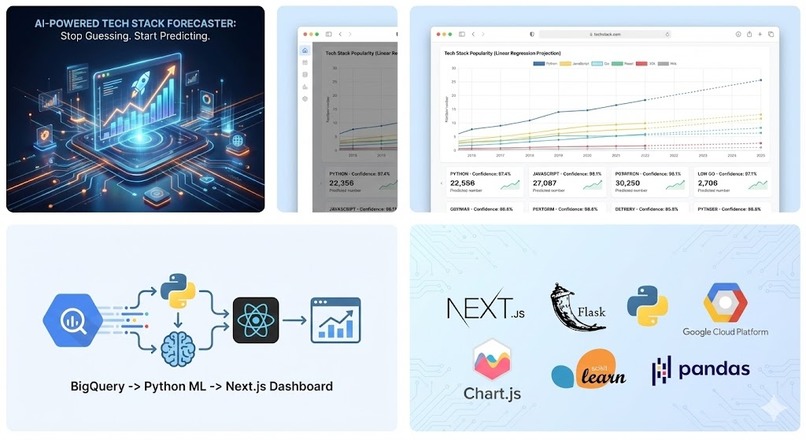
Tech Stack Forecaster - Sheridan Datathon 2025 Submission

Tech Stack Forecaster (AI-Powered)
Sheridan Datathon 2025 Submission > A data-driven platform predicting the future of programming languages using Google BigQuery & Machine Learning.
The Problem
In the fast-paced tech industry, students and developers struggle to decide what to learn next. Subjective YouTube videos aren't enough—we needed hard data to answer questions like:
"Is Java actually dying?"
"Is Rust just hype or a real career path?"
"What will be the most popular language in 2025?"
The Solution
Tech Stack Forecaster doesn't just show history; it predicts the future. We analyze millions of questions from the Stack Overflow Public Dataset on Google BigQuery and apply a Linear Regression Machine Learning Model to forecast trend lines for the coming year.
Key Features
Real-Time Data: Queries 5 years of live data from BigQuery (2019–2024).
AI Forecasting: Uses scikit-learn to calculate slope and projected growth for 2025.
Smart Verdicts: Automatically classifies languages as "Skyrocketing 🚀", "Plateauing ⚖️", or "Declining 📉".
Mobile-Ready PWA: Fully responsive design that looks native on mobile devices.
Tech Stack
Component
Technology
Frontend
Next.js 14, React, Tailwind CSS, Chart.js
Backend
Python, Flask, Pandas, NumPy
AI / ML
Scikit-Learn (Linear Regression)
Database
Google BigQuery (Public Datasets)
Cloud
Google Cloud Platform (GCP)
Setup & Installation Guide
Follow these steps to run the project locally.
Prerequisites
Node.js & npm installed
Python 3.9+ installed
A Google Cloud Service Account Key (service-account.json)
Backend Setup (Flask + ML)
The backend handles the BigQuery connection and the Machine Learning logic.
Navigate to backend folder
cd backend
Create and activate virtual environment
python3 -m venv venv source venv/bin/activate # Windows users: venv\Scripts\activate
Install dependencies (Flask, BigQuery, Scikit-Learn, Pandas)
pip install -r requirements.txt
⚠️ CRITICAL STEP ⚠️
Place your 'service-account.json' file inside the 'backend/keys/' folder.
If the folder doesn't exist, create it: mkdir keys
Run the server
python3 app.py
Server should be running at http://127.0.0.1:5000
Frontend Setup (Next.js)
The frontend visualizes the data with interactive charts.
Open a new terminal and navigate to frontend
cd frontend
Install packages
npm install
Run the development server
npm run dev
App should be live at http://localhost:3000
How the AI Model Works
Data Extraction: We extract monthly question counts for specific tags from BigQuery.
Vectorization: We convert time-series data into feature vectors.
Training: A Linear Regression model is trained on the last 5 years of data points.
Prediction: The model projects the trend line forward to predict the total count for 2025.
Classification: We calculate the coefficient (slope) of the regression line to determine the "Verdict" label.
Team
Built with ❤️ for the Sheridan Datathon 2025.
Anas Abu Mosameh - DevOps Engineer - Cloud Security at Sheridan College
Log in or sign up for Devpost to join the conversation.