-
-
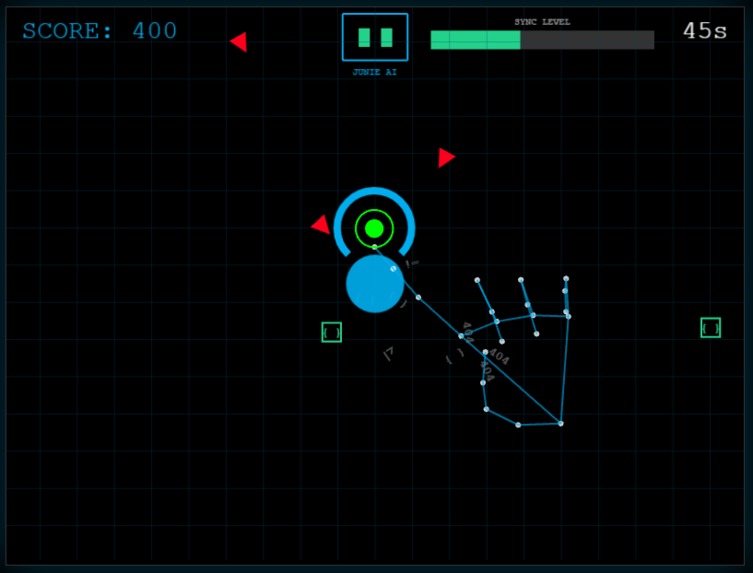
Hand Gesture Mesh using MediaPipe
-
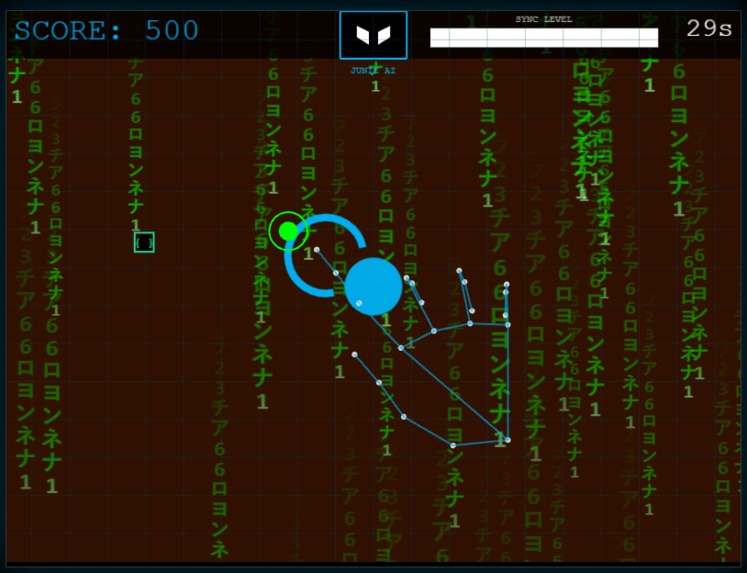
Matrix Rain Effect


Inspiration
We wanted to gamify the daily struggle of a developer: fighting off bugs and syntax errors to protect the codebase. Inspired by the partnership between Cloud9 and JetBrains, we imagined: "What if an IDE wasn't just text, but a defensive shield?"
We were also tired of standard keyboard controls. We wanted to build something futuristic—an "Iron Man" style interface where the player controls the game using only their hand in mid-air. We wanted a booth experience that was hygienic (touchless), visually striking, and instantly accessible to anyone walking by.
What it does
Syntax Defense is a gesture-controlled arcade survival game.
- The Goal: Protect the "Cloud Core" from incoming "Syntax Errors" (enemies) by rotating a defensive shield.
- The Control: The game uses the player's webcam to track their hand in real-time. Moving your hand physically rotates the shield on screen.
- The Visuals: A "Holographic Skeleton" overlays the player's real hand, tracking 21 skeletal joints to prove the system is "locked in" to their movements.
- The Juice: When the "Sync Level" maximizes, the game enters "Brave Mode"—triggering a Matrix-style code rain, voice-acted AI feedback ("Maximum Synchronization!"), and a visual Bloom overhaul.
- The Cloud: High scores are uploaded in real-time to a global leaderboard powered by Google Sheets, accessible via a QR code.
How we built it
We built a bridge between high-performance web gaming and computer vision:
- Phaser 3 (Game Engine): Handled the physics, particle emitters (Syntax Debris), and post-processing FX (Neon Bloom, Glitch shaders).
- MediaPipe Hands (AI): We used MediaPipe's machine learning model to track hand landmarks directly in the browser. We mapped the Index Finger Tip coordinates to the game world to control the shield rotation.
- Visual Feedback: We used the HTML5 Canvas API to draw a "Wireframe Mesh" connecting the user's hand joints, creating the augmented reality feel.
- Web Audio API: We utilized the browser's native SpeechSynthesis API to give "Junie" (the AI assistant) a voice without needing large audio assets.
- Google Apps Script: We created a custom API endpoint using Google Scripts to turn a standard Google Sheet into a JSON database for our leaderboard.
Challenges we ran into
- The "Jitter" Problem: Raw computer vision data is noisy. The shield would shake uncontrollably. We had to implement Linear Interpolation (Lerp) to smooth out the hand data, making the shield feel heavy and responsive rather than twitchy.
- The Mirror Effect: Moving your hand "Right" on a webcam usually moves the cursor "Left." We had to perform coordinate flipping and sensitivity scaling so the movement felt natural to the brain immediately.
- Browser Security: Modern browsers block audio until user interaction. We had to carefully architect the "Attract Mode" to capture that first click so our dynamic music and AI voice would work seamlessly.
Accomplishments that we're proud of
- The "Iron Man" Interface: Seeing the blue wireframe skeleton track your hand perfectly in real-time is a huge "Wow" moment. It feels magical.
- Modular Architecture: We built a clean system with separate Managers (AudioManager, HandInputManager, FXManager), making the code robust and easy to debug during the hackathon.
- Atmosphere: We successfully combined "Glitch" shaders, dynamic pitch-shifting music (which speeds up as time runs out), and procedural particles to make the game feel like a high-budget arcade cabinet.
- Zero-Touch Gameplay: We built a fully functional game that requires zero mouse or keyboard input during gameplay, which is a massive technical achievement for a web game.
What we learned
- Juice is King: Simple mechanics (blocking a ball) became thrilling only after we added screen shake, "hit stop" freezes, and haptic vibration.
- AI in the Browser: We learned that modern browsers are powerful enough to run ML models (MediaPipe) and WebGL renderers (Phaser) simultaneously at 60FPS if optimized correctly.
- The Power of Sound: Using the Speech API gave our game a personality ("Junie") that text alone could never achieve.


Log in or sign up for Devpost to join the conversation.