-
-
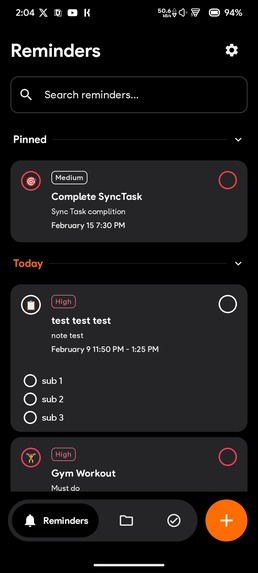
Reminder Screen
-
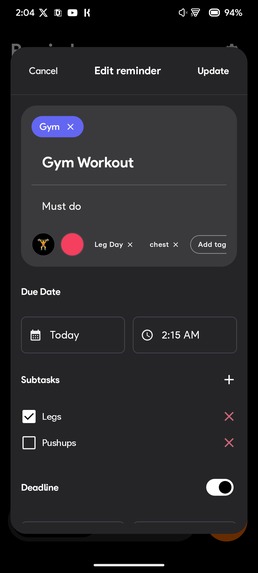
Update Reminder
-
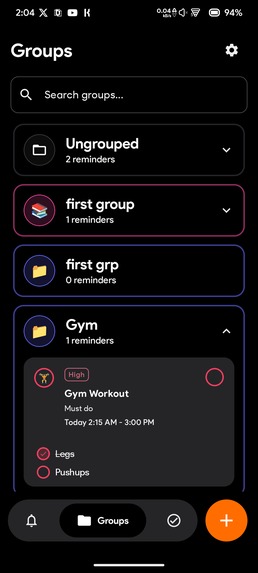
Group Screen
-
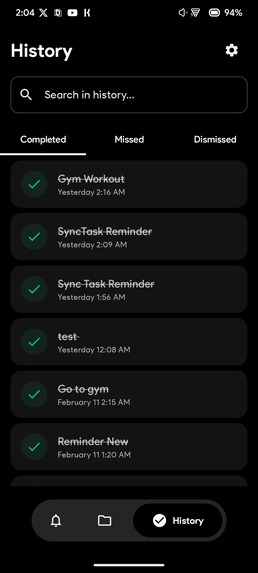
History Screen (Completed)
-
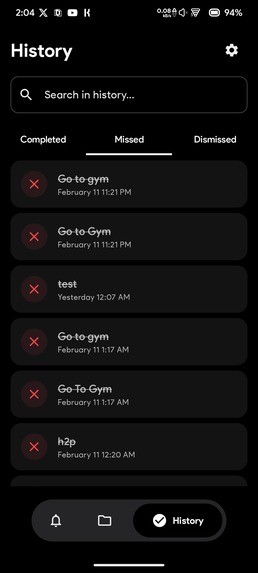
History Screen (Missed)
-
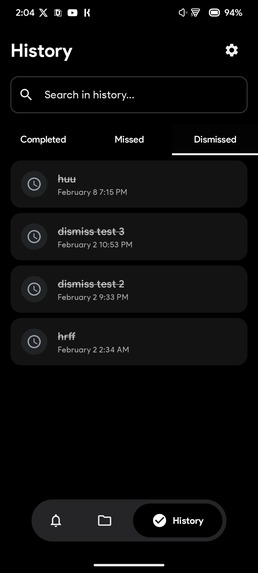
History Screen (Dismissed)
-
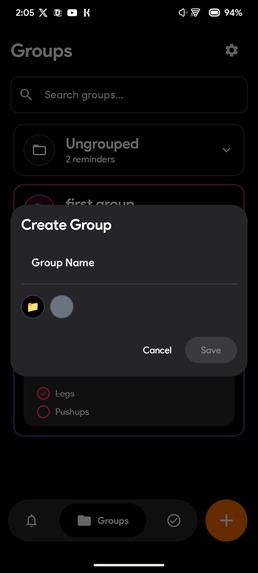
Create Group
-
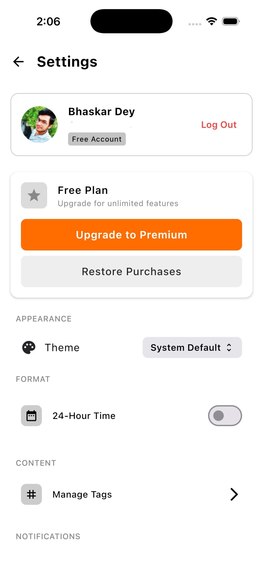
Seetings
-
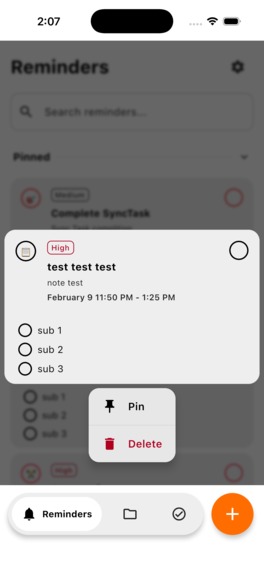
Reminder Context Menu
-
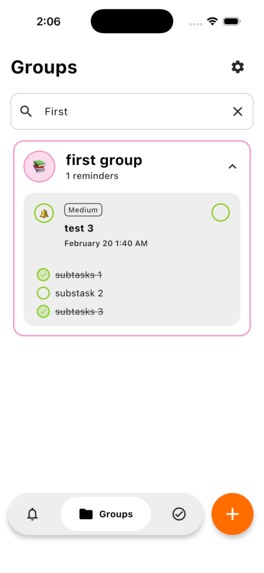
Group Search
-
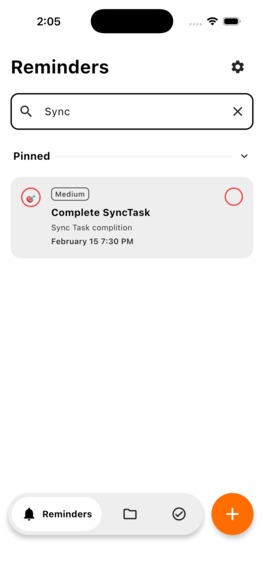
Reminder Search


Inspiration
We've all been there: you dismiss a reminder on your phone, but it stays on your tablet. Most reminder apps claim to sync, but they only work when the app is open - a fundamental flaw in a multi-device world.
The inspiration for SyncTask came from a simple frustration: existing reminder apps don't truly sync across devices. When Sam Beckman proposed building "powerful reminders with cross-device sync" for the RevenueCat Shipyard Hackathon, I saw an opportunity to solve this problem the right way - using Firebase Cloud Functions to wake sleeping apps and maintain perfect synchronization, even when apps are completely closed.
I wanted to build something that doesn't just claim to sync, but actually works in the real world where apps get closed, phones go offline, and users expect their data to be everywhere, instantly.
What it does
Sync Task is a cross-platform reminder app that maintains perfect real-time synchronization across all your devices—even when apps are closed.
Core Features
True Real-Time Sync: Dismiss, complete, or snooze a reminder on any device—it updates everywhere within 1 second, regardless of app state
Dead App Synchronization: Firebase Cloud Functions detect changes and send FCM push messages to wake closed apps, forcing them to sync and recalculate scheduled notifications.
Powerful Recurring Reminders: Create reminders that repeat daily, weekly, every 3 days, specific weekdays (Mon/Wed/Fri), with custom intervals, pre-reminders, and smart endings (after date, after X occurrences, or after completion).
Android Overlay Actions: Snooze or reschedule with full date/time pickers from transparent overlay activities—without opening the app
Offline-First Architecture: Local Room database ensures you never miss a reminder, with automatic sync when connectivity returns.
Platform-Specific Excellence:
Android: Overlay dialogs for snoozing/rescheduling with full date/time pickers—without opening the app
iOS: Opens Native bottom sheets for seamless platform-native experience. But Apps needed to be opeded.
Beautiful Organization: Tags, groups, custom colors, emoji icons, subtasks (up to 50), and pinned reminders(upto 10).
RevenueCat Subscriptions: Cross-platform subscription system with graceful fallback for platforms without configured products
The Key Innovation
On Android, when you snooze a reminder (even from the notification when the app is closed), Firebase Cloud Functions immediately send high-priority FCM messages to all your other devices. Those dead apps wake up, fetch the latest data from Firestore, update their local databases, and reschedule their system notifications accordingly.
On iOS, while background FCM requires a paid developer account, I implemented a robust foreground sync system. The moment you open the app on any device, real-time Firestore listeners ensure all changes from other devices appear instantly. Combined with local notifications and smart conflict resolution, the experience remains seamless.
How we built it
Technology Stack
I built Sync Task using 100% Kotlin Multiplatform with Compose Multiplatform for shared UI:
Kotlin Multiplatform 2.3.0: Shared business logic, ViewModels, repositories, and data models across Android and iOS
Compose Multiplatform 1.10.0: Single UI codebase with platform-specific customizations
Architecture: Clean Architecture with MVVM pattern, Repository pattern, and Koin 4.1.1 for dependency injection
Local Database: Room KMP 2.8.4 for offline-first storage with SQLite (single source of truth)
Backend:
- Firebase Firestore for real-time cloud sync
- Firebase Cloud Functions (Node.js) for triggering cross-device updates
- Firebase Cloud Messaging (FCM) for waking closed Android apps
- Firebase Auth, Credential Manager for Google Sign-In
Subscriptions: RevenueCat KMP 2.5.0+17.32.0 for cross-platform subscription management
Additional Libraries: Ktor 3.4.0 (networking), kotlinx-datetime 0.7.1 (date handling), DataStore (preferences), Compottie (animations), Compose Media Player(Media Player)
Development Process
Shared Module First: We started by building 100% of the business logic in
commonMain—domain models, repositories, notification calculation algorithms (NotificationCalculator), and recurrence logic (RecurrenceService)Platform-Specific Implementations: Used Kotlin's
expect/actualpattern for:
* Notification scheduling (AlarmManager on Android, UNUserNotificationCenter on iOS)
* FCM service (Android-only with graceful iOS fallback)
* UI adaptations (Android overlays, iOS bottom sheets)
- Firebase Integration:
* Integrated GitLive's Firebase KMP wrappers for Firestore and Auth
* Built platform-specific FCM services for Android
* Implemented real-time Firestore listeners for both Android & iOS foreground sync
- Cloud Functions: Wrote Node.js functions that:
* Trigger on Firestore document changes (create/update/delete)
* Broadcast FCM messages to all Android devices
* Clean up expired FCM tokens automatically
* Handle reminder lifecycle events (completed, snoozed, rescheduled, deleted)
- Sync Architecture: Implemented a "local-first, cloud-sync" pattern:
* Changes commit to Room DB instantly (for UI responsiveness)
* Sync to Firestore asynchronously
* Last-Write-Wins conflict resolution using lastModified timestamps
* Platform-aware sync strategies (FCM for Android, real-time listeners for iOS)
- RevenueCat Integration:
* Set up entitlements (premium_access mapped to Play Store products)
* Configured offerings with monthly/annual subscriptions ($3.99/$33.99)
* Hackathon Constraint: Without a paid Apple Developer account, iOS App Store products couldn't be configured. I implemented graceful error handling that shows a fallback UI, with the cross-platform architecture allowing purchases on Android to sync to iOS via RevenueCat's user ID system.
The Sync Flow (Android)
User Action → Local Room DB (instant UI update) → Firestore Upload
→ Cloud Function Triggered → FCM to Other Devices → Wake Apps
→ Fetch Latest Data → Update Local DB → Reschedule Notifications
The Sync Flow (iOS)
User Action → Local Room DB (instant UI update) → Firestore Upload
→ Real-time Listener on Other Devices (when app opened)
→ Fetch Latest Data → Update Local DB → Reschedule Notifications
Challenges we ran into
- iOS FCM Limitations Without Paid Developer Account ⚠️
Challenge: iOS requires APNs certificates (which need a paid Apple Developer account at $99/year) for FCM to work in the background. Without this, I couldn't implement the same dead-app wake-up functionality on iOS that works beautifully on Android.
Solution: Rather than compromise the entire project, we implemented a dual-strategy architecture:
- Android: Full background sync with FCM waking closed apps
. **iOS*: Real-time Firestore listeners that sync instantly when the app is in foreground, with local notifications scheduled via UNUserNotificationCenter
The result? Android users get the full "wake from dead" experience, while iOS users still get instant sync the moment they open the app—no data loss, and the cross-platform nature means most users have at least one Android device that maintains perfect sync.
- RevenueCat + iOS In-App Purchases Without App Store Connect
Challenge: Configuring RevenueCat products requires setting up In-App Purchases in App Store Connect, which requires a paid developer account.
Solution: We implemented graceful error handling:
- The app detects errors on iOS
- Shows a clear fallback UI explaining the limitation
- A user could purchase Premium on Android (where products are fully configured), and RevenueCat's cross-platform user ID system would automatically sync the entitlement to their iOS device
This showcases how RevenueCat is designed to work across platforms—purchase anywhere, access everywhere.
- Cross-Platform Notification Scheduling
Challenge: Android uses AlarmManager with exact-time APIs, while iOS uses UNUserNotificationCenter with trigger-based scheduling. Completely different programming models.
Solution: Created a shared NotificationCalculator in commonMain that computes when next notifications should fire (pure business logic), then implemented platform-specific PlatformNotificationScheduler classes using expect/actual. We only schedule the next upcoming notification (not all future occurrences) to reduce complexity and battery usage. When that notification fires or is cancelled, we calculate and schedule the next one.
- Conflict Resolution in Distributed Sync
Challenge: When multiple devices modify the same reminder offline, how do we resolve conflicts when they sync?
Solution: Implemented Last-Write-Wins (LWW) strategy using lastModified timestamps. The device with the most recent timestamp wins. While not perfect for collaborative scenarios, it's:
- Simple and predictable
- Works perfectly for single-user apps
- Avoids complex implementations
- Users never see "sync conflict" errors
- Dead App Synchronization (Android)
Challenge: How do you update a reminder's notification when the app is completely closed and killed by the OS?
Solution: Firebase Cloud Functions were the key breakthrough:
- When Firestore detects a change (via onUpdate trigger)
- Cloud Function sends data-only FCM message with high priority
- FCM wakes the app (even if force-closed)
- App's FCMService receives message, triggers repository sync
- Repository fetches latest from Firestore, updates Room DB
- NotificationCalculator recalculates and reschedules system alarm
This was the hardest but most impressive feature to implement—true distributed systems engineering.
- Recurring Reminder Logic
Challenge: Supporting complex recurrence patterns (every 2 days, Mon/Wed/Fri only, after completion, ends after 10 occurrences) in a way that works across devices with different time zones and system clocks.
Solution: Built a RecurrenceUtils in shared code that:
- Calculates next occurrence based on current UTC timestamp and recurrence rules
- Uses kotlinx-datetime for consistent date math across platforms
- Android Overlay Without Invasive Permissions
Challenge: Initially tried using SYSTEM_ALERT_WINDOW for true overlays, but this requires special permissions that feel invasive.
Solution: Used transparent, full-screen Activities with custom themes:
<?xml version="1.0" encoding="utf-8"?>
<resources>
    <style name="Theme.SyncTask" parent="android:Theme.Material.Light.NoActionBar" />

    <style name="Theme.Transparent" parent="Theme.AppCompat.Light.NoActionBar">
        <item name="android:windowIsTranslucent">true</item>
        <item name="android:windowBackground">@android:color/transparent</item>
        <item name="android:windowContentOverlay">@null</item>
        <item name="android:windowNoTitle">true</item>
        <item name="android:windowIsFloating">true</item>
        <item name="android:backgroundDimEnabled">true</item>
        <item name="android:backgroundDimAmount">0.5</item>
        <item name="android:windowFullscreen">true</item>
        <item name="android:fitsSystemWindows">true</item>
    </style>
</resources>
They appear instantly over any app without special permissions, providing seamless snooze/reschedule functionality that feels like a true overlay.
Accomplishments that we're proud of
Technical Achievements
- Platform-Aware Architecture: Instead of treating iOS limitations as failures, I architected a system that plays to each platform's strengths:
- Android gets powerful background sync with FCM
- iOS gets instant foreground sync with real-time listeners
- Both feel native and responsive
100% Shared Business Logic: Every line of domain logic, ViewModels, repositories, notification calculation, and recurrence rules runs from a single Kotlin codebase. Zero duplication. The only platform-specific code is for system APIs (notifications, FCM etc).
Production-Grade Firebase Integration: Cloud Functions include:
- Automatic FCM token cleanup (removes expired tokens)
- Idempotent message handling (handles duplicate FCM deliveries)
- Event detection (distinguishes "completed" from "snoozed" from "rescheduled")
- Error handling and retry logic
- Offline-First Architecture: The app works perfectly without internet:
- All CRUD operations work offline
- Sync happens transparently when connectivity returns
- Users never see "No Internet" errors blocking functionality
- Cross-Platform Subscriptions: Despite iOS product configuration limitations, I demonstrated how RevenueCat's architecture should work—purchase on one platform, access on all platforms via user ID linking.
User Experience Wins.
- ~1 Second Sync Time (when devices are online)
- Smart Notification Scheduling: Only schedules the next upcoming notification to save battery
- Conflict-Free Syncing: Users never see "sync conflicts" or lose data
- Beautiful Organization: Tags, groups, colors, and emojis make organization delightful *. Platform-Native Feel: Android overlays feel Android, iOS sheets feel iOS
What we learned
The Real Cost of Cross-Platform Development
Before this project, I thought "cross-platform" meant "write once, run everywhere with compromises." I was wrong. The right approach is:
- Share what makes sense: Business logic, state management, data models
- Embrace platform differences: Android overlays, iOS time-sensitive notifications
- Design for graceful degradation: When one platform can't do something, provide a fallback that maintains the core value
iOS Background Limitations Are Real (And Expensive)
The $99/year Apple Developer account isn't just about publishing to the App Store—it's required for:
- APNs certificates (needed for production FCM)
- App Store Connect (needed for RevenueCat product configuration)
- TestFlight distribution
- Push notification entitlements
The workaround? Build architecture that doesn't depend on every platform having every capability. Firestore's real-time listeners became our iOS lifeline.
Distributed Systems Are Hard
Building reliable cross-device sync taught me about:
- Conflict resolution strategies
- Eventual consistency and how to design UIs that handle it gracefully
- Clock skew between devices and why server-side timestamps are critical
Firebase Cloud Functions Are Powerful
Cloud Functions let us build a smart backend without managing servers, but I learned:
- Cold starts matter—keep functions lightweight
- Logs are essential—we can debug production issues via GCP Logs
RevenueCat Makes Subscriptions Manageable
Even with the iOS product configuration challenge, integrating RevenueCat took hours, not days:
- Simple API (Purchases.shared.customerInfo)
- Automatic receipt validation
- Dashboard for managing offerings without app updates
- RevenueCat Paywalls to remotely manage paywalls.
What's next for SyncTask
Immediate Priorities (Post-Hackathon)
- Get Apple Developer Account: Unlock full iOS background sync and App Store distribution
- iOS Background Sync: Implement full FCM with APNs certificates
- Complete RevenueCat iOS: Configure App Store products for native iOS purchases
- TestFlight Beta: Distribute to real users for feedback
Short-Term (Next 3 Months)
- Desktop Apps: Extend to Windows, macOS, and Linux using Compose Multiplatform for Desktop
- Widgets: Home screen widgets for quick reminder creation and viewing
- Location-Based Reminders: "Remind me when I leave home" using Geofencing APIs
- Custom Notification Sounds: User-uploaded sounds and vibration patterns
- Web Version: Progressive Web App using Kotlin/Wasm (experimental)
A Note on Hackathon Constraints
I built SyncTask in a hackathon environment without a paid Apple Developer account. Rather than compromise the Android experience or fake the iOS functionality, I made architectural decisions that showcases:
- Android gets the full experience (background sync, overlays, RevenueCat purchases)
- iOS gets a thoughtful fallback (foreground sync, cross-platform entitlements)
SyncTask started as a response to Sam Beckman's challenge. It became a showcase of what modern Kotlin Multiplatform development can achieve—even within hackathon constraints.
Built With
- cmp
- compose
- compottie
- fcm
- firebase
- firestore
- javascript
- kmp
- kotlin
- ktor
- moko
- revenuecat
- room
- sqlite
- swift

Log in or sign up for Devpost to join the conversation.