-
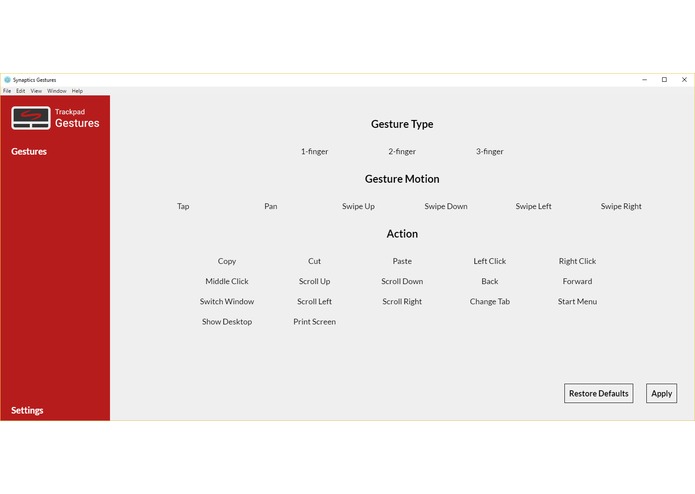
Main interface of the program

Inspiration
We found it frustrating that many old trackpads on computers running Windows lacked simple gestures necessary for basic productivity, while it was difficult to create custom macros for newer trackpads.
What it does
Synaptic Gestures allows users to select the type of gesture they would like to perform, then select the action that would correspond with that gesture. After they apply their new configuration, they can perform the gesture to execute the action.
Gestures include:
- Tapping
- Swiping up
- Swiping down
- Swiping left
- Swiping right
Each gesture can be performed with one, two, or three fingers.
Actions include:
- Copy
- Paste
- Switching between windows
- Switching between virtual desktops
- Going back in a browser
- Middle clicking
- Scrolling up/down/left/right
- Minimizing/maximizing windows
How we built it
Electron, Node.JS, and HTML was used to build the UI, while a C++ backend was used to detect when gestures were performed. AutoHotKey was used to execute the actions.
Challenges we ran into
Tracking the position of the user's finger(s) on the touchpad while it was in absolute mode was the most significant challenge, as well as detecting the number of fingers on the trackpad.
What we learned
It was our first time using Electron and none of our team had done a project of this scale in C++ before. We learned a lot about how touchpads work as well.
What's next for Synaptic Gestures
Some features we would like to implement that we unfortunately didn't have the time to include:
- Allowing users to create custom keyboard macros or AutoHotKey scripts for actions
- More pre-selectable actions
- More gestures, such as swiping diagonally, panning, and flicking from the edge of the touchpad

Log in or sign up for Devpost to join the conversation.