-
-
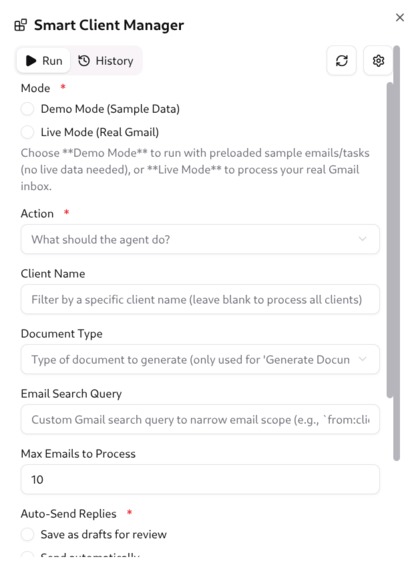
Interface

Inspiration
Managing client communications, proposals, and follow-ups manually is extremely time-consuming for freelancers and small businesses. I wanted to build a tool that automates these repetitive tasks while maintaining professionalism and accuracy, freeing up time to focus on actual work.
What it does
Smart Client Manager is an AI agent that:
Automatically reads incoming client emails.
Drafts professional replies.
Generates project proposals in Google Docs using pre-designed templates.
Creates and tracks follow-up tasks in Google Tasks.
Produces optional weekly summary PDFs combining emails and tasks.
The result is a fully automated workflow from email → proposal → task management, saving hours of manual work.
How I built it
I built the project using Creao.ai as the core platform for the AI agent, integrated with:
Gmail – to read client emails and draft replies.
Google Docs – to generate and format proposals automatically.
Google Tasks – to create and track follow-up tasks.
The agent uses preloaded sample emails, tasks, and templates to simulate real client scenarios for demos and hackathon purposes. Commands in Creao.ai allow the agent to perform end-to-end automation without manual intervention.
Challenges I ran into
Ensuring the agent could accurately match emails to clients and generate personalized proposals.
Structuring Google Docs templates so the agent could fill placeholders dynamically from email and task data.
Making the demo hackathon-friendly without relying on real clients or sensitive data.
Accomplishments that I'm proud of
Fully automated agent workflow from email reading → reply drafting → task creation → proposal PDF generation.
Successfully simulated multiple clients with preloaded data for a live demo without real emails.
Integrated three major productivity tools (Gmail, Google Docs, Google Tasks) into a single AI workflow.
Created a professional-ready output that can be extended for real clients.
What I learned
How to leverage Creao.ai integrations to orchestrate multiple productivity tools.
How AI agents can streamline repetitive workflows for real-world business problems.
Importance of data structuring and templates for automation in client management.
What's next for Smart Client Manager
Expand integrations to Notion, Slack, or CRM tools to handle more complex workflows.
Add automatic scheduling and follow-up notifications for multiple clients.
Implement a user-friendly dashboard for end users to manage tasks, emails, and proposals in one place.
Explore multi-language support to serve freelancers and SMBs globally.
Built With
- ai
- creao.ai
- google-docs
- googlegmail
- googletasks
- vibe

Log in or sign up for Devpost to join the conversation.