-
-
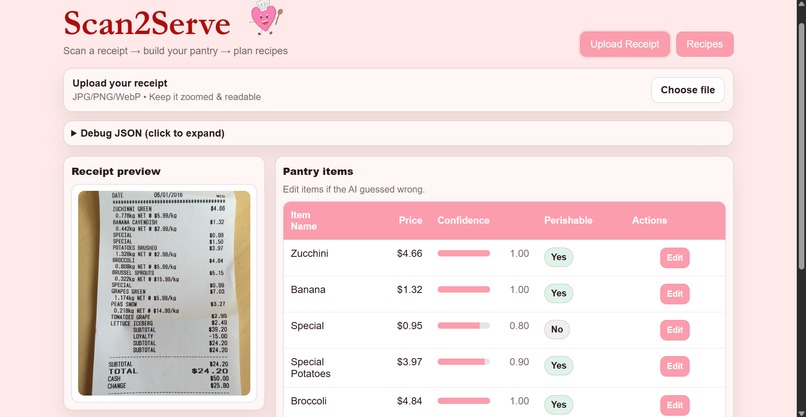
Home page after uploading a receipt with the parsed ingredients.
-
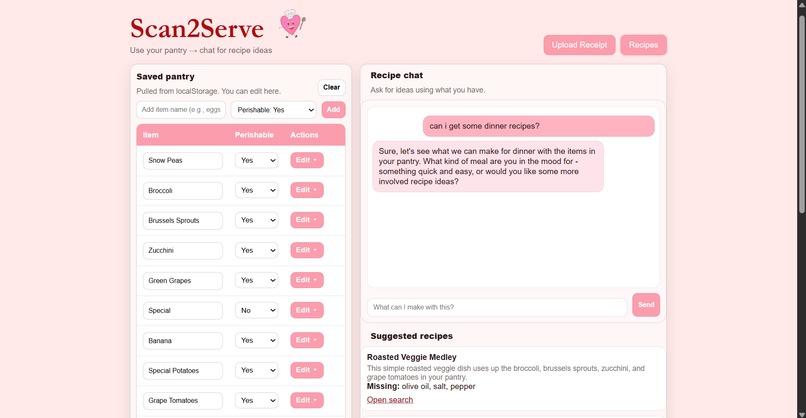
Recipe page with saved ingredients, chatbot, and suggested recipes.


Inspiration
Too often we find ourselves with just a handful of ingredients we forgot about in our fridge and on the verge of going bad but having no idea what to do with them. Do we go out and buy more ingredients so we can add our existing ingredients to the mix? Do we scour the web in an attempt to find a decent recipe that uses all of our expiring foods?
What if we had a website that could help keep track of groceries and find recipes for us?
What It Does
Scan2Serve lets users upload images of their receipts to be put into a table storing attributes such as "item name", "price", "confidence value", and "perishable". When parsing the receipt, the AI will ignore non-food items and give a confidence value for each item when decoding the receipt due to its abbreviated nature. Once the AI is done, the user has the ability to edit or delete each entry.
On the Recipes page, the user will be able to see all of their perishable food items and have access to a chatbot to ask about potential recipes. The user can have as many exchanges as they please, and once they are satisfied with their prompts, the AI will return links to recipes the user can use to begin their cooking journey. There is also the ability to edit the ingredients available in case the user used something up or didn't have the recipe for it.
How We Built It
- Started with basic front-end (pure HTML) to help us map out where everything would go and give a blueprint for back-end logic.
- Figured out how to read receipts with Claude AI.
- Enhanced front-end for receipt parsing with CSS and JavaScript.
- Added logic and AI functions to the recipes page.
- Tweaked UI for neatness and consistency.
Challenges We Ran Into
How to organize our site: We knew what we wanted to do early on, but it was difficult trying to figure out how to display everything on our site. Where do we put receipt after we upload it? How should the tables look, and what attributes should they include? How do we make it fun yet sleek? This required a lot of UI/UX mockups and asking questions in regards to making the most seamless user experience. With trial and error, we created 2 finalized "page" layouts for our demo.
Accomplishments We're Proud Of
Taking advantage of AI's capabilities: Recently, AI is most well-known for its generative capabilities -- which helped us in creating our project while also being a key part of our project -- but its pattern recognition is just as notable. For us, it was important to emphasize all the different ways AI can be used in everyday life and have that shown through our project.
Seeing how everything tied together: Our project's development was rather segmented as we aimed to get each feature fully functioning before moving on to the next -- starting simple before complicating things so we had a fallback if things went awry. But when we were finally able to get our two features working together, we couldn't help but feel proud of what we had built, despite the ups and downs.
What We Learned
- How to take advantage of AI's ability to parse photos
- Implementing a chat bot
- Elegant design
What's Next for Scan2Serve
In the future, we would like to implement a way to keep track of expiration dates to allow the user to sort by what's closest to expiring so those items could be prioritized when finding recipes. We also want to add streaks for how many meals the user used a recipe to make a meal at home as a way to encourage them to stay in instead of going out and would reset whenever they had to throw away an expired ingredient to discourage them letting food expire. This would reduce the potential for food waste at home and carbon emissions that can come with commuting to a restaurant.
Built With
- amazon-web-services
- chatgpt
- claudeai
- css
- github
- html
- javascript

Log in or sign up for Devpost to join the conversation.