-
-
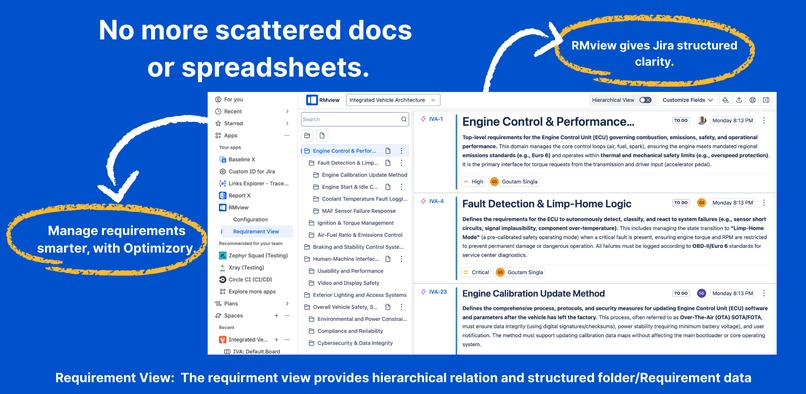
No more scattered docs, RMview gives Jira a structured, folder-based requirement view.
-
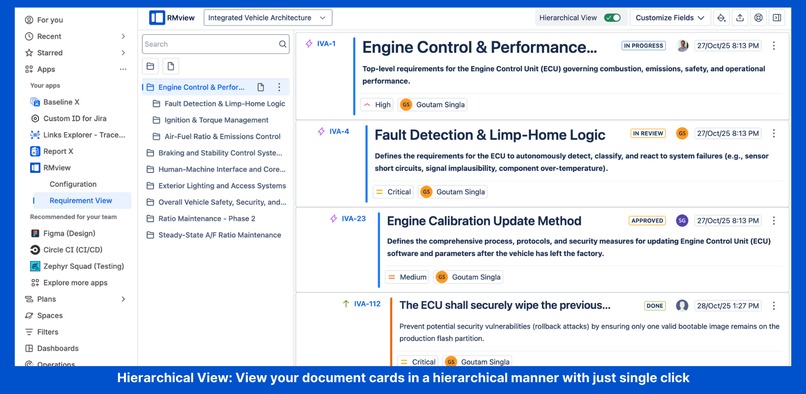
View your document cards hierarchically with one click, structure meets clarity in RMView.
-
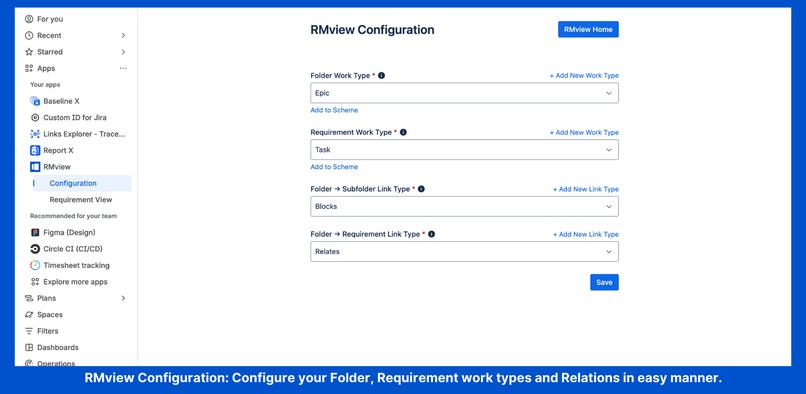
Easily configure folder, requirement types, and link relations in RMview’s simple setup page.
-
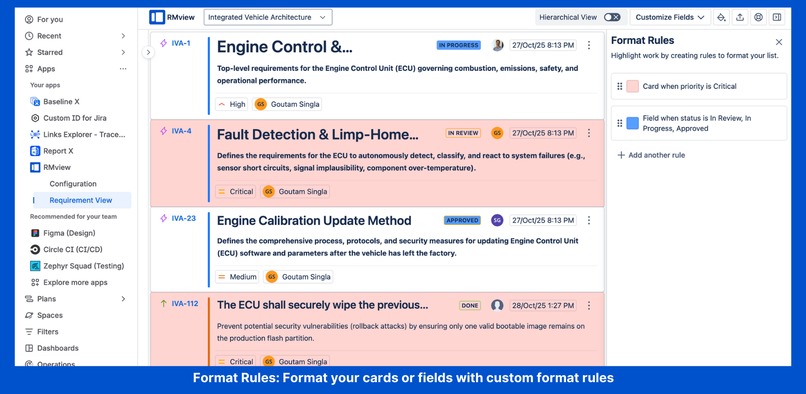
Highlight critical work instantly with custom format rules, color your fields or cards by condition.
-
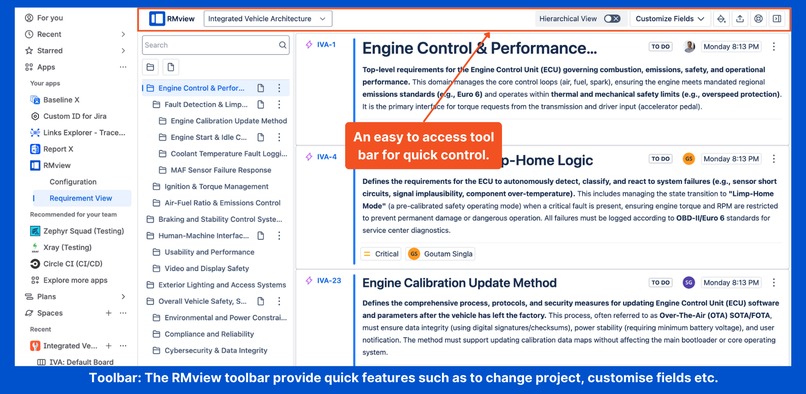
Access quick controls from the RMview toolbar, switch projects, customize fields, or export instantly
-
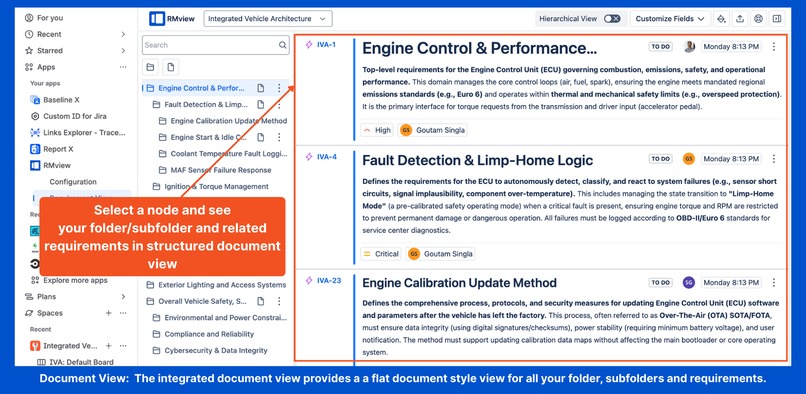
Select a node to view related folders and requirements in a single structured document view.
-
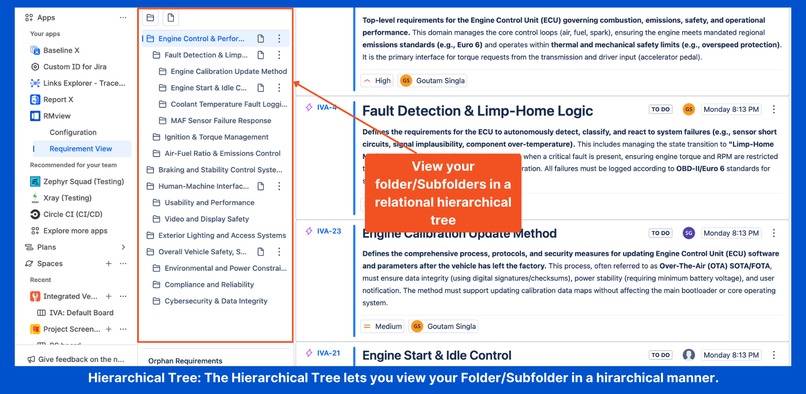
Visualize your folders and subfolders in a clear hierarchical tree for effortless navigation.
-
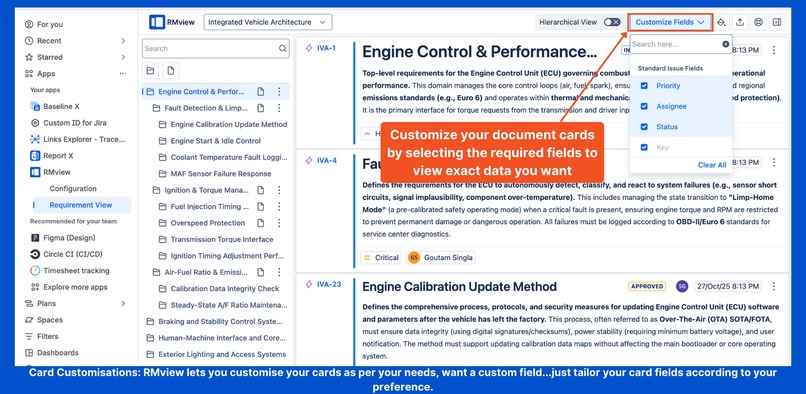
Customize cards by selecting only the fields you need, tailor your view for maximum clarity.


Inspiration
During our conversations with development teams, one challenge kept surfacing, managing complex requirement documents inside Jira.
A senior product manager at an automotive company shared their struggle:
“We manage three vehicle programs - an electric sedan, an SUV, and a compact car. Each project has its own Jira board, and we spend more time copying requirements than improving them. When emission standards changed last month, it took us three days to find and update the same requirement across five different boards.”
Their frustration wasn’t just about reusability, it was about structure. Requirements were scattered across issues, stories, and subtasks with no cohesive document view. Reviews became painful because teams had to export everything to Word, reorganize them manually for presentation, and then re-enter changes back into Jira, losing traceability in the process.
This story echoed across industries, from automotive to healthcare and SaaS. Teams loved Jira for task tracking, but when it came to organizing requirement documents, maintaining hierarchies, and ensuring traceability, Jira’s flat structure fell short.
RMview was built to bridge this gap, bringing document-like structure, cross-project visibility, and reusable requirements into Jira. With RMview, teams can finally visualize folders, subfolders, and requirements in a structured hierarchy, review them like documents, and keep every change traceable, all without leaving Jira.
What it does
RMview transforms Jira into a powerful requirements management tool by introducing:
Core Features
Hierarchical Folder & Requirement Structure
Create nested folders and requirements with proper parent-child relationships, just like organizing files in a file system.
Dual View Modes
Document View
A linear, scrollable, spec-like format perfect for reading through requirements sequentially.
Tree View
A hierarchical view showing clear parent-child structures for understanding relationships at a glance.
Cross-Project Requirements Management
- Share requirement libraries across multiple Jira projects.
- Link requirements between related projects for unified tracking.
- Manage portfolios of requirements at the organizational level.
- Export requirements from one project and import them into another with full context preservation.
Flexible Configuration
- Map custom Jira work types to folders and requirements.
- Define link types that represent relationships (contains, defines, includes, etc.).
- Create custom work item types and link types on-the-fly if they don’t exist.
Seamless Jira Integration
- Works directly within the Jira interface.
- Maintains all Jira work item properties (status, assignee, priority, etc.).
- Leverages Jira’s native linking and work item management.
Productivity Tools
- Drag-and-drop reordering and re-parenting.
- JQL search integration for filtering.
- Export capabilities (CSV, print) for stakeholder reviews.
- Quick-create dialogs for folders and requirements.
For the full guide, see Getting started with RMview
How we built it
Technology Stack
Platform
Built as a Jira Cloud app using Atlassian’s Forge platform.
Frontend
Developed using a modern JavaScript/TypeScript framework (React) for rendering the document and tree views.
Backend
Integration layer connecting to Jira’s REST API for work item manipulation and link management.
Configuration System
Custom schema mapper allowing teams to define their own work item types and link semantics.
Architecture
Configuration Layer
First-launch wizard that maps the user’s existing Jira schema to RMView’s folder and requirement concepts.
Data Model
Abstraction layer translating folder/requirement hierarchies into Jira work item links.
View Engine
Dual rendering system supporting both document and tree visualizations.
State Management
Real-time synchronization with Jira’s work item database for up-to-date hierarchy representation.
Development Process
User Research
Started with in-depth interviews of teams managing requirements in Jira to understand real-world challenges.
MVP Development
Built an MVP focusing on core hierarchy creation and visualization.
Iterative Enhancements
Added configuration flexibility to support diverse team workflows.
Feature Improvements
Implemented drag-and-drop hierarchy management and advanced filtering based on continuous user feedback.
Challenges we ran into
1. Mapping Hierarchies to Jira's Link System
Jira wasn’t originally designed for strict hierarchical document structures.
To enable this, we built a robust abstraction layer that:
- Enforces folder and requirement type constraints.
- Maintains hierarchy integrity even when users modify links outside RMView.
- Handles circular dependencies and invalid link structures gracefully.
2. Configuration Flexibility vs. Simplicity
Different teams use different terminologies — for example, “Epic” vs. “Folder”, “Story” vs. “Requirement”.
Designing a configuration system that was flexible enough to handle these variations while still being simple for first-time setup posed a significant challenge.
3. Performance with Large Hierarchies
When managing requirement documents with hundreds of items across multiple nesting levels, performance was critical:
- Initial tree rendering could become slow.
- Drag-and-drop operations required optimization.
We implemented lazy loading, pagination, and virtual scrolling to ensure responsiveness even with large data sets.
4. User Experience Transitions
Switching seamlessly between Document View and Tree View while preserving user context required sophisticated state management.
RMview now maintains:
- Scroll position
- Expanded nodes
- Selected items
This ensures a smooth, uninterrupted experience when toggling between views.
Accomplishments that we're proud of
Zero Learning Curve
Teams can start organizing requirements within minutes of installation.
The configuration wizard makes setup intuitive and effortless, requiring no prior training.
True Jira Integration
Unlike standalone requirements tools, RMview works entirely within Jira, ensuring a single source of truth for all requirements, links, and updates.
Flexible Schema Mapping
The ability to create custom types and links on the fly means RMView adapts to your team’s workflow, not the other way around.
Dual View Innovation
Offering both Document View and Tree View satisfies different use cases:
- Document View for stakeholder reviews.
- Tree View for in-depth structural analysis and hierarchy management.
Marketplace Success
Successfully published on the Atlassian Marketplace, with positive adoption across diverse industries including automotive, software, and healthcare, proving its flexibility and scalability in real-world use.
What we learned
Technical Learnings
API Design Matters
Working within Jira’s constraints taught us to design abstractions that feel natural while still leveraging existing Jira primitives effectively.
Configuration is King
Flexibility in enterprise software isn’t optional, different teams have deeply ingrained workflows and terminologies that can’t be forced to change.
Performance Optimization
Rendering large hierarchical structures efficiently requires advanced techniques like virtualization, memoization, and incremental loading for smooth interaction.
Product Learnings
Requirements Management is Universal
Every team approaches requirements differently, but the need for structure, traceability, and organization remains universal.
Integration > Replacement
Teams prefer tools that enhance their existing workflows rather than forcing them to adopt entirely new platforms. RMview builds on Jira instead of replacing it.
Progressive Disclosure
Advanced features should be discoverable without being overwhelming, RMview’s configuration wizard embodies this principle by introducing complexity gradually.
User Experience Learnings
Visual Feedback is Critical
Drag-and-drop operations need clear visual cues to indicate valid drop targets and maintain user confidence.
Context Preservation
When users switch between document and tree views, maintaining their mental context, such as scroll position, expanded nodes, and selected items, is essential.
Export is Essential
Even in a digital-first world, stakeholders often need printable and shareable versions of requirement structures for audits and offline reviews.
What's next for RMview
Advanced Filtering
- Saved filter presets and saved user preferences for quick reuse.
- Complex JQL builder UI for creating dynamic and powerful queries.
- Filter by requirement status, assignee, or any custom field.
Collaboration Features
- Real-time multi-user editing indicators to show who’s working on what.
- Comment threads tied to specific requirement sections for focused discussions.
- @mentions and notifications within RMview for seamless collaboration.
Template System
- Pre-built requirement document templates (Agile, Waterfall, IEEE 830).
- Support for creating and sharing custom templates.
- Quick-start wizards to help teams set up common project types instantly.
Version Control & Baselines
- Snapshot requirement states at specific project milestones.
- Compare baseline versions to track requirement evolution.
- Rollback capabilities to restore previous versions when needed.
Traceability Matrix
- Visualize requirement coverage across linked test cases.
- Perform impact analysis when requirements change.
- Generate dependency graphs showing affected components.
Advanced Export Options
- PDF generation with custom branding and formatting.
- Word document export maintaining hierarchy and structure.
- HTML export for external sharing and stakeholder reviews.
AI-Powered Features
- Requirement quality analysis for completeness, clarity, and testability.
- Auto-suggestion for requirement categorization.
- Duplicate requirement detection using natural language processing.
Compliance & Standards
- Built-in templates for ISO 26262, DO-178C, and IEC 62304 compliance.
- Complete audit trail and approval workflow support.
- Regulatory reporting and certification-ready documentation generation.
Built With
- forge
- forge-storage
- javascript
- jira
- react
- rest-api
- typescript


Log in or sign up for Devpost to join the conversation.