-
-
context
-
popup


Inspiration
We all know that students love to start studying early... right? But just in case you find yourself cramming the night before exams (like never happens), QuickNotes is here to save you—one selected sentence at a time.
What it does
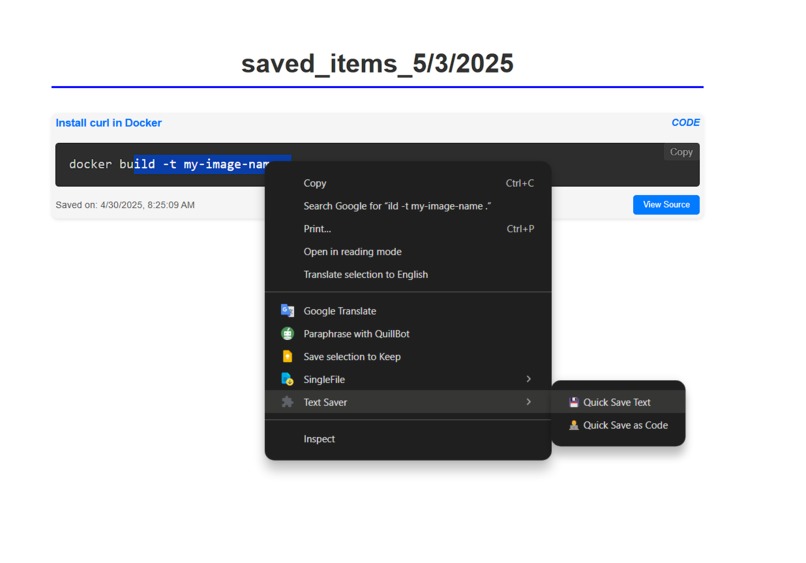
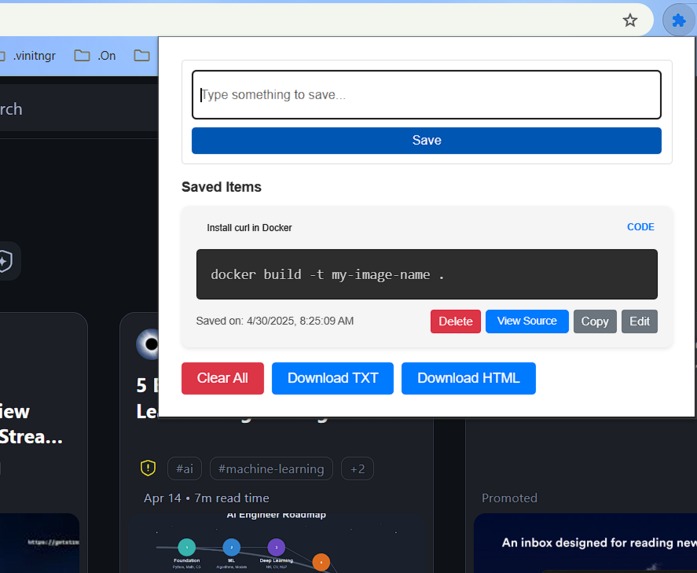
QuickNotes is a browser extension that lets you instantly save selected text from any webpage as notes. Whether you're reading documentation, an article, or a PDF, just highlight and save—no switching tabs, no distractions.
How we built it
Built using vanilla JavaScript, HTML, and CSS for the frontend with Chrome Extension APIs for seamless integration. We use localStorage to persist notes across sessions, keeping things lightweight and fast.
Challenges we ran into
- Handling text selection across different DOM structures.
- Ensuring note persistence without a backend.
- Keeping the UI minimal but functional inside a browser popup.
Accomplishments that we're proud of
- Built a fully functional extension with zero dependencies.
- Designed a clean and distraction-free interface.
- It actually helped us during our own last-minute exam sprints (seriously).
What we learned
- Deep dive into Chrome Extension architecture.
- Efficient DOM manipulation and event handling.
- UX decisions for high-stress users (a.k.a. students at 2 AM).
What's next for QuickNotes
- Export notes to PDF/Markdown.
- Add tagging and search functionality.
- Sync across devices using cloud storage.
- Maybe... an AI that summarizes your selected text too?
Built With
- built-with:-html
- chrome-extension-apis
- css
- javascript-(vanilla)

Log in or sign up for Devpost to join the conversation.