-
-
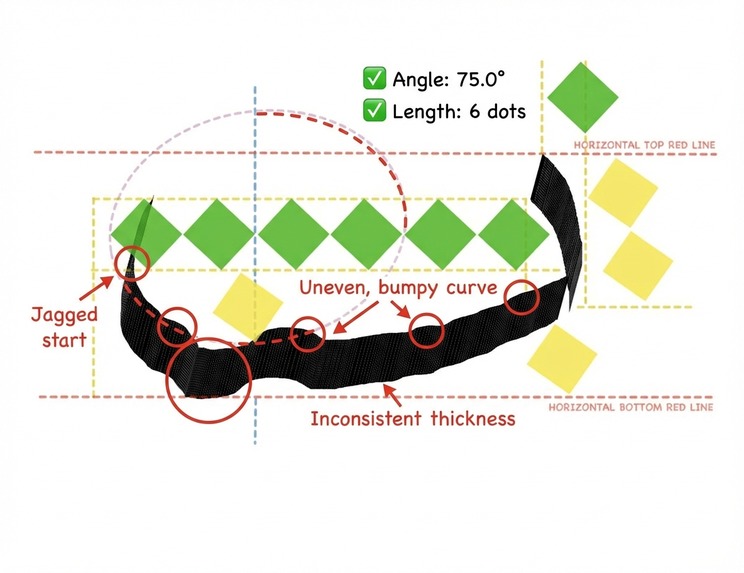
Gemini 3 Pro Analysis Showcase-1
-
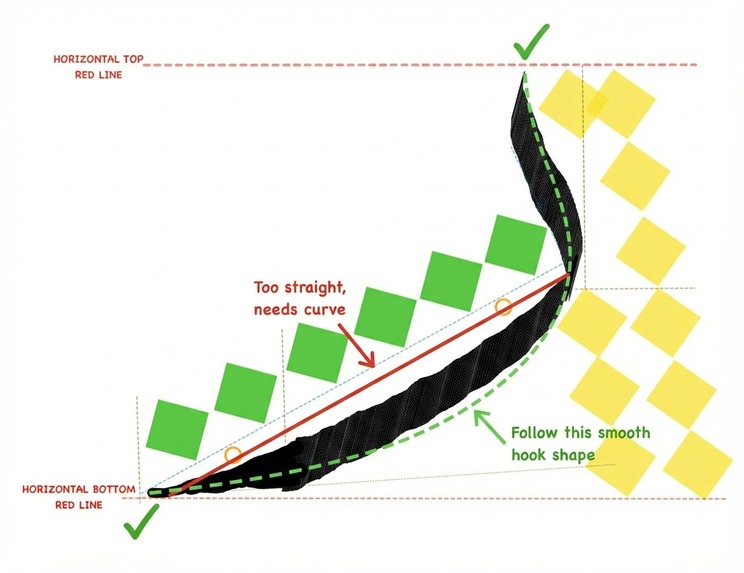
Gemini 3 Pro Analysis Showcase-2
-
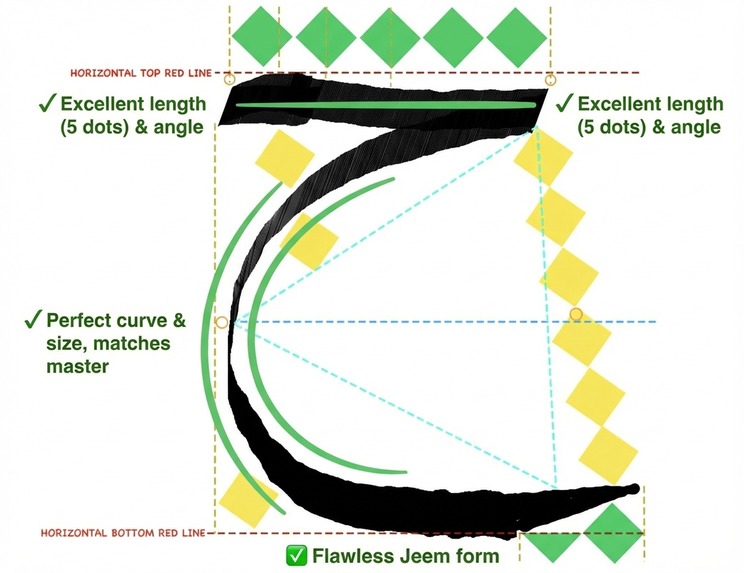
Gemini 3 Pro Analysis Showcase-3
-
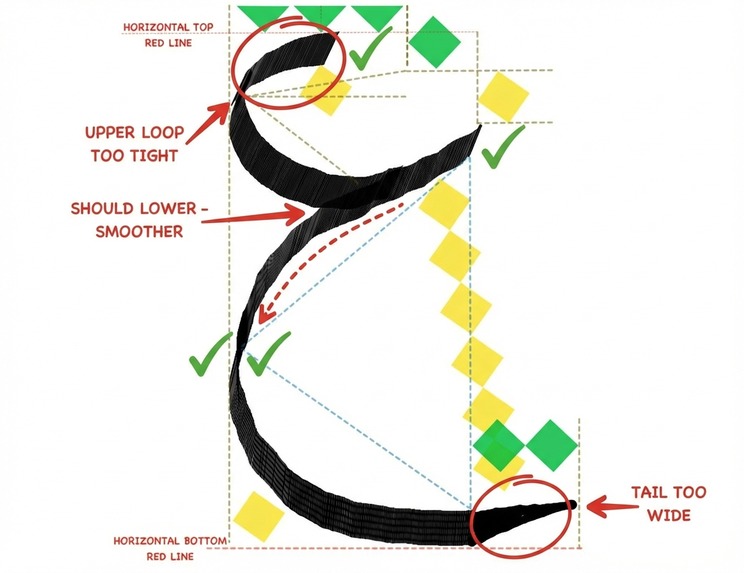
Gemini 3 Pro Analysis Showcase-4
-
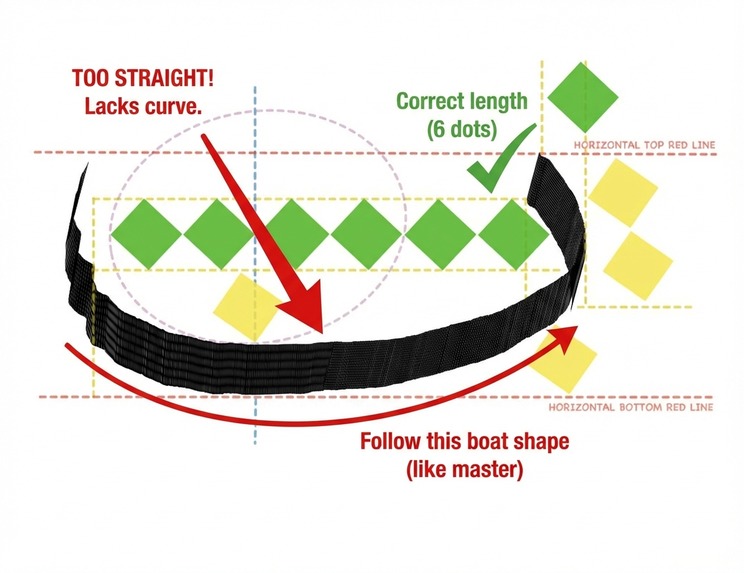
Gemini 3 Pro Analysis Showcase-5
-
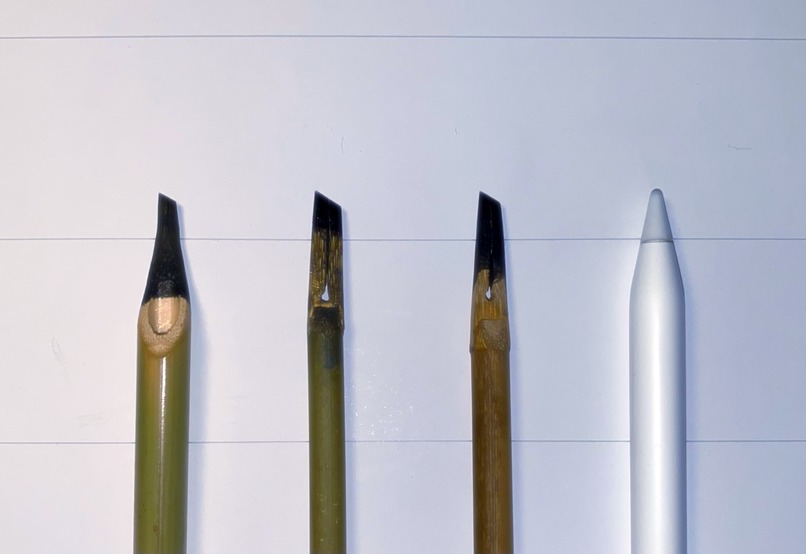
The traditional Reed pen (Hat Qalam) vs Apple Pencil
-
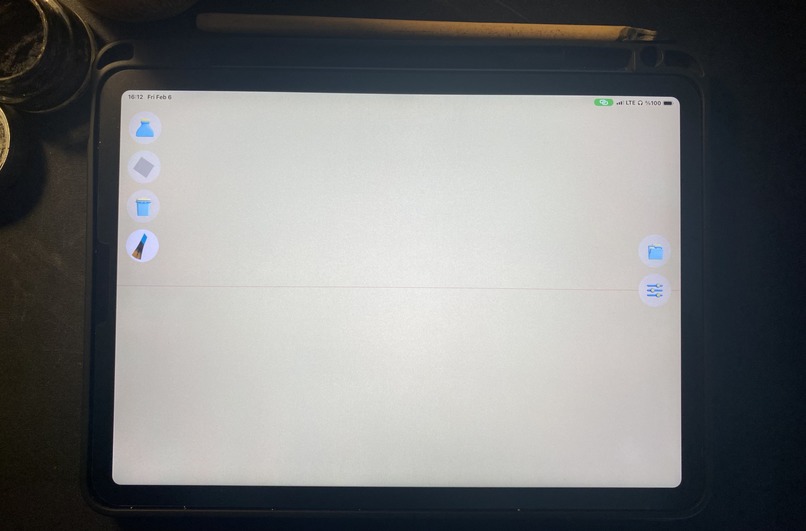
Initial Screen Free Practice Screen
-
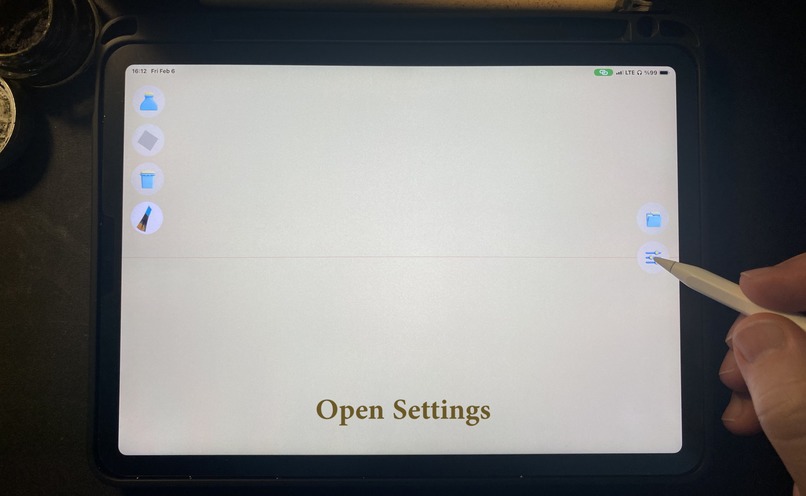
Settings Button
-
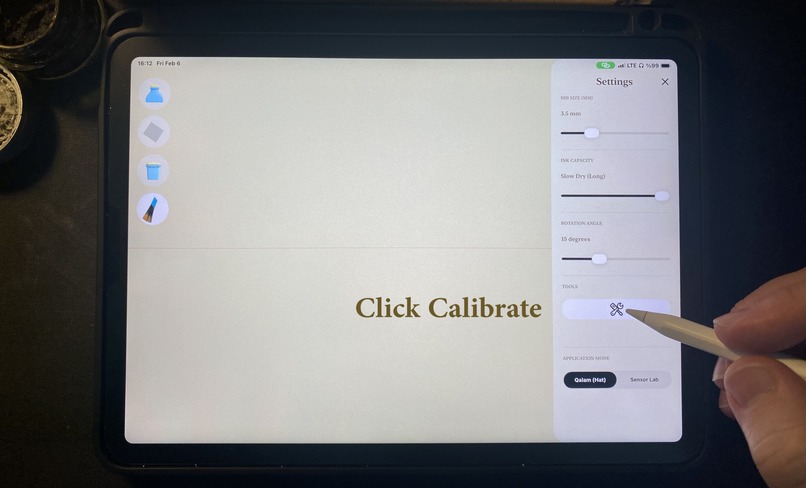
Calibrate Tool Button
-
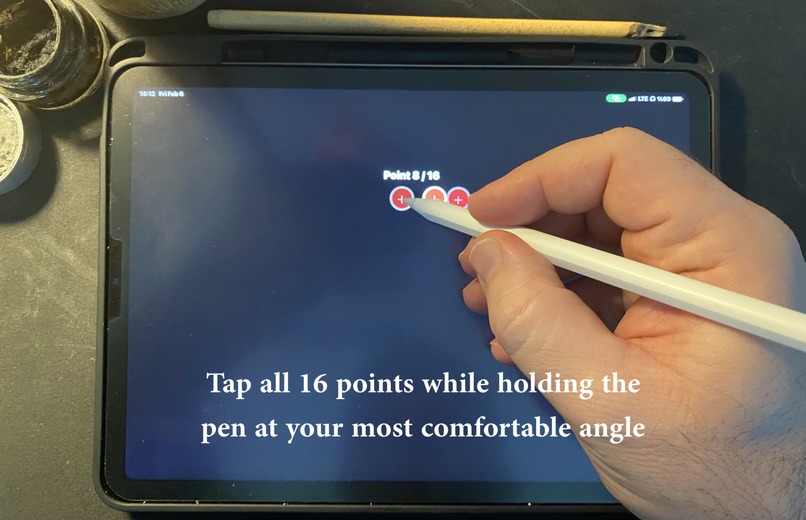
Calibration
-
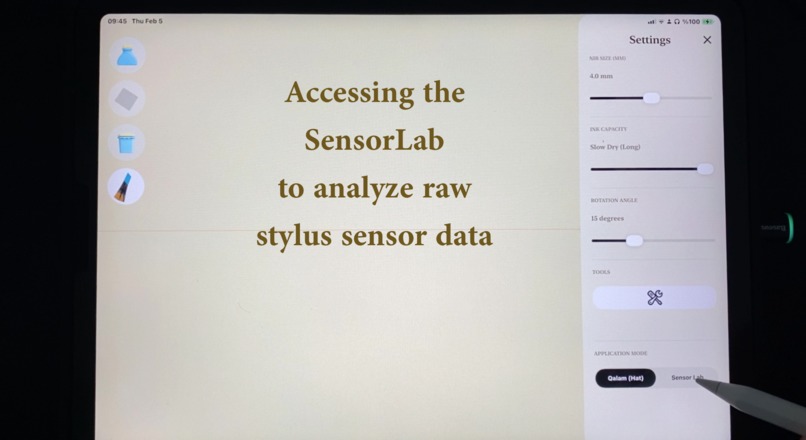
Navigating to the Sensor Lab
-
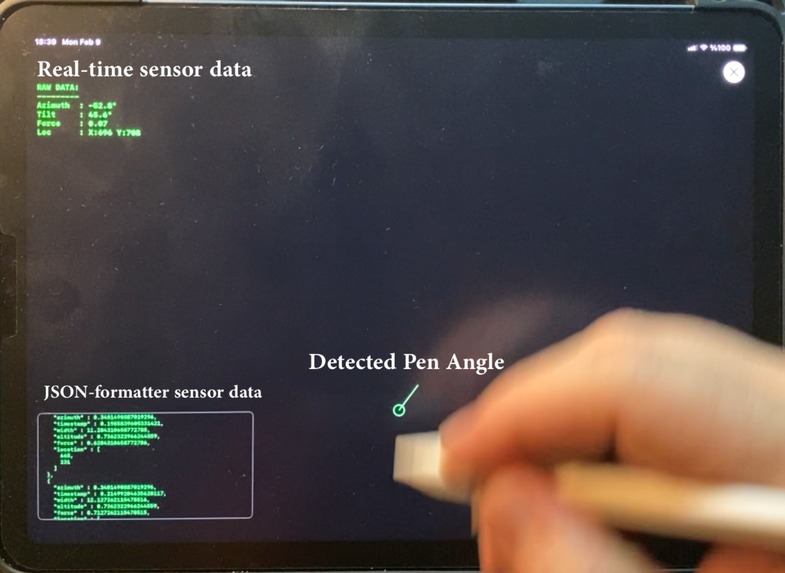
The Sensor Lab
-
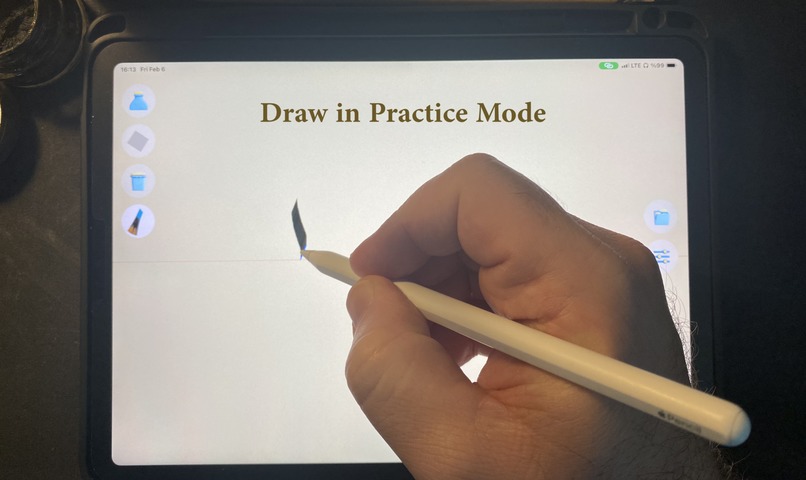
Free Practice Mode
-
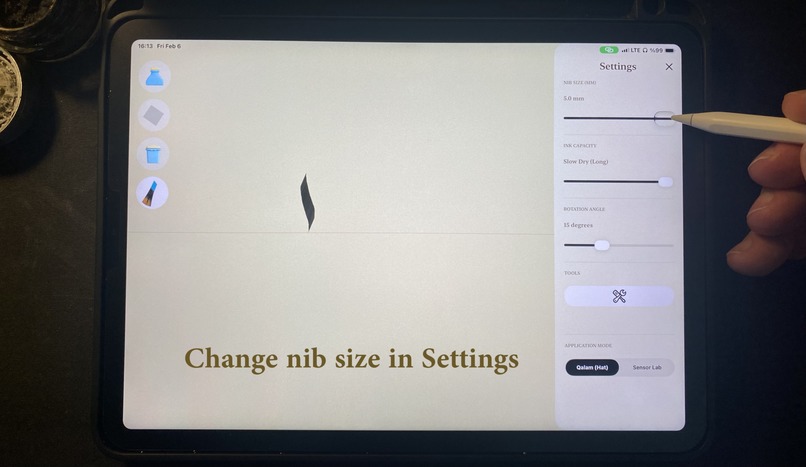
Changing the pen's nib size
-
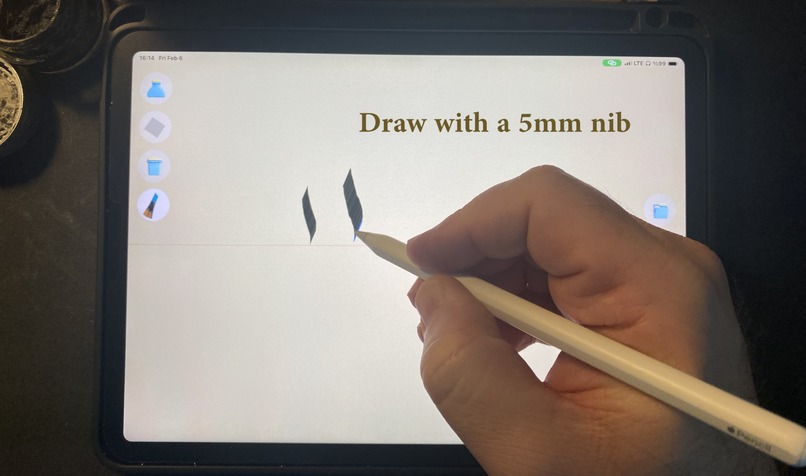
5mm Nib Demo
-
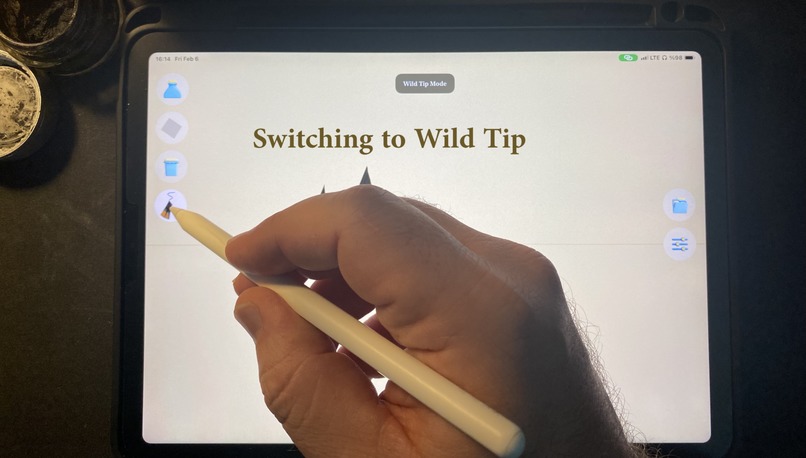
Pen Tip Mode button
-
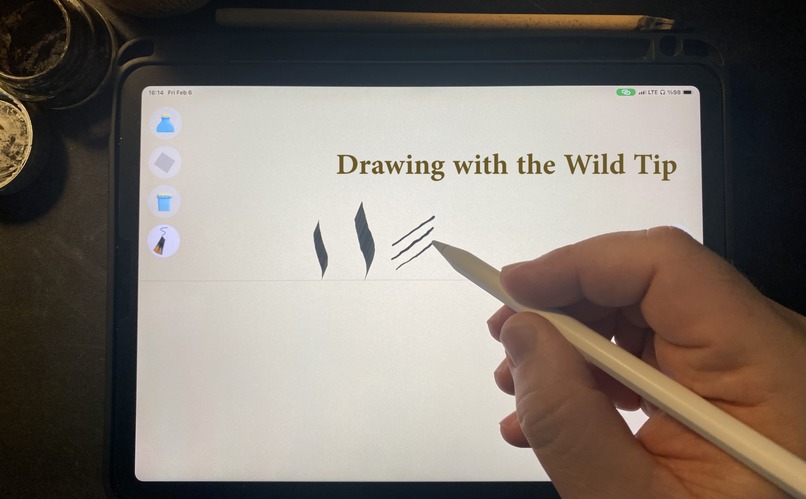
Wild Tip Mode
-
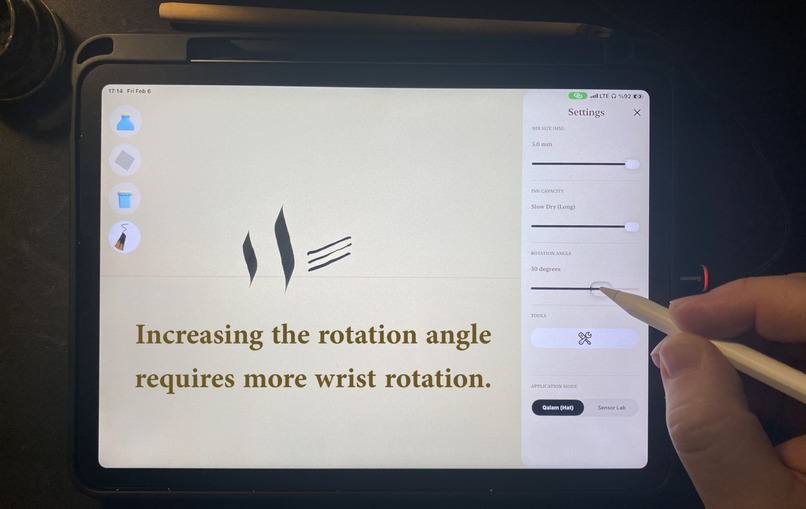
Adjusting The Rotation Angle Slider
-
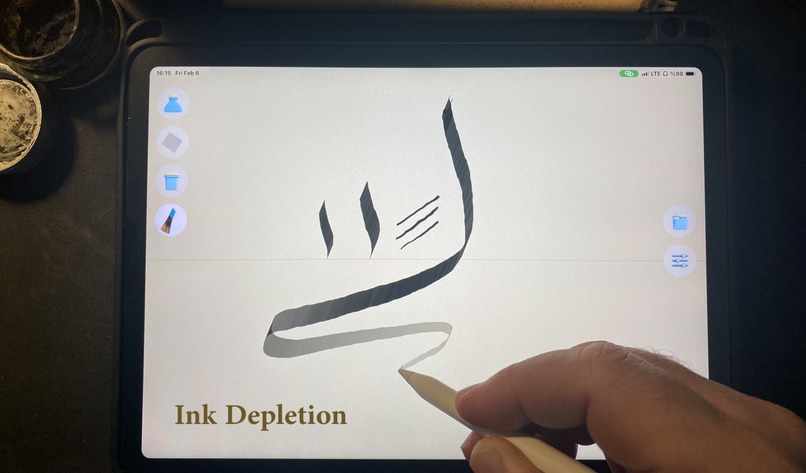
Simulating ink Depletion
-
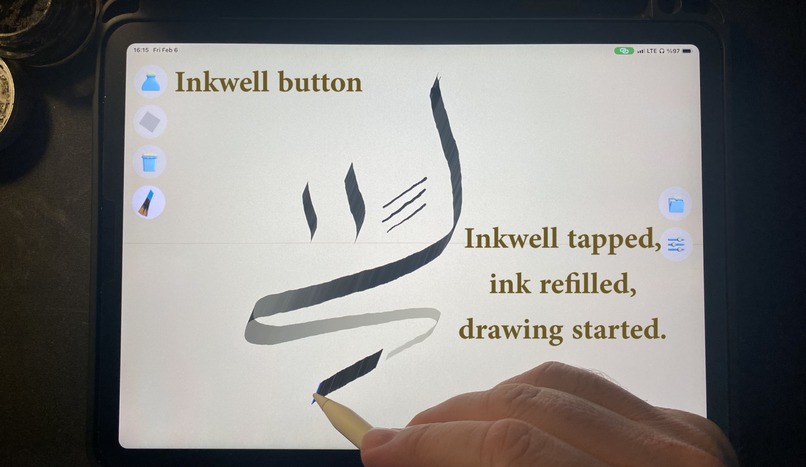
Inkwell Button
-
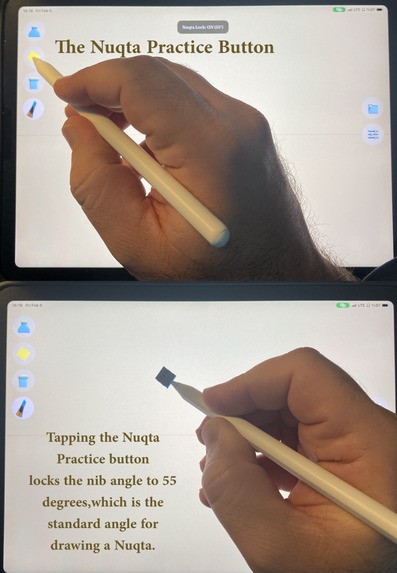
The Nuqta Override Button
-
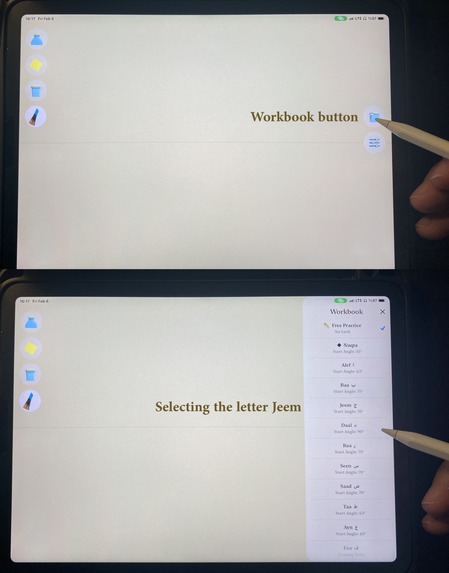
The Workbook Button
-
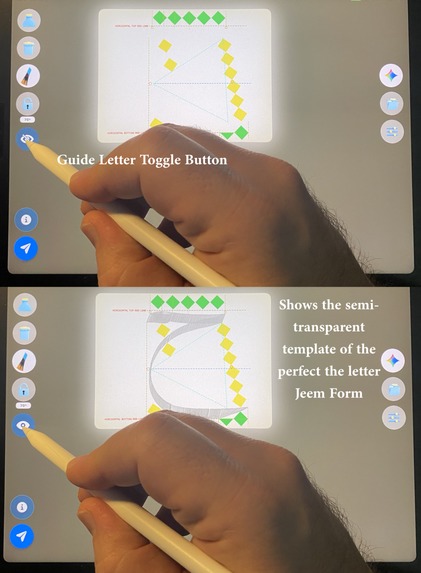
The Guide Letter Toggle Button
-
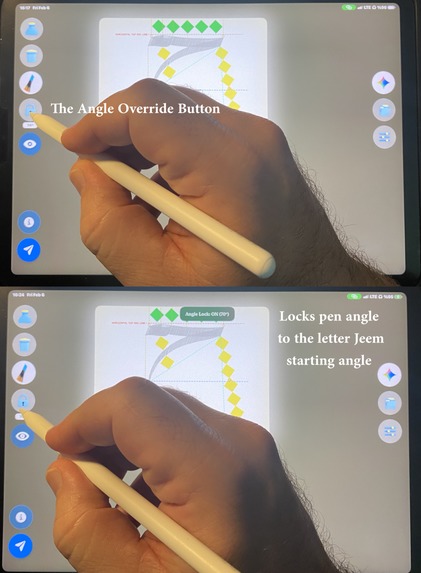
The Angle Override Button
-
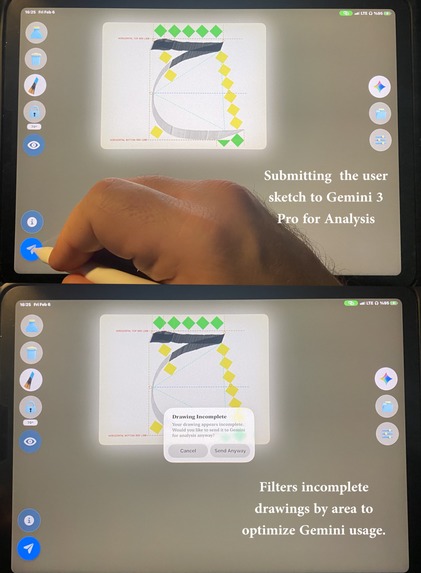
Submitting the user sketch to Gemini 3 Pro Image Model
-
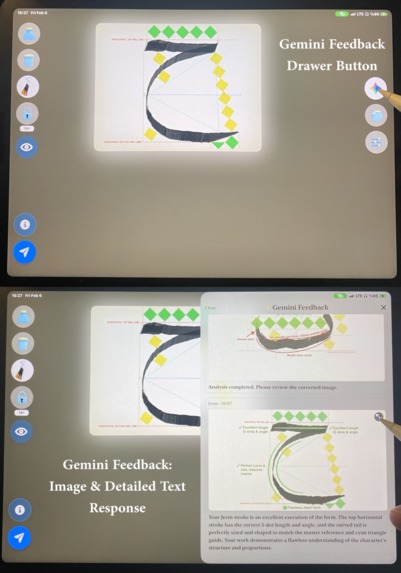
The Gemini Feedback Drawer (Accessing multimodal response: Visual Feedback and/or detailed text analysis)
-
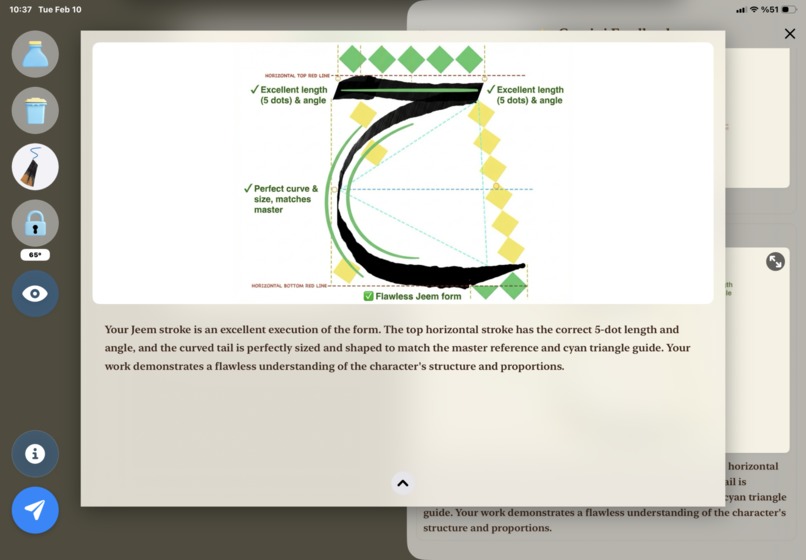
In-Depth View: Gemini Visual Feedback & Text Analysis


Inspiration
Traditional Arabic calligraphy is a 1000+ year old art form requiring years of practice and expert guidance. As someone passionate about preserving cultural heritage, I saw an opportunity: what if AI could democratize access to expert calligraphy instruction? With Gemini 3's multimodal capabilities, I realized we could build something unprecedented—an AI teacher that truly understands the geometry, biomechanics, and artistry of calligraphy.
What it does
QalamAI is the world's first AI-powered Arabic calligraphy teacher. It teaches through these core features:
Reed Pen Simulation: World's first digital simulation of traditional calligraphy pen using Apple Pencil 2. Users adjust pen angle naturally by moving the pencil tail in their palm—just like real calligraphy.
- Dual Tip Modes: Simulates both pen tip contact modes:
- Normal Mode: Full nib contact (both vahshi and ünsi tips) for thick strokes
- Wild Mode: Only vahshi (outer) tip contact for thin, delicate strokes (e.g., Jeem's tail end, Ayn's head tip)
- Authentic Ink Depletion: Stroke starts black, gradually fades to gray, and ends with jagged edges and a center line—exactly like traditional reed pens running out of ink. Users must "refill" from the virtual inkwell.
- Dual Tip Modes: Simulates both pen tip contact modes:
Customizable Pen Settings:
- Calibration Tool: Users must calibrate their natural pen grip on first use. App learns user's default hand/wrist position relative to iPad and simulates their most comfortable grip. Ensures accurate angle detection regardless of how user holds the device.
- Pen Tip Size: Adjustable nib width (e.g., 5mm for Thuluth script) to simulate different traditional pen sizes
- Rotation Sensitivity: Adjustable wrist rotation response—lower values = faster angle changes (for flexible wrists), higher values = slower response (for stiffer wrists). Accommodates different user biomechanics and physical abilities.
- Sensor Lab: Real-time visualization tool showing live Apple Pencil sensor data (angle, pressure, altitude, force) and JSON recording of stroke data. Enables users to understand the biomechanics of their drawing and debug their technique.
- All parameters developed through Gemini 3 Pro video analysis of traditional calligraphy techniques
Gemini Analysis Workflow:
- Submit Button: After drawing, tap submit to send screenshot + sensor data to Gemini 3 Pro Image Preview for analysis
- Feedback Drawer: Results appear in Gemini drawer showing session history. Each analysis includes:
- Annotated Image (always): Gemini-generated correction with red markings for errors, green for correct parts, arrows and labels. Tap to view full-screen detailed version.
- Text Feedback (when provided): 2-3 sentences explaining what's correct, what needs improvement, and how to fix it physically
- Session History: All previous analyses saved in drawer for progress tracking
Intelligent Validation: Before allowing Gemini API calls, validates that user has drawn at least 20% of the letter's expected area (calculated per-letter using guide overlay dimensions). Prevents accidental API calls from single strokes while respecting the learning process.
Practice Modes:
- Guided Mode: Select from 10 letters in workbook—each has letter-specific guide overlays with measurement grids and Gemini analysis enabled. Features include:
- Info Button: View letter's description card showing stroke phases in different colors (e.g., Baa has 2 phases)
- Angle Override Button: Locks pen angle to letter's starting angle (e.g., 75° for Baa)—critical in Thuluth where starting angle determines stroke quality. Lock for fixed angle practice, unlock for dynamic angle response.
- Guide Letter Toggle: Shows/hides a semi-transparent template of the perfect letter form. When visible, users trace over the template like traditional calligraphy practice with physical templates (meshk). When hidden, users draw independently using only measurement grids—progressive learning from tracing to independent drawing.
- Free Practice Mode: Draw freely without guides. Includes Nuqta Override button that locks pen angle to 55° for drawing measurement dots (nuqta)—the traditional unit for measuring letter proportions in calligraphy.
- Guided Mode: Select from 10 letters in workbook—each has letter-specific guide overlays with measurement grids and Gemini analysis enabled. Features include:
Supports 10 Arabic letters with letter-specific geometric specifications, guide overlays, feedback history, and intelligent validation.
How we built it
Development Process: Collaborated with Gemini 3 Pro in an iterative video-driven development workflow. We would implement Gemini's code suggestions, test them on iPad, record videos showing the results while explaining the problems and requirements, then feed these videos back to Gemini 3 Pro. The model analyzed each video to understand what was working and what needed improvement, then wrote better code for the next iteration.
Development Video Playlist: Watch the complete development process - 40+ videos showing this unique AI-powered development workflow where Gemini 3 Pro analyzed our iPad test videos and iteratively improved the reed pen simulator code.
Three-Layer Prompt Architecture:
- Layer 1 (Base Prompt): BasePromptBuilder class (100+ lines) with common instructions for all letters—treats Gemini as image editor, defines output format, language requirements, and annotation rules
- Layer 2 (Letter-Specific Prompts): 10 custom prompt builder classes (one per letter, 400+ lines each) that understand each letter's unique geometry, stroke phases, and common mistakes
- Layer 3 (Dynamic Composition): At runtime, we combine base prompt + letter-specific prompt + JSON metadata + real-time sensor data to generate final 500+ line prompts
Example: For Jeem analysis, we merge:
base_prompt.py(common instructions)jeem_prompt.py(Jeem-specific analysis logic)jeem_metadata.json(geometric specifications)- User's sensor data (angle: 68.5°, pressure: 0.85, etc.) → Result: 500+ line prompt with precise instructions for Gemini
Tech Stack: iOS (Swift) for iPad app with Apple Pencil integration, Python (Flask) backend for Gemini API orchestration, Gemini 3.0 Pro Image Preview for multimodal analysis and image generation.
Gemini 3 Integration (How Gemini is Central)
GEMINI MODEL USED: Gemini 3.0 Pro Image Preview (gemini-3-pro-image-preview)
GEMINI API: Google Generative AI Python SDK (google-generativeai)
QalamAI leverages Gemini 3.0 Pro Image Preview through sophisticated prompt engineering:
MULTIMODAL INPUT:
- Multiple images: Master reference (from GitHub) + user screenshot (from iPad)
- Structured data: 10 JSON metadata files (200+ lines each) encoding 1000+ years of calligraphy expertise
- Real-time sensors: Apple Pencil angle, pressure, altitude, force
ADVANCED PROMPT ORCHESTRATION: We built a sophisticated three-layer system generating 500+ line prompts per analysis (detailed in "How we built it" section above).
MULTIMODAL CAPABILITIES USED:
- Visual Analysis: Gemini analyzes two images simultaneously (master reference vs user drawing)
- Spatial Reasoning: Geometric analysis (70° angles, curve shapes, proportions, alignment)
- Image Generation: Generates annotated corrections with professional markings (red for errors, green for correct)
- Root Cause Analysis: Explains why errors occurred, not just what's wrong
- Structured Data Processing: Combines JSON metadata + sensor measurements with visual analysis
- Multipart Responses: Returns both text feedback AND generated annotated image
WHY GEMINI IS CENTRAL: Without Gemini 3 Pro Image Preview's multimodal capabilities, QalamAI couldn't exist. We need simultaneous visual analysis + numerical reasoning + image generation. This isn't a prompt wrapper—it's a production-grade orchestration system demonstrating advanced Gemini 3 usage for specialized domain expertise.
Challenges we ran into
Prompt Engineering Complexity: Getting Gemini to annotate existing images (not generate new ones) required extensive prompt engineering with explicit constraints and good/bad examples.
Reed Pen Physics: Translating Apple Pencil's azimuth/tilt/pressure into traditional reed pen behavior required understanding both digital sensors and traditional calligraphy biomechanics.
Metadata Encoding: Converting 1000+ years of calligraphy expertise into structured JSON format required deep domain knowledge and iterative refinement.
Image Differentiation Challenge: Critical breakthrough in getting Gemini to distinguish between master reference and user drawing:
- Image Order: Master reference must be sent first, user screenshot second—order affects analysis quality
- Color Coding: Made master stroke MAGENTA/PINK, user stroke BLACK/GRAY—explicit visual distinction
- GitHub Raw URLs: Hosted master images on GitHub raw URLs for consistent access and prompt clarity
- Explicit Instructions: Added detailed prompt instructions: "PINK stroke = master (don't touch), BLACK stroke = student (annotate this)"
- This three-part solution (order + color + instructions) was essential for accurate annotations
Language Consistency: Ensuring all Gemini responses (text + image annotations) are in English required explicit language requirements in prompts.
Accomplishments that we're proud of
World's First: Created the first AI-powered Arabic calligraphy analysis tool—no competition exists in this space.
Reed Pen Breakthrough: Achieved first-ever digital simulation of traditional reed pen with natural angle control AND authentic ink depletion (black → gray → jagged with center line).
Gemini as Developer: Demonstrated Gemini 3 Pro model's capability to analyze videos and write production code (physics engine).
Production-Grade Prompts: Built scalable three-layer architecture with 10 × 500+ line prompts—not a simple wrapper.
Intelligent Validation: Per-letter area calculation system (20% threshold) prevents wasted API calls while respecting learning process—device-independent validation using guide overlay dimensions.
Debug Mode & Transparency: Backend saves complete debugging artifacts for every Gemini API call:
debug_prompts/: Full 500+ line prompts sent to Gemini (with timestamp)debug_responses/: Complete Gemini responses (text + metadata)debug_screenshots/: User's original drawing sent for analysiscorrected_output/: Gemini-generated annotated images- Enables developers to inspect entire pipeline: input → prompt → response → output. Critical for prompt engineering iteration and reproducibility.
Cultural Impact: Made expert calligraphy instruction accessible to 1.8 billion Arabic speakers worldwide.
Technical Depth: Combined multimodal input (visual + sensor), structured metadata, dynamic generation, and image annotation in cohesive system.
What we learned
Gemini's Video Understanding: Gemini 3 Pro can analyze hand movement videos and generate working physics code—powerful for biomechanics applications.
Prompt Architecture Matters: Three-layer system (base + metadata + dynamic) scales better than monolithic prompts.
Image Editing vs Generation: Treating Gemini as image editor (adding annotations) produces better results than asking it to generate new images.
Domain Expertise Encoding: Structured metadata (JSON) makes traditional knowledge machine-readable and maintainable.
Multimodal Fusion: Combining visual analysis with numerical sensor data produces more accurate feedback than either alone.
Cultural Preservation Through AI: AI can democratize access to traditional arts without replacing human masters.
What's next for QalamAI
Short-term: Expand to all 28 Arabic letters, add multiple calligraphy scripts (Naskh, Diwani), implement progress tracking.
Medium-term: Expand to other languages (Chinese, Japanese calligraphy), add video tutorials, build web version.
Long-term: Partner with calligraphy schools, create certification program, expand to other traditional arts, build marketplace for custom commissions.
Vision: Make QalamAI the global standard for learning traditional calligraphy, preserving cultural heritage while making it accessible to everyone.

Log in or sign up for Devpost to join the conversation.