-
-
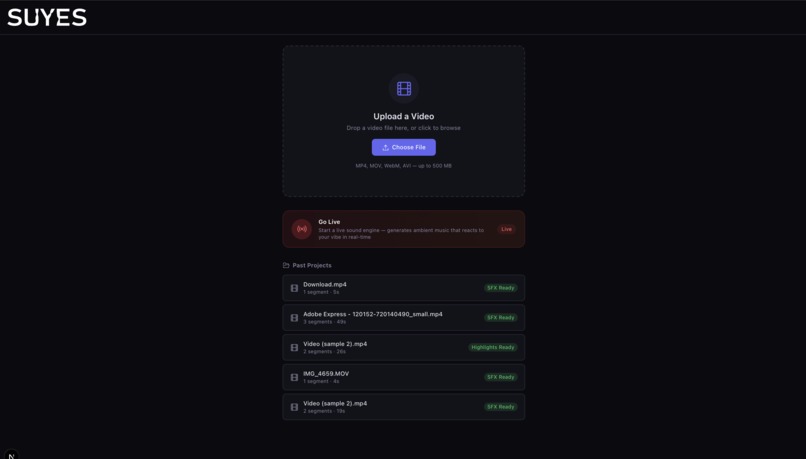
Landing Page
-
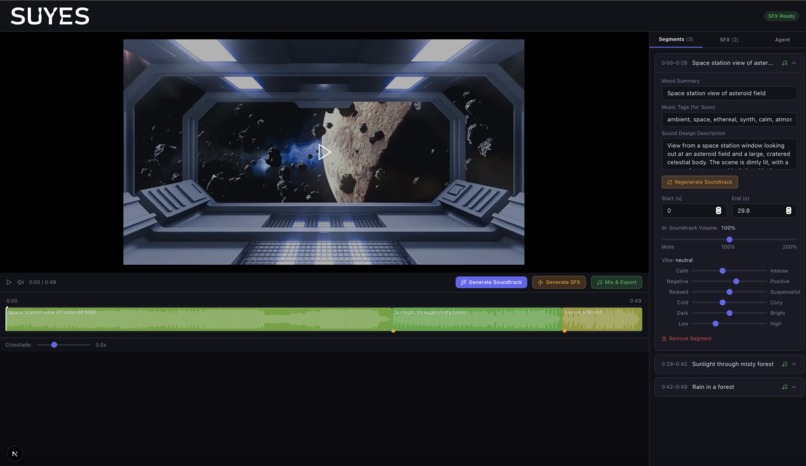
Editor View 1
-
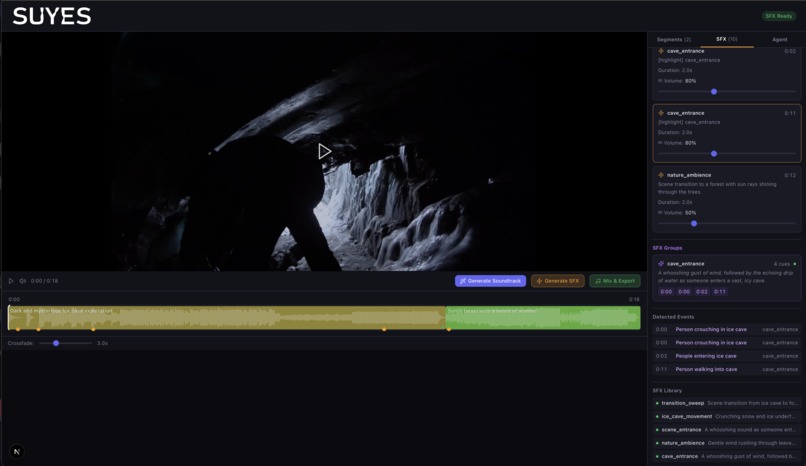
Editor View 2
-
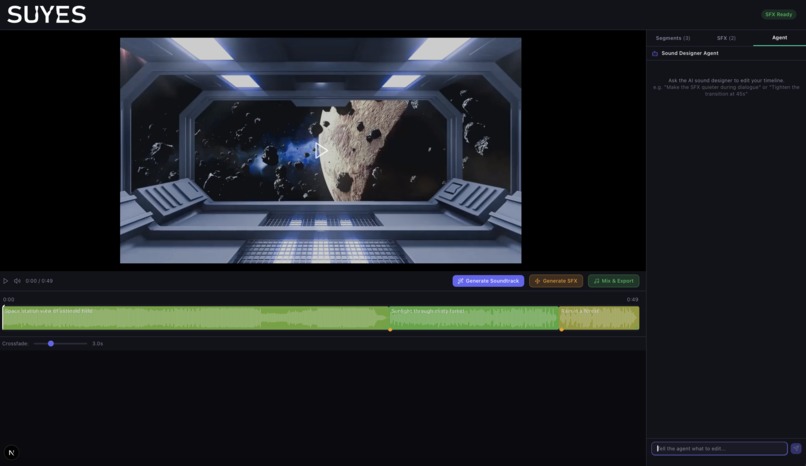
Editor View 1 with Sound Agent
-
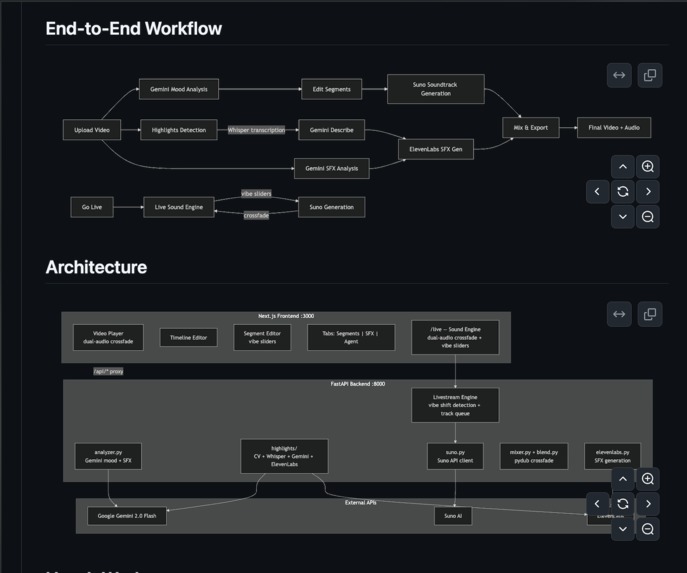
End to End Workflow


Suyes
Inspiration
Good audio brings color to a video. It can make technical topics feel more digestible, create a calm ambience, and subtly guide attention and emotion.
But most people don’t have access to professional audio tools, and educators or creators don’t have time to compose, mix, and sync music and sound effects for every video. The result is usually either one generic track for everything, or a lot of manual work just to get something that feels “right.”
So we built Suyes: an end-to-end pipeline that automatically generates a full soundtrack for a video. It adapts across different scenes and moods, handles transitions and pacing shifts, and adds emphasis cues, so the final audio feels intentional without the creator having to do audio editing from scratch.
What It Does
Suyes analyzes a video and produces an exported version with adaptive audio. At a high level, it tries to answer: what is happening here, what does it feel like, and what should the audio be doing right now?
Suyes currently includes the following features:
- Detects scene changes and mood shifts
- Splits the video into timestamped segments
- Generates background music per segment
- Finds highlights and adds sound effects
- Blends, mixes, and exports the final video
Users can review and adjust the segments in a timeline editor before exporting, so the system stays automatic but still feels controllable.
How We Built It
Suyes has a Next.js frontend and a FastAPI backend.
Backend pipeline
1) Scene differentiation
- A multimodal model watches the video and, with few-shot prompting, returns:
- Timestamped segments (start/end)
- Mood labels (happy, tense, sad, etc.)
- Optional continuous scores (energy/valence)
- For longer videos, we use a sliding window with overlap so we don’t miss mood shifts near boundaries
- We merge overlapping windows automatically and smooth segment edges so the timeline feels stable, not jittery
2) Ambience creation
- For each segment, we translate the mood into a short music brief:
- tempo, intensity, instrumentation
- We generate an instrumental clip per segment using a music generation API (e.g., Suno)
- We blend clips using audio processing (loop/trim to fit, plus equal-power crossfades) so transitions feel like a natural change in atmosphere rather than a hard switch
3) Highlight generation
- We detect “interesting” moments using computer vision signals like optical flow and scene-change detection
- We map each highlight to an audio treatment (SFX hit, riser, bass drop, filter sweep)
- We place cues precisely on the timeline, then mix them into the background track so emphasis lands where the viewer’s attention is already going
4) Mix + export
- The system assembles the final audio track and exports the video end-to-end (ffmpeg-based pipeline)
Frontend
- Video player + preview
- Timeline view of detected segments and highlight markers
- Segment editor with mood controls (optional live preview mode)
Challenges
One of the main challenges was that with the Suno API, generated music doesn’t always come back at the exact length we need, especially when segments are short or when the video has lots of quick scene changes. We built fitting logic into the pipeline so clips get automatically trimmed, looped, and blended to stay aligned with the timeline.
We also found that even when the music “fits,” transitions can still feel jarring if the mood shifts quickly. To handle that, we added blending and crossfades in both the preview experience and the final export so changes in atmosphere feel smooth.
Another challenge was prompt stability. Turning mood signals into music prompts that consistently produce the right vibe took iteration, especially across very different kinds of videos.
Finally, tying everything together into one clean flow (analysis, editing, generation, mixing, export) required careful backend orchestration to keep the system reliable end-to-end.
Accomplishments
We built a complete upload-to-export workflow that doesn’t require manual audio editing. The timeline editor makes the system feel transparent, since users can see what was detected and adjust segments before generating the final soundtrack.
We’re also proud that the outputs clearly adapt as the video changes, with music that follows mood shifts and sound effects that land on the right moments. Overall, Suyes feels like a real tool rather than a demo, because it works consistently from input video to exported result.
What’s Next
- Better segmentation and mood detection
- Layered tracks / stems
- Finer control over intensity over time
- Faster generation and preview
- Integrations with editing tools
Long-term, we want adaptive audio to feel like a default part of video creation.
Log in or sign up for Devpost to join the conversation.