-
-

Nutshell in a nutshell
-
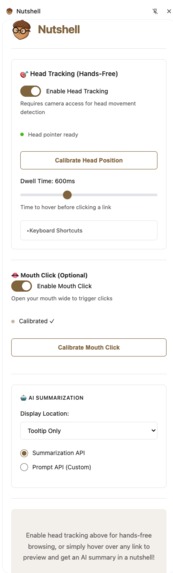
Extension Side Panel
-

Enabling Head Tracking
-

Head Tracking Calibration
-

Mouth Click Calibration
-
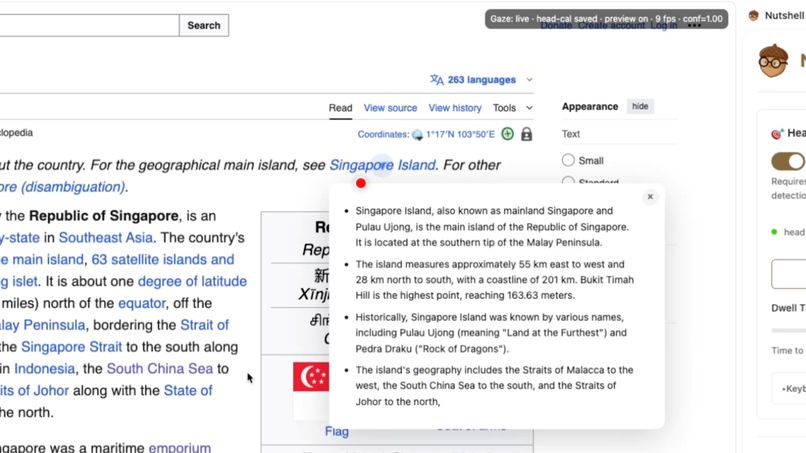
Hover Summarizer (can be used hands-free or with mouse cursor)
-
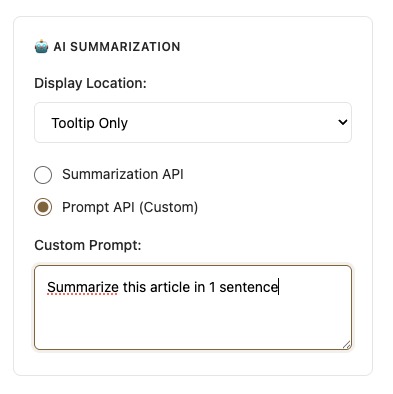
Custom summarizer prompt using Prompt API
-
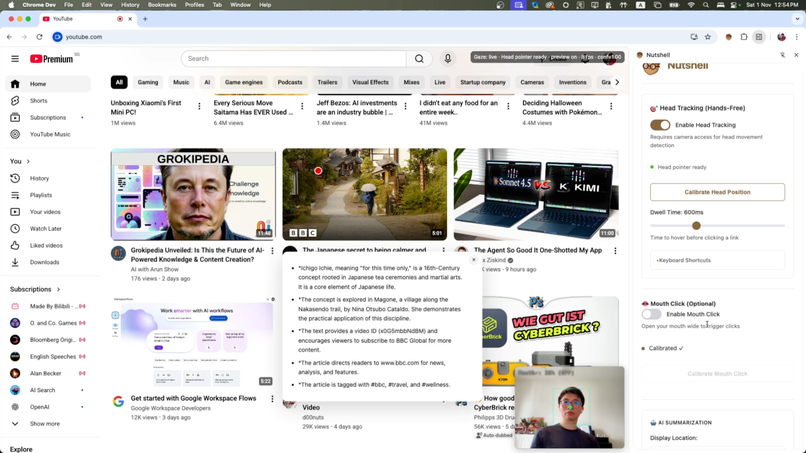
Gaze / Hover Summarizer using Description and Captions to summarize YouTube videos


Inspiration
The web is humanity's greatest library, but for millions with motor disabilities, the simple act of clicking a link is a monumental barrier. I was inspired by the question: How can we build a more helpful and accessible web for everyone? I saw the launch of Chrome's built-in AI not just as a new tool for developers, but as a revolutionary opportunity to create deeply personal and private assistive technologies without expensive, specialized hardware. My vision for Nutshell was to build a tool that could literally open up the digital world to those who have been left behind, giving them the power to explore, learn, and connect with complete independence.
This project is my answer. It's built on the belief that technology should empower, and that the best AI is the kind that runs securely on your own device, working for you and you alone.
What it does
Nutshell is a Chrome Extension that transforms the browsing experience by leveraging Chrome's new built-in AI APIs and advanced camera-based interaction. It moves beyond simple summarization to create a comprehensive, hands-free navigation system:
- AI-Powered Summaries: To reduce the physical burden of navigating confusing websites, Nutshell provides instant, on-device summaries. By simply looking at a link, the user gets a concise preview, ensuring every interaction is meaningful. This works across various content types:
Regular Web Pages: Uses the Summarizer API or Prompt API to generate concise summaries from extracted article content
YouTube Videos: Intelligently intercepts and processes video captions via XHR interception, then uses the Prompt API to generate structured summaries from the video's transcript and description
- Complete Hands-Free Navigation: This is the heart of Nutshell's mission. Using a standard webcam and the Human.js library for on-device computer vision, it offers full browser control:
Head-Tracked Cursor: Smooth and precise cursor control is mapped to the user's head movements using:
One-Euro Filter ($1€$ filter): A real-time signal filtering algorithm that eliminates jitter while maintaining responsiveness. The filter's behavior is governed by adaptive cutoff frequencies based on movement velocity
Head Calibration System: Users calibrate by positioning their head at five points (center, left, right, up, down), creating a personalized control space that adapts to their natural range of motion
Intelligent Movement Mapping: Combines head translation (position) and rotation (pitch/yaw) with different gains for center vs. edge regions, providing both precision and range
Mouth-Open Click: A voluntary mouth-opening gesture triggers a 'left-click', providing an intuitive and low-effort way to interact. This includes:
Calibration System: Users calibrate by keeping their mouth closed for samples, then opening wide, establishing personalized thresholds
Cooldown Protection: 800ms cooldown prevents accidental multiple clicks from sustained mouth opening
Real-time Mouth Aspect Ratio Detection: Uses facial landmark detection to measure mouth opening
Dwell-Based Interaction: When hovering over links or UI elements:
Visual Feedback: A growing ring indicator shows dwell progress
Configurable Timing: Default 600ms dwell time, adjustable in settings
Magnetic Snapping: Cursor automatically snaps to nearby interactive elements within 45px radius for easier targeting
Effortless Navigation: Dedicated screen zones for browser control:
Scroll Zones: Looking at the top/bottom 180px of the screen triggers smooth scrolling with visual feedback gradients
Browser Navigation: Left edge (80px) for back navigation, right edge (80px) for forward navigation with 400ms dwell requirement and purple/orange visual indicators
How I built it
I engineered Nutshell as a fully client-side application, ensuring maximum privacy and performance.
Multimodal AI Interaction: The core of the project combines two input streams: the user's gaze (via head-tracking) and Chrome's AI. This creates a practical, multimodal AI application. I used the powerful, open-source
Human.jslibrary to perform real-time face and head-pose tracking directly in the browser, with custom modifications for head translation tracking and facial landmark detection.On-Device AI with Gemini Nano: To generate summaries, Nutshell uses Chrome's built-in AI APIs:
The
Summarizer APIis used for quick, high-quality article summaries with streaming support for real-time updatesThe
Prompt APIprovides flexibility with custom prompts. For example, my custom prompt for YouTube video summaries instructs the model to act as an expert analyst, creating a structured summary from the video's transcript and descriptionIntelligent Content Preparation: Getting good results from an AI requires good input. I developed specialized content extraction for different platforms:
YouTube Captions: The extension injects a script into YouTube.com that intercepts XHR requests for caption data. It captures both JSON3 (newer) and XML (older) caption formats, parses timestamps and text segments, and makes them available to the content script via a secure messaging API
Smart Truncation: For long content, the system intelligently preserves the beginning, middle, and end segments to fit within the AI's context window while maintaining narrative coherence
Advanced Computer Vision Pipeline:
Real-time Processing: Uses requestVideoFrameCallback for optimal frame timing and skips frames when detection is in progress to maintain performance
One-Euro Filter Implementation: Applied to both X and Y coordinates independently with configurable parameters (min cutoff: 0.4, beta: 0.0025, derivative cutoff: 1.0)
Adaptive Smoothing: Different lerp factors for center (0.06) vs. edge (0.10) movements to balance precision and responsiveness
Face Detection: Tracks face presence and score to ensure reliable head tracking before enabling cursor control
Challenges I ran into
1. Achieving Smooth, Non-Jittery Cursor Control:
This was a major hurdle. Raw head pose data from computer vision is inherently noisy. To solve this, I implemented a One-Euro Filter ($1€$ filter), a classic algorithm in human-computer interaction for filtering noisy signals in real-time. The filter's behavior is governed by the following equations, where I tuned the cutoff frequency ($f_c$) and beta ($\beta$) to create a responsive yet stable cursor:
$$\tau = \frac{1}{2\pi f_c}$$
$$\alpha = \frac{1}{1 + \frac{\tau}{dt}}$$
The adaptive cutoff frequency adjusts based on movement velocity, providing more smoothing during slow movements and less during fast movements.
2. Distinguishing Intentional vs. Involuntary Actions:
For mouth-open clicking, I needed to prevent false positives from natural mouth movements like talking or yawning. The solution involved:
Personalized calibration that learns each user's baseline mouth closure and maximum comfortable opening
A threshold calculation that sits between these two extremes
An 800ms cooldown period to prevent repeated clicks from sustained mouth opening
3. YouTube Caption Extraction:
YouTube doesn't expose captions through a public API. I solved this by:
Injecting a script into the page context (not the extension context) to intercept XMLHttpRequest
Monitoring all network requests for caption endpoints (
timedtextorcaption)Parsing both JSON3 and XML caption formats
Implementing a secure postMessage bridge to transfer caption data from page context to extension context
4. Streaming Updates Without Flickering:
When AI summaries stream in character by character, naive implementations cause tooltip flickering and repositioning. I solved this by:
Tracking which URL's content is currently displayed in the tooltip
Only accepting streaming updates for the exact URL currently being processed
Canceling pending hide timeouts when new content arrives
Implementing a request token system for YouTube to prevent stale updates
Accomplishments that I'm proud of
A Truly Private Assistive Tool: By running 100% on-device, Nutshell offers life-changing accessibility without ever sending a user's camera feed, browsing data, or content to the cloud. This aligns perfectly with the privacy-first ethos of on-device AI.
Pixel-Precise Navigation: The combination of head-tracking, the One-Euro filter, and magnetic snapping is so effective that users can accurately navigate dense websites like Wikipedia, hovering over specific inline links to get summaries without losing their place.
Bridging the Web-Native Accessibility Gap: Nutshell brings capabilities traditionally found only in expensive, dedicated operating system software (like eye-gaze systems costing thousands of dollars) directly into the open web, using standard device hardware.
Intelligent Content Summarization for Any Link: The custom logic for handling YouTube transcripts demonstrates a deeper, more practical application of AI beyond just summarizing simple articles. The YouTube caption extraction alone required solving several non-trivial engineering challenges.
Sophisticated Computer Vision Pipeline: Successfully implementing head pose tracking with translation detection, One-Euro filtering, adaptive smoothing, and calibration creates a production-quality interaction system from open-source components.
Streaming AI Integration: Real-time streaming of AI-generated summaries provides immediate feedback to users, with sophisticated state management to prevent race conditions and stale updates.
What I learned
This project proved to me that on-device AI is a paradigm shift for accessibility. Chrome's new APIs empower individual developers to build powerful, privacy-first assistive technologies that previously required massive resources or expensive specialized hardware.
Key technical learnings:
Signal Processing Matters: Raw computer vision data requires sophisticated filtering and smoothing to create usable interfaces
Context-Specific AI Prompts: Different content types (articles, videos, threads) benefit from specialized prompting strategies
Multi-Strategy Robustness: Implementing fallback strategies creates more reliable systems
User Calibration is Essential: What works for one user's physiology doesn't work for another—personalized calibration is key to accessibility
Privacy by Architecture: Building with on-device AI from the start creates fundamentally more private systems than retrofitting privacy into cloud-based solutions
It also highlighted that the most "helpful" AI applications are often those that integrate seamlessly into a user's workflow, solving practical, real-world problems with elegance and respect for the user.
What's next for Nutshell
Nutshell has a clear path to becoming an even more robust assistive tool. Next steps include:
Enhanced Click Alternatives:
Eye blink detection for more discreet clicking
Customizable dwell times per interaction type
Voice command integration for complex actions
Advanced Navigation:
Customizable gestures mapping specific head movements to actions like "copy," "paste," or "close tab"
Smart scrolling with variable speed based on gaze position
Tab and window management via head gestures
Improved AI Features:
Multi-turn conversations with content (ask questions about summarized pages)
Smart content highlighting based on AI-identified key points
Personalized summary styles based on user preferences
Platform Expansion:
Support for more specialized websites (LinkedIn, GitHub, documentation sites)
Mobile browser support as APIs become available
Integration with screen readers for users with visual + motor impairments
Distribution:
Chrome Web Store publication to reach users who need it most
User testing with individuals who have motor impairments
Documentation and tutorial videos for onboarding



Log in or sign up for Devpost to join the conversation.