-
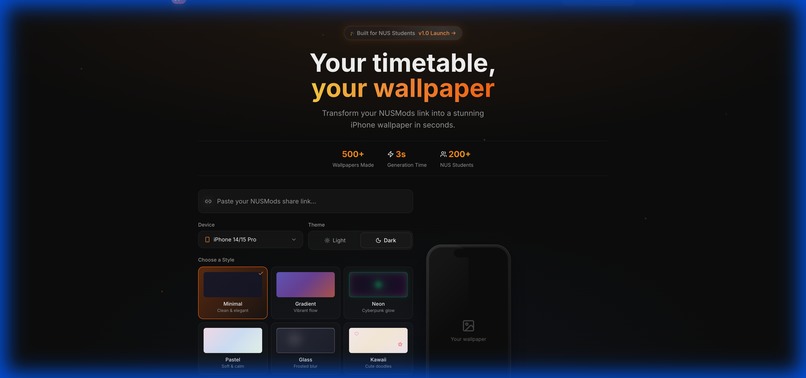
Landing Page
-
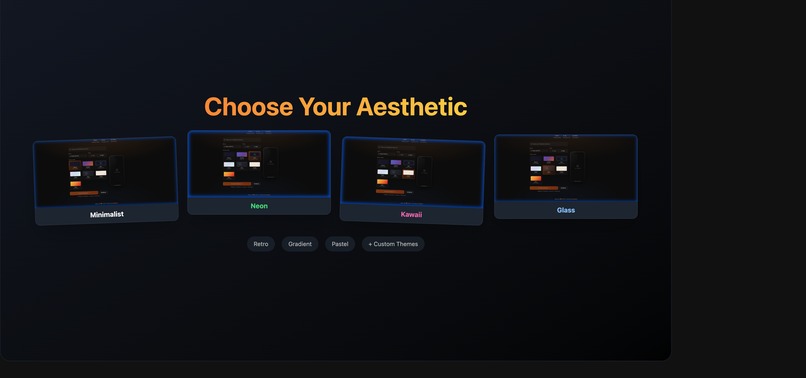
Styles and Offers


ModPocket
💡 Inspiration
As NUS students, we’ve all been there: sprinting to a lecture only to realize it was actually in UTown, or checking NUSMods ten times a day just to remember our next tutorial. We realized that while NUSMods is an incredible tool, it requires active engagement—you have to unlock your phone, open the app, and wait for it to load. We asked ourselves: "What if your timetable was just... there?" We spend 4+ hours a day on our phones. The lock screen is the most viewed real estate in our digital lives. We wanted to reclaim that space to make a utility that is "set and forget." ModPocket was born from the desire to turn a mundane timetable into a functional piece of art that lives on your lock screen.
📱 What it does
ModPocket is the fastest way to turn a complex NUSMods schedule into a stunning, personalized phone wallpaper.
- Instant Parsing: Users simply paste their NUSMods share link.
- Custom Styling: Choose from 7 distinct aesthetics, including "Neon" (Cyberpunk), "Kawaii" (for the wholesome vibes), "Glassmorphism" (clean & frosted), and "Retro" (80s pixel art).
- Device Optimization: We automatically adjust layouts for iPhone 14/15 Pro, Pro Max, SE, and generic Android aspect ratios to ensure the notch never covers your 9 AM lecture.
- Smart Overlay: The wallpaper is generated in seconds and downloaded directly to the device, ready to be set as a lock screen. ## ⚙️ How we built it We built ModPocket with a modern, scalable tech stack designed for speed and aesthetics:
- Frontend: Built with React 19 and Tailwind CSS. We used
framer-motionfor those buttery smooth transitions andlucide-reactfor iconography. The UI uses a glassmorphic design system to feel premium and native. - Backend: Hosted on Google Cloud Run using Python. We utilized high-performance image processing libraries to draw text, shapes, and gradients pixel-perfectly onto a canvas.
- AI Integration: We leveraged Google Gemini to help analyze visual hierarchies and generate color palettes that ensure text readability against complex backgrounds (like our Neon and Gradient styles).
- DevOps: Continuous deployment via Cloud Run ensured our backend could scale to zero when not in use and handle spikes during the hackathon demo. ## 🚧 Challenges we ran into
- The "Notch" Problem: Every phone has a different safe area ( Dynamic Island, notches, pinhole cameras). We had to mathematically calculate safe zones for each device type to ensure no module information was obscured.
- Aesthetic Consistency: Programmatically generating art is hard. A "Neon" glow effect that looks good in CSS is difficult to replicate in a static PNG generation backend. We had to write custom shader-like logic in Python to create those glowing borders and bloom effects.
- URL Decoding: NUSMods URLs are dense with data. Writing a robust parser that handles every edge case (odd-week tutorials, intense overloading) without crashing the image generator was a significant logic hurdle. ## 🏆 Accomplishments that we're proud of
- Sub-3-second Generation Speed: We optimized the backend to generate high-res (4K equivalent) wallpapers almost instantly.
- The "Kawaii" Style: It sounds silly, but implementing a doodle-style aesthetic with randomized cute icons (hearts, stars, clouds) programmatically was a huge technical and creative win. It’s our team's favorite feature!
- Mobile-First UX: The web app itself feels native. We spent hours polishing the touch interactions, haptics, and responsive layout so it feels great on the very devices the wallpapers are meant for. ## 🧠 What we learned
- Design Systems Matter: Setting up a strict design token system (colors, spacing, typography) early on allowed us to iterate on the 7 different themes extremely fast.
- Serverless Power: Google Cloud Run is a beast. It allowed us to forget about server maintenance and focus entirely on the code.
- User Psychology: Students don't just want utility; they want identity. By adding styles like "Retro" and "Kawaii", we transformed a boring utility tool into something people actually want to show off. ## 🚀 What's next for ModPocket
- iOS Lock Screen Widgets: Moving beyond static wallpapers to interactive Live Activities.
- Direct "Add to Wallet": Allowing users to add their timetable as a pass for easier access.
- Social Sharing: "Roast my Timetable" integration where you can share your generated wallpaper directly to Instagram Stories with a sticker overlay.
- Semester-Specific Themes: Halloween themes for Semester 1, festive themes for the end of the year.
Contact
ModPocket Team - Built with 🧡 at NUS
Project Link: https://github.com/Ducksss/ModPocket


Log in or sign up for Devpost to join the conversation.