-
-
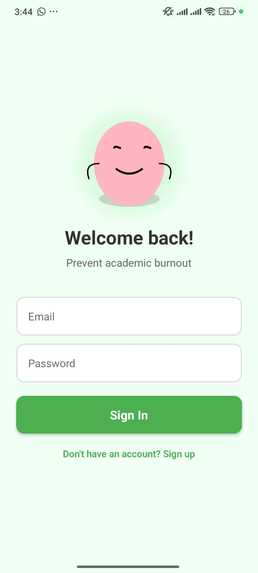
Start
-
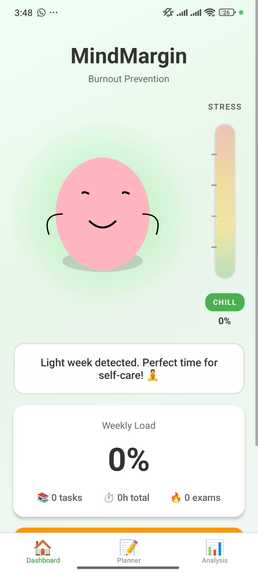
Main1
-
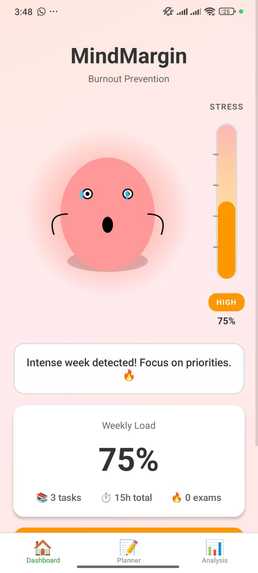
Main2
-
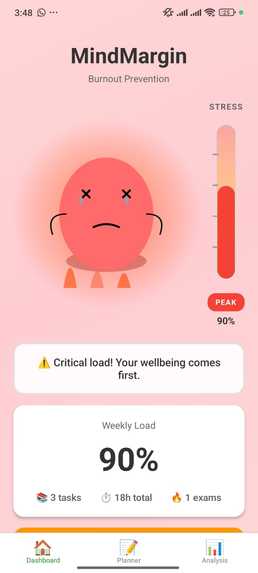
Main3
-
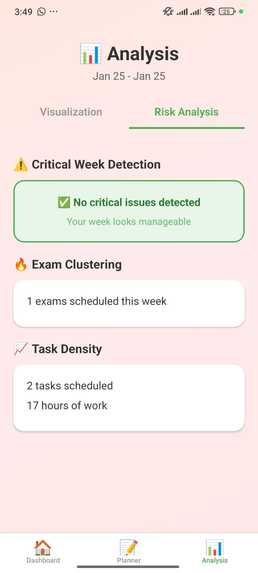
Risk analysys
-
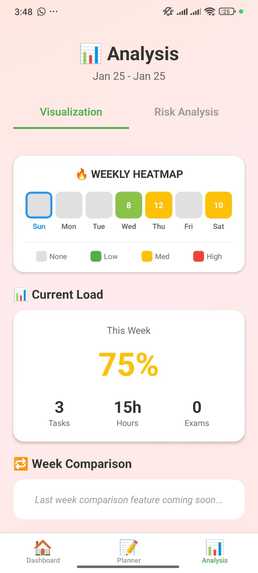
Analysis
-
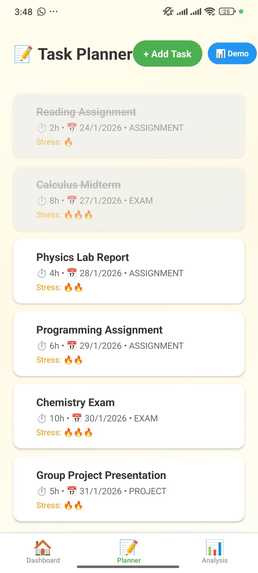
Tasks


Inspiration
As a student myself, I've watched countless peers burn out from academic overload—not because they weren't capable, but because they didn't realize they were drowning until it was too late. Traditional productivity apps only made it worse, treating students like machines that just need to "work harder."
I wanted to create something different: a system that cares about your limits, not just your tasks.
MindMargin was born from a simple question: What if an app asked "How much can you handle?" instead of "What do you need to do?"
What it does
MindMargin is an academic burnout prevention system disguised as a task planner.
Instead of celebrating productivity, it celebrates sustainability. The app monitors your weekly workload using a sophisticated algorithm that considers:
- Estimated hours per task
- Stress level perception (low/medium/high)
- Task urgency (deadline proximity)
- Task type (exams weighted heavier than assignments)
- Your real capacity (available hours - commitments - rest)
Key Features:
Animated Blob Character - A cute blob that reacts to your stress level with 5 distinct states (from chill to burnout), complete with animations, auras, and even flames when you're in critical overload.
Traffic Light System - Visual indicator that shows if you're in the green (manageable), yellow (busy), or red (danger zone).
Weekly Heatmap - Color-coded visualization showing stress distribution across each day of the week.
Critical Week Detection - Automatically identifies dangerous patterns like:
- 3+ exams clustered in 5 days
- High-density task weeks
- Excessive total hours
Survival Mode - When activated, the app simplifies the interface, filters only critical tasks, and adjusts its tone to be more supportive during crisis moments.
Task Simulator - Preview how moving tasks to different weeks affects your load score in real-time.
Smart Notifications - Timely alerts that warn you about upcoming critical weeks without becoming spam.
How we built it
Architecture
Frontend: React Native + TypeScript for cross-platform mobile development (Android + iOS)
Framework: Expo for rapid development and easy deployment
Backend: Firebase ecosystem
- Firestore for real-time database
- Firebase Authentication for user management
- Expo Notifications for local push notifications
UI/UX: Custom components built with React Native SVG
- Hand-crafted blob character with 5 emotional states
- Victory Native for data visualization charts
- Custom stress bar component
- Dynamic background gradients that change with stress levels
The Algorithm
The core innovation is the weekly load score calculator:
$$\text{score} = \frac{\sum(\text{hours} \times \text{stress} \times \text{urgency} \times \text{type})}{\text{available_capacity}}$$
Where:
- urgency_factor increases exponentially as deadlines approach (2.0x for tasks due today, 1.0x for tasks 7+ days away)
- type_factor weights exams at 1.5x, projects at 1.2x, assignments at 1.0x
- available_capacity = total weekly hours - fixed commitments - minimum rest hours
Traffic light thresholds:
- Green: score < 0.60
- Yellow: 0.60 ≤ score < 0.85
- Red: score ≥ 0.85
Data Model
Task {
  title: string
  estimatedHours: number
  dueDate: Date
  taskType: 'exam' | 'assignment' | 'project'
  stressLevel: 1 | 2 | 3
  completed: boolean
  weekStart: string // YYYY-MM-DD format
}

WeeklyConfig {
  availableHours: number    // Total weekly hours
  fixedCommitments: number  // Classes, work, etc.
  minRestHours: number      // Sleep + breaks
}
Challenges we ran into
1. Timezone Hell
The biggest technical challenge was handling dates consistently across timezones. Tasks created at different times of day were being assigned to different weekStart values, breaking the entire score calculation.
Solution: Normalized all dates to local midnight before calculating week boundaries using date-fns with explicit weekStartsOn: 1 (Monday).
2. Expo Go Limitations
Firebase Cloud Messaging (remote push notifications) doesn't work in Expo Go—only in native builds. This threatened to cut a key feature.
Solution: Pivoted to Expo's local notification system, which actually worked better for our use case since we're predicting stress patterns, not reacting to external events.
3. Firestore Composite Indexes
Firebase requires manual index creation for queries combining where() and orderBy(). The app crashed on first task load.
Solution: Firebase provides the exact index creation link in the error message. One click, 3-minute wait, problem solved.
4. Real-time UI Updates
Dashboard wouldn't refresh when returning from other screens, showing stale data.
Solution: Replaced useEffect with useFocusEffect from React Navigation, enabling automatic refresh whenever the screen gains focus.
5. Making Stress "Cute"
The hardest challenge wasn't technical—it was design. How do you visualize burnout without being depressing?
Solution: Inspired by "Dumb Ways to Die," I created a blob character with expressive animations. Even the "burnout" state (with flames and exhausted expression) feels approachable rather than scary.
Accomplishments that we're proud of
The Blob Character - Created 5 distinct emotional states with custom SVG animations, gradients, and particle effects (sweat drops, flames). It's adorable AND functional.
The Algorithm - Built a defendable, explainable scoring system that's sophisticated enough for a research paper but simple enough to implement in a hackathon.
Full-Stack Solo - Designed, architected, and built a complete mobile app with backend, authentication, real-time database, and push notifications in 48 hours as a solo developer.
User-Centered Design - Every feature asks "Does this reduce stress or add to it?" The result: no dark patterns, no guilt trips, no toxic productivity.
It Actually Works - Loaded demo data, watched the blob turn red, got a notification, moved tasks around, saw the score drop. The entire feedback loop works end-to-end.
What we learned
Technical:
- React Native isn't just "React for mobile" - Navigation, lifecycle, and state management work fundamentally differently
- Firebase is powerful but opinionated - Composite indexes, data denormalization, and security rules require planning
- Expo accelerates development 10x - But you need to understand its limitations (no native modules in Expo Go)
- TypeScript saves lives - Caught dozens of bugs at compile time that would've been nightmare runtime errors
Design:
- Gamification ≠ Infantilization - The blob is cute but not condescending. Students want approachable, not dumbed-down
- Less is more - Originally planned 8 screens. Shipped with 5. Users don't want features; they want solutions
- Animations matter - The blob's stress reactions create emotional connection. Static UI would've failed
Product:
- Students don't need another planner - They need permission to say "no" and evidence that they're overloaded
- Burnout prevention is a UX problem - Not a time management problem
- Explainability builds trust - Users trust the traffic light because they understand the formula
What's next for MindMargin
Short-term (Next Month):
- Photo OCR for syllabi - Scan your syllabus, auto-populate tasks
- Study group coordination - See aggregated stress levels across your group
- Historical trends - "You were yellow this week last semester too"
- Smart task splitting - "This 8-hour project could be 4 × 2-hour sessions"
Medium-term (Next Semester):
- Campus-wide deployment - Aggregate anonymous data to help universities identify high-stress periods
- AI-powered suggestions - Use Gemini API to analyze task descriptions and auto-estimate hours/stress
- Wellness integration - Connect with fitness trackers, sleep data
- Accountability partners - Opt-in check-ins with friends
Long-term Vision:
Transform MindMargin into a campus mental health infrastructure tool:
- Universities get dashboards showing when students are most stressed
- Counseling centers can proactively reach out during critical weeks
- Professors receive (anonymized) feedback on assignment density
- Students get personalized resilience coaching
The goal: Make academic burnout predictable, preventable, and culturally unacceptable.
"Sustainable studying, not toxic productivity."
---


Log in or sign up for Devpost to join the conversation.