-
-
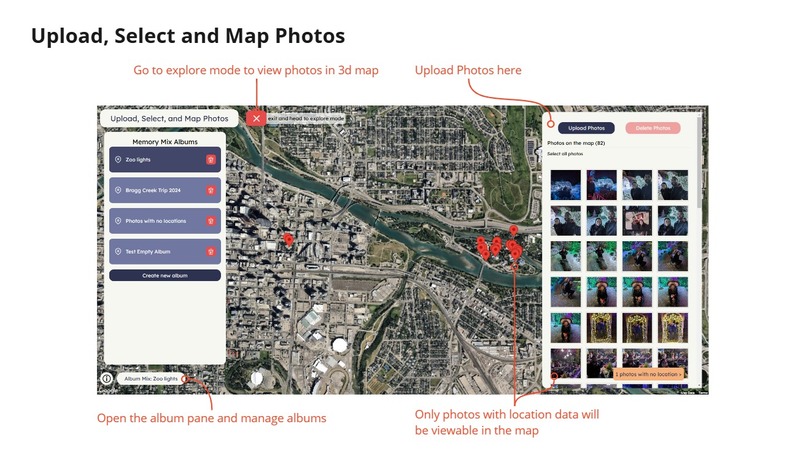
Application Features Overview - Upload photos, create albums
-
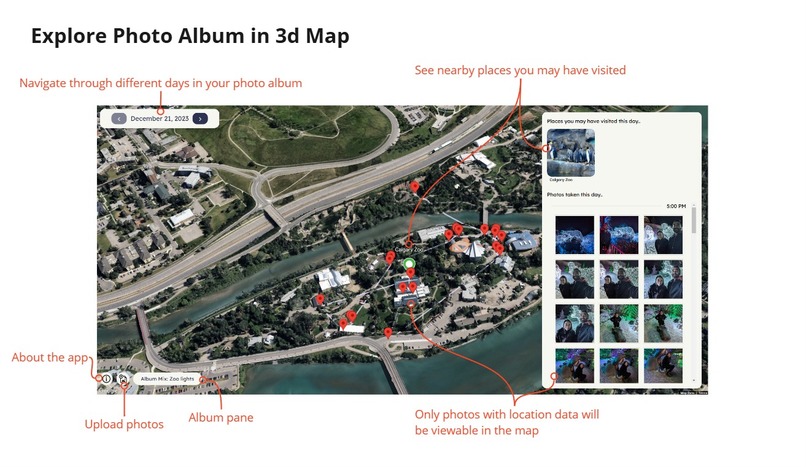
Application Features Overview - Explore Photo Album in 3d Map and see nearby places
-
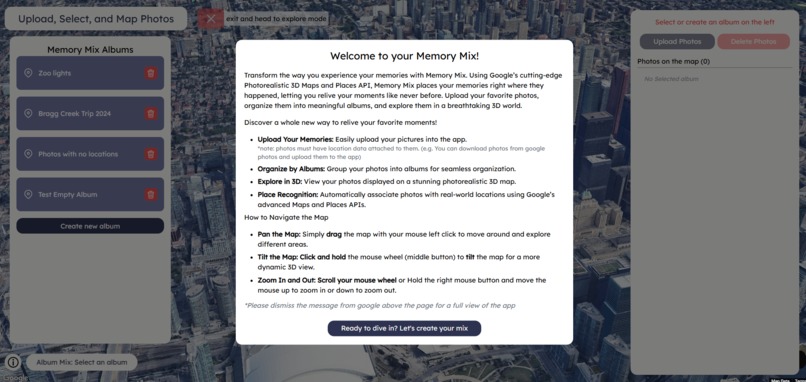
Landing Page
-
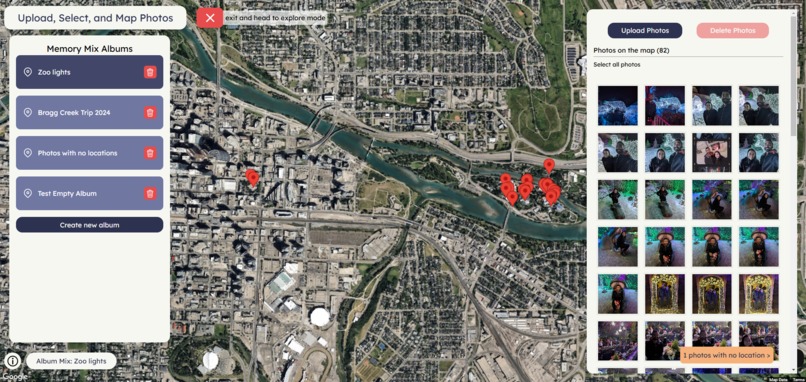
Upload photos into albums
-
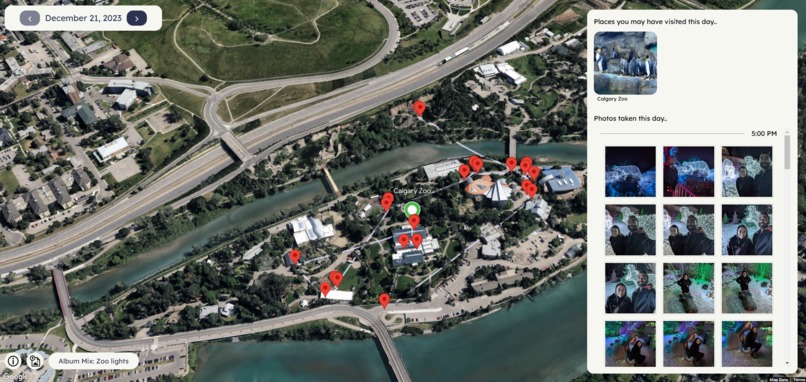
See daily photos in the map
-
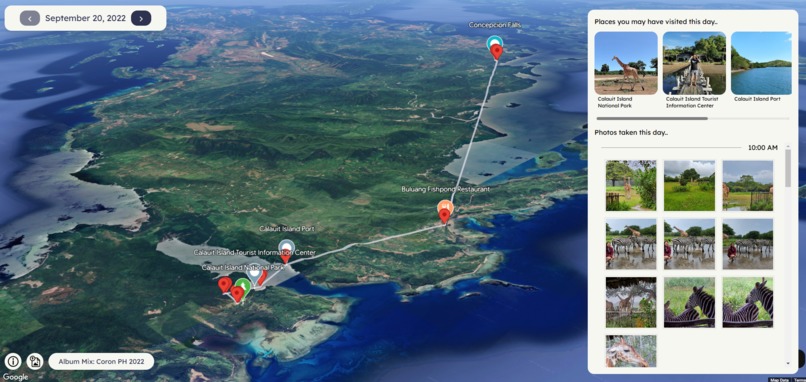
Nearby Places detection
-
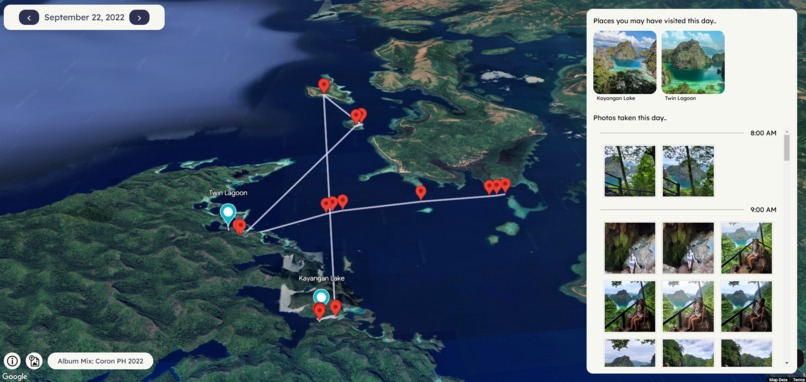
Track your travel throughout a day in time
-
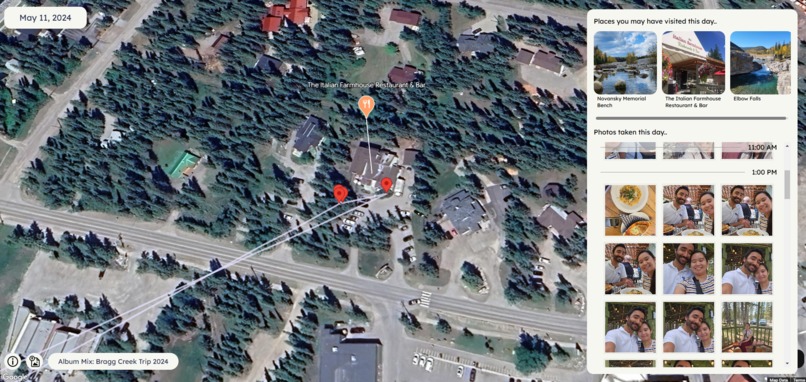
Nearby Places detection
-
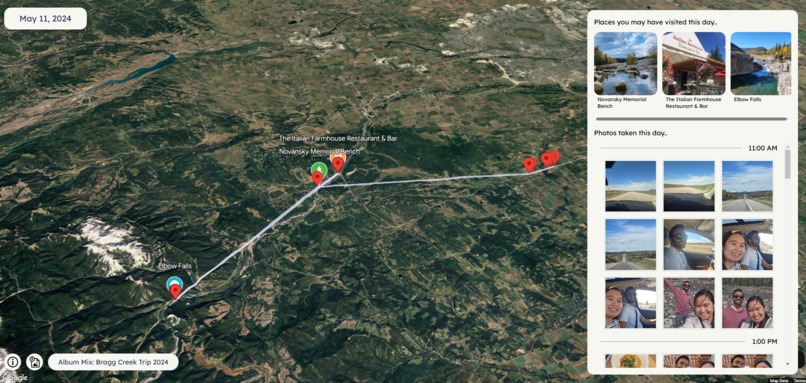
Nearby Places detection
-
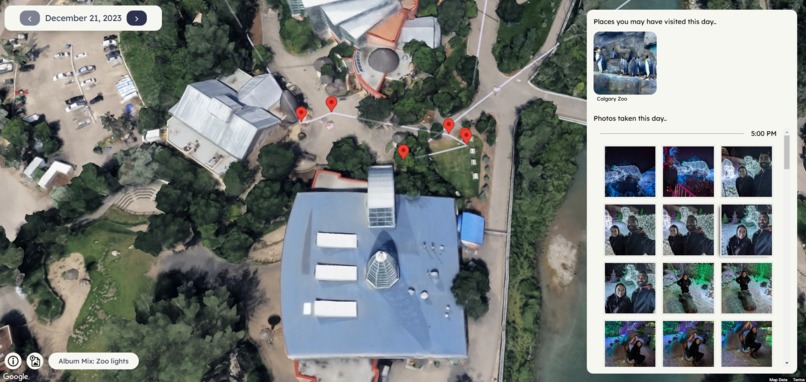
3d Map Overview


Inspiration
What inspired me to create this project was wanting to look back at my photos and see a visual diary of special events, holidays, or places I have visited with my family. More so I’ve been always wanting to create some personal project relating to my photo memories with my partner. We use google photos extensively, organizing our photos in albums, taking lots of photos during trips, etc. This challenge created an opportunity to create that idea into life. And I was also intrigued about the 3d maps capabilities of google as this was the first time I have heard of it so I wanted to experiment with the API.
What it does
Memory mix allows you to upload photos with geolocation to view in a 3d map. You can sort your photos into albums and view them by album. After creating your album and uploading photos, you can go into explore mode where it will show your photos by day and will navigate to your group of photos using animations to navigate in the 3d map. The app will also show places you may have visited during that day with the help of the Places API. More details about these features are listed below:
- Upload photos: You can upload photos (png,jpg) into the app. Only photos that are geotagged (photos that have location data) will be shown in the map. What I have done for testing is that I have downloaded my photos from google photos (photos taken with my phone with location data on), and uploaded them into the app. (This manual downloading/uploading of photos was unfortunately necessary as I could not use google photos api to integrate to my app to easily retrieve photos as it does not provide the location data on retrieval)
- Photos are saved locally in your browser: The app uses IndexedDB to store your uploaded photos into your device’s browser so you can leave where you left off whenever you close and open the web application. Photos uploaded are not accessible to public and are stored locally on the device via IndexedDB in the browser.
- Sorting into Albums: You can create multiple albums and organize your photos into albums.
- Explore Mode: Visualize your geotagged photos in a 3d map. Photos will be grouped by day which you can scroll through. photos will be pinned on the map and will also visualize the timeline of the photos using a polyline connecting each of them by timestamp. Nearby places that are detected will also have a pin in the map, highlighting places you may have visited. Further more, a sidebar along with the map will provide info such as the nearby places that was detected. Your photos are also listed ordered by hour in this sidebar so you can easily see your photo timeline in a list and see their location as you click through them.
How I built it
To bring Memory Mix to life, I used a combination of modern technologies and APIs that enabled a seamless user experience for uploading, organizing, and exploring photos on a 3D map. Here’s a breakdown of how I built the app:
- Frontend: React.js, tailwind.css, Material UI
- 3D Map Integration: Google’s Photorealistic 3D Maps using the Maps JavaScript API.
- Places API: The app uses Google Places API to predict and suggest locations where photos were taken. This feature analyzes the GPS coordinates of the uploaded images and tries to match them with known location.
- Backend Storage: The application also features photo storage in your browser using IndexedDB.
I brainstormed the features of the application and the designed my ideas of a user friendly UI/UX through figma. These designs evolved through an iterative process during the app's development, where I encountered limitations, explored new ideas, and adjusted the designs accordingly.
Challenges I ran into
There were definitely a couple of challenges that I ran into as I was implementing the app.
- Easily uploading geotagged photos (sadly no google photos integration): The main big thing I wanted for this app was that I thought I could integrate Google Photos to easily upload my geotagged photos. I have my photos all in google photos so I thought that it was just a given that i can use the google photos API to enable users to login to google photos, and select photos to add into the application. But as I was testing the implementation, I found out that while you can retrieve photos, it doesn’t provide the location data along with it, which was useless for my app. After a long time searching if there was a workaround, and not finding a solution, I opted to just manually downloading the photos (thankfully it downloaded with the location data intact) and having a manual photo upload feature to my app. So my idea of having the option to upload from google photos was a bust. In the future, I hope google adds the location data on the retrieval of photos in the google photos api so I can integrate this feature in my application.
- Efficiently search potential nearby places from gps data from photos: Another potential issue that I thought was how to detect nearby places from hundreds of photos. It would be inefficient and costly if I were to make a call for the search for nearby places from the places API for each photo. So I had to implement a clustering system that determines a couple cluster centers which then I can use to call for nearby search based on the photo’s locations. To make it more efficient, I stored previous calls for nearby search and saved their location and results in the user browser’s local storage. So whenever the user refreshes the page, it searches in the local storage first before making a call (based on proximity between the locations of the cluster centroids and the saved nearby search locations). Optimizations was also made for accurate location detection such as filtering out cluster of pins where they stay less than x amount of minutes between photos (cluster of photos driving on the road would include nearby places that we did not visit)
- Managing Photo Storage: This was also my first time using IndexedDB so it was a challenge to learn it and probably took most of my initial time setting up the app, managing of the photos (upload, photo storage, album sorting). I did not opt in to using a cloud service such as AWS because along with the complexity it adds, I also didn’t want to upload my photos publicly for testing. I also wanted to experiment with IndexedDB. With IndexedDB, it is at least only saved in my device. I did not have a formal backend system too so I just wanted to manage all the application features with the frontend code. In the future, I might want to use a cloud based storage so users can access their photo albums anywhere.
- Finding time…: this was a side project and having a full-time job and a busy life makes it tricky to find time. I was solo in this project too so it made it all challenging for one developer. I intend to continue working on this project slowly as I really enjoyed the process of it though.
Accomplishments that I am proud of
First and foremost, being able to submit a working application is already big accomplishment to me as I was afraid I wouldn’t be able to submit a fully functional app. Working on this project as a side along with a full-time day job, It is hard to find time. I had initial ideas that did not make it to the app submission but the general vision of the app is there. I wanted to visualize my photos and relive and travel through them again. And I did it in google’s 3d map! Isn’t that cool! I learned and got some experience using different technologies and libraries, google’s places API, maps, 3d maps, IndexedDB. It was all a great learning experience that I am very proud of and I hope to continue on with this project to flesh it out and implement more ideas in the future.
What I learned
That 3d Maps is cool and is the new future for google maps. As I have mentioned above I have learned a lot from creating this application and will learn more so in the future. But I just wanted to say there are so many possibilities with 3d maps. And I realized that as I was implementing and learning the capabilities of google’s suite of APIs. One last thing I will have to say is…. Please add location data to the photos retrieved by google API. Our photos are housed in google photos and I really wanted to integrate google photos into the app but could not due to this… Until then, the application will have to make do with manually adding geotagged photos…
What’s next for Memory Mix
I feel that I wasn’t able to implement my full vision and ideas of the app as I didn’t have the time to do it in time for the challenge submission due date. But other features that I initially had in mind were:
- Adding Gemini to suggests other places around that they might like, considering the places they have visited through the photos
- Google Photos API integration… eventually once google adds location data to the fetched photos
- Share and Collaborate Album Mixes
- Add more user info on each photos such as description, etc.
- Slideshow feature of photos timeline. Some kind of “tour” of photos to relive trips
- UI/UX improvements
- And more…
But I will continue working on this project as a side, making my own personal 3d maps photo exploration app that my family and I can enjoy.
Built With
- figma
- google-photorealistic-3d-maps-api
- indexeddb-api
- maps-javascript-api
- mui
- react.js
- tailwind.css


Log in or sign up for Devpost to join the conversation.