-
-
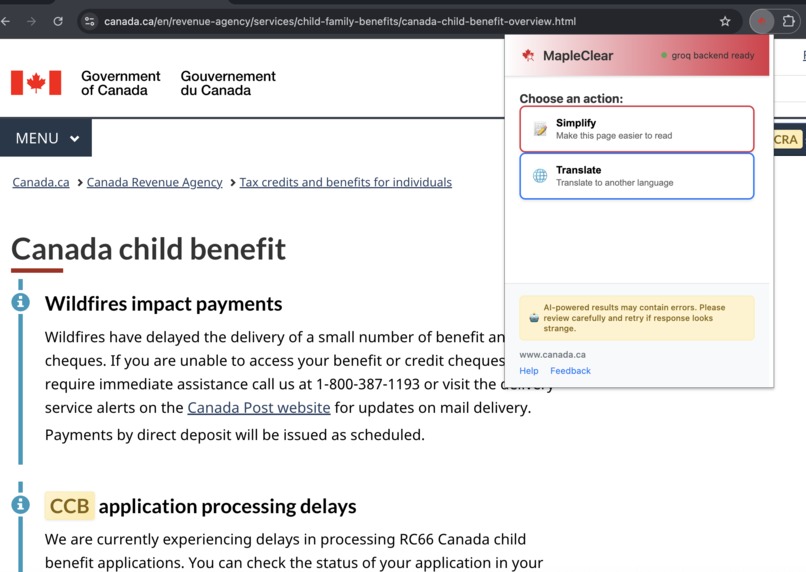
MapleClear browser extension
-
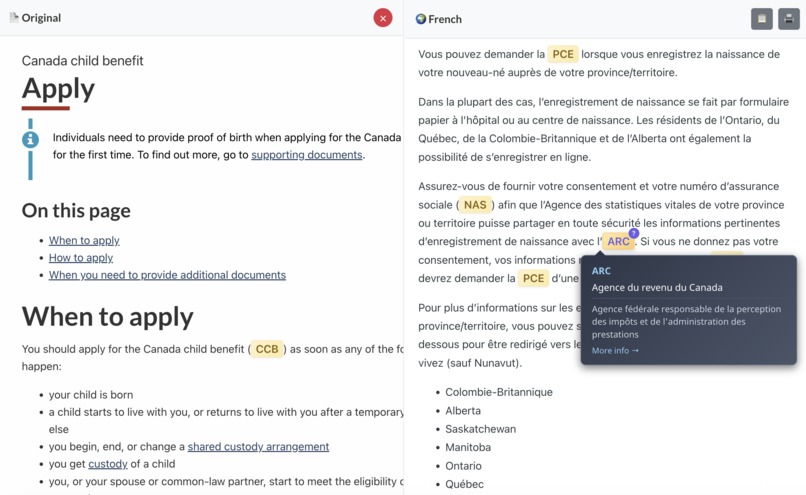
Split-screen translation


Inspiration
The inspiration for MapleClear came from stories my mom shared with me about the struggles her parents faced when immigrating to Canada. She often told me about how, as a child, she had to help them navigate essential government services because they struggled with complicated paperwork. Canadian government websites are often full of jargon, complex acronyms, and dense legal language, which can be intimidating, even for native speakers.
Although progress has been made over the years, I realized that access to vital information about healthcare, immigration, benefits, and taxes should not be a privilege reserved for those with advanced English skills or legal expertise. Every Canadian resident, whether they have lived here for decades or have just arrived, deserves to clearly understand their rights, benefits, and obligations. The digital divide was preventing people from accessing services they were entitled to, and I wanted to build a tool that could bridge that gap. MapleClear was designed to respect privacy, empower users, and run entirely on local hardware to ensure sensitive information never leaves their device.
What it does
MapleClear is a privacy-first browser extension that transforms Canadian government webpages into accessible plain language in real-time. When a user visits websites like canada.ca or gc.ca, the extension simplifies complex text into plain language that follows the Canadian government’s own plain language guidelines. It automatically expands acronyms using definitions from a locally cached terminology database so readers can understand technical or bureaucratic terms without leaving the page. Users can also translate content into multiple languages with a single click, making it a powerful tool for newcomers and ESL learners.
The extension features a split-screen comparison view, allowing users to see the original and simplified content side by side. This transparency helps users verify accuracy and learn as they read. All processing happens entirely on the user’s device using open-source AI models such as GPT-OSS, ensuring that no sensitive data leaves their computer. A future experimental feature will offer Indigenous language support, clearly labeled and developed with community input and consent.
How I built it
MapleClear was designed using a local-first architecture with modern web development tools. The browser extension frontend was built with TypeScript, Vite, and modern browser APIs. It uses content scripts to seamlessly inject functionality into government websites and a popup interface to provide intuitive controls for text simplification and translation. A split-screen mode lets users compare original and simplified content without disrupting their browsing experience.
The backend is a lightweight AI server running locally on FastAPI, with multiple AI backend integrations including llama.cpp, vLLM, Groq, HuggingFace, and LM Studio. A SQLite database stores terminology data, enabling fast offline acronym expansion. Specialized prompts, tailored to Canadian government content, ensure high-quality simplification results.
The AI pipeline uses open-weight models like GPT-OSS 20B and includes custom fine-tuning on Canadian government plain language examples. It integrates a curated acronym database and applies readability scoring via textstat to guarantee improvements. To protect user privacy, all processing occurs locally without reliance on cloud services. Performance optimizations, caching mechanisms, and offline fallback functionality ensure the extension is both fast and reliable.
Server Architecture:
server/
├── app.py                 # FastAPI server with health checks and CORS
├── backends/              # Pluggable AI inference backends
│   ├── base.py           # Abstract backend interface
│   ├── groq_backend.py   # Groq API integration (default)
│   ├── huggingface_backend.py  # Local transformers
│   ├── lmstudio_backend.py     # LM Studio integration
│   ├── vllm_backend.py   # vLLM for production
│   └── llama_cpp.py      # llama.cpp integration
└── prompts/
    └── schema.py         # Response models and validation
Challenges I ran into
One of the biggest technical challenges was achieving real-time performance while running large AI models locally. To address this, I had to implement aggressive caching strategies and fine-tune optimizations to ensure text processing felt instantaneous.
Another major challenge was maintaining the accuracy of legally significant government content while simplifying its language. It was critical to avoid changing the meaning of the information while improving its clarity. Additionally, supporting Indigenous languages required cultural sensitivity, extensive consultation, and careful labeling to ensure users understood that these features were experimental.
From a user experience perspective, it was difficult to integrate MapleClear into government websites in a way that felt seamless without disrupting existing workflows or accessibility standards. Communicating the privacy advantages of local processing was also essential, as many users were accustomed to cloud-based tools and needed reassurance that their data was secure.
Accomplishments that I'm proud of
One of my biggest achievements was building a fully local AI pipeline that ensures complete privacy for users, an uncommon approach for AI-powered tools. I also created a seamless browser extension with minimal friction for users and designed a flexible backend architecture that supports multiple AI backends. This means users with different hardware setups can still benefit from the tool.
Beyond the technical milestones, I’m proud of the positive social impact MapleClear has already demonstrated. It democratizes access to essential government information, making it easier for ESL learners and newcomers to navigate services they are entitled to. The project was built with an ethical, privacy-first approach and thoughtful inclusion of Indigenous languages, ensuring cultural respect. I also created comprehensive documentation and transparent AI data cards so users can understand exactly how the tool works.
MapleClear also breaks new ground by pioneering real-time, local-first simplification of government text. The specialized terminology databases and split-screen comparison view help users not only access information but also learn and become more confident when interacting with government services.
What I learned
This project proved that local AI processing is both viable and, in many cases, preferable for sensitive applications. Users deeply value knowing their data never leaves their device. I learned the importance of highly specialized prompts, as generic simplification tools often fail to accurately rewrite legal or government content. Building a browser extension also highlighted the need for deep security considerations and cross-platform compatibility to make sure it works across devices.
In terms of user experience, I found that simplification works best when users can compare the original and rewritten content side by side. This transparency builds trust and makes users feel more in control. Different user groups have different priorities, such as translation for newcomers or acronym expansion for long-term residents, so tailoring features for their needs was key.
Finally, this project emphasized the social responsibility that comes with building tools for vulnerable populations. Collaborating with Indigenous communities and clearly labeling AI limitations were necessary for creating a tool people can trust. Privacy is not just a technical feature; it is essential for fostering trust, especially among people who may fear surveillance or data misuse.
What's next for MapleClear
In the short term, I plan to fine-tune the models using real user feedback and Canadian government plain language guidelines to further improve accuracy. Expanding language support, including partnerships for Indigenous languages, is also a top priority.
Over the next six to twelve months, MapleClear will gain full offline functionality to serve users in remote areas or those with limited internet access. I also plan to integrate a community feedback system to continuously refine the tool, as well as partner with settlement agencies and ESL programs to bring MapleClear into newcomer orientation programs.
Looking further ahead, I'd love to collaborate with Canadian government digital services to improve accessibility at the source. I intend to open-source the project’s datasets and methodologies so other countries can build similar tools. By publishing research on local AI’s effectiveness in accessibility, MapleClear can become a model for how technology can empower communities. The ultimate vision is a world where language barriers and bureaucratic systems never prevent people from understanding their rights or accessing essential services.
Built With
- cors
- css
- fastapi
- gpt-oss
- gpt-oss-20b
- groq
- html
- huggingface
- javascript
- llama.cpp
- llama2
- llama3
- mistral
- node.js
- npm
- ollama
- pip
- pydantic
- python
- sqlite
- typescript
- uvicorn
- vite
- vllm


Log in or sign up for Devpost to join the conversation.