-
-
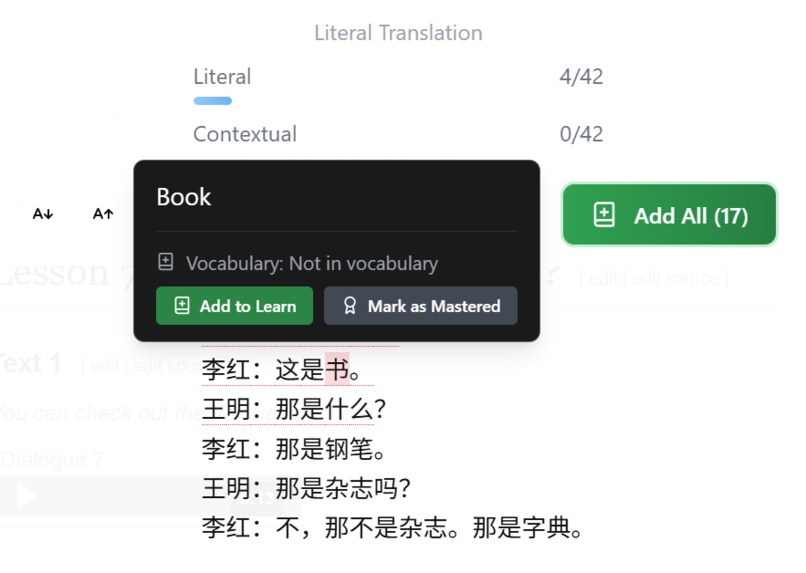
Reading Mode with Text Annotation (Language Detector, Translator, Prompt APIs)
-

Inline text simplification (Rewrite API)
-
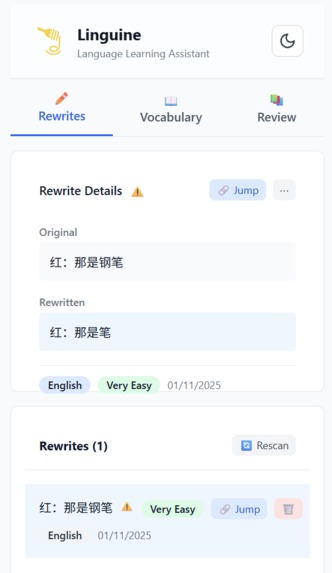
Rewrites Storage (OPFS, SQLite, Text Fragments)
-
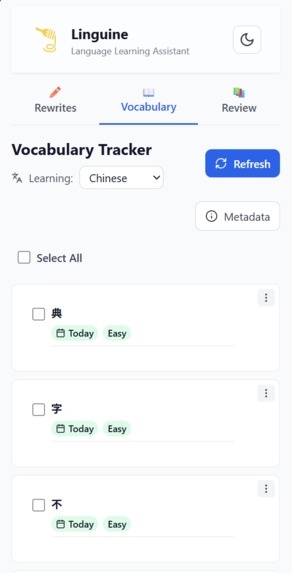
Vocabulary Storage (OPFS, SQLite)
-
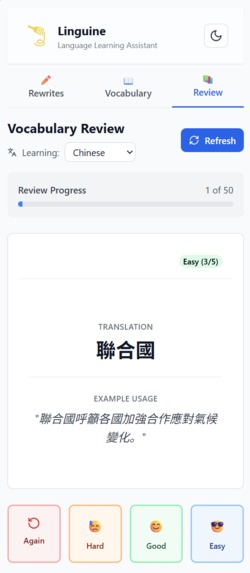
Vocabulary Review - Front
-
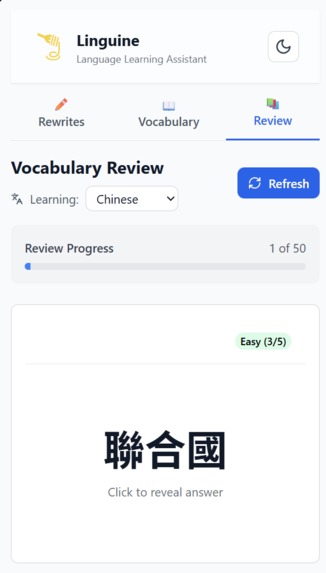
Vocabulary Review - Back
-
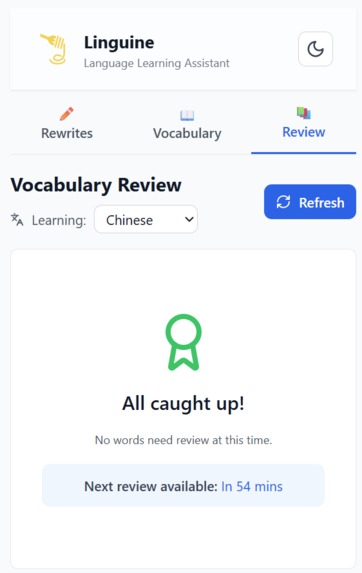
Vocabulary Review - Complete


Inspiration
The Problem
When learning a new language, you need vocabulary apps, translation tools, and reading platforms—but they're all separate. You copy-paste text between apps, lose context, and break your natural learning flow. There's no single tool that lets you learn naturally while browsing real content.
The Solution
Linguine transforms any webpage into an interactive language learning experience. Learn vocabulary from real articles, understand complex texts through AI simplification, and review what you've learned—all without leaving your browser. Every webpage becomes a learning opportunity with one click.
Why This Matters
Languages are learned through context, not isolated vocabulary lists. Linguine bridges the gap between learning apps and real-world language use, enabling you to learn exactly how you encounter language in daily life—while reading news, blogs, or any webpage you visit.
What it does
Linguine is a Chrome extension that transforms web browsing into language learning. It uses Chrome's Built-in AI to provide translations, text simplification, and vocabulary tracking—all running on your device with complete privacy.
How It Works: Two Learning Loops
Vocabulary Learning Loop (Learn Words → Remember Words)
- Browse any webpage in your target language
- Discover unfamiliar words naturally in context
- Add words to your personal vocabulary database (one click)
- Review words using ANKI-style flashcards with spaced repetition
- Master words through consistent practice
Example: Reading a French news article → seeing "bonjour" in context → adding it to vocabulary → reviewing it later → mastering it through flashcards.
Comprehension Learning Loop (Understand Complex Texts → Build Confidence)
- Encounter complex text while browsing
- Simplify text using AI to make it more accessible
- Save simplified versions with source links
- Return to original text with better understanding
Example: Finding a difficult Spanish article → simplifying complex sentences → saving for later → returning to original text with confidence.
How They Work Together: Words you learn help you understand more complex texts. Texts you simplify provide clearer context for vocabulary words. Both loops accelerate each other.
Key Features
📖 Reading Mode
- Transform any webpage into an interactive learning experience
- Word-by-word translations appear on hover
- Color-coded vocabulary status (red=unknown, green=learned, gray=mastered)
- Text-to-speech pronunciation
- Progressive loading: text appears instantly, translations stream smoothly
✏️ Text Simplification
- Highlight any complex text → AI makes it easier to understand
- Compare original vs. simplified versions
- Save simplified texts to your personal library
- Jump back to original text with one click
📚 Vocabulary Management
- Personal database of words you're learning
- ANKI-style spaced repetition flashcards
- Track progress from challenging (level 1) to mastered (level 5)
- Automatic review scheduling (words appear when ready)
🔒 Privacy & Offline
- Everything runs on your device (zero data leaves your browser)
- Works completely offline after initial setup
- No API costs, no subscriptions, no tracking
🌍 Multi-Language Support
- Tested on 6 languages: English, Spanish, French, Thai, Japanese, Mandarin
- Automatic language detection
- Language-specific word segmentation and readability scoring
Chrome Built-in AI APIs Used
- Prompt API (LanguageModel): Generates contextual translations, example sentences for flashcards, and analyzes vocabulary progress
- Translator API: Provides fast, literal word-by-word translations in Reading Mode
- Rewriter API: Simplifies complex text to make it more accessible for learners
- LanguageDetector API: Automatically detects webpage language for seamless experience
How we built it
Architecture: Four-layer system that keeps data local and secure
- UI Layer: React components for popup, side panel, and Reading Mode
- API Layer: Type-safe interfaces with Zod validation
- Background Layer: Offscreen document for database access
- Database Layer: SQLite stored locally via OPFS (survives browser restarts)
Tech Stack: React + TypeScript, Vite, Turborepo, SQLite (OPFS), Zod validation
Key Technical Decisions
Offscreen Document for Database: Chrome extensions need special handling to store data locally. We use an offscreen document to access SQLite via OPFS, ensuring your vocabulary and rewrites persist even after closing Chrome.
Progressive Streaming: Reading Mode shows text immediately, then loads translations in the background. This means no waiting—you can start reading while translations appear smoothly.
Multi-Language Word Segmentation: Different languages need different approaches. We use modern JavaScript for most languages, special libraries for Thai, and smart fallbacks for everything else.
Visual Vocabulary Feedback: Words are color-coded based on your knowledge level. Red words you don't know, green words you've learned. This instant visual feedback accelerates learning.
Privacy-First Architecture: All AI processing happens on your device using Chrome's built-in AI. No data is sent to external servers, enabling offline use and complete privacy.
Challenges we ran into
Storing Data Locally in Chrome Extensions Challenge: Chrome's background scripts can't directly access local file storage. We needed a way to store vocabulary and rewrites permanently. Solution: Implemented offscreen document pattern—a hidden page that can access local storage and communicate with the extension.
Making AI Fast and Non-Blocking Challenge: AI translations can be slow. We didn't want users waiting with blank screens. Solution: Built progressive streaming—display text instantly, load translations in the background. Users see content immediately while AI processes in parallel.
Handling Different Languages Challenge: Thai doesn't use spaces between words. Japanese uses three writing systems. Each language needs different segmentation. Solution: Built language-specific strategies with smart fallbacks. Works for any language, with special handling for unique cases.
Keeping Everything Synchronized Challenge: Extension has multiple parts (popup, side panel, content scripts) that need to stay in sync. Solution: Created reactive storage system with live updates. Change vocabulary in side panel, see it update everywhere instantly.
Chrome AI API Requirements Challenge: Chrome's AI APIs need user interactions (clicks) to work, especially for initial model downloads. Solution: Designed UI so all AI operations are triggered by explicit user actions, with clear feedback about what's happening.
Accomplishments that we're proud of
✅ Complete Privacy: Zero data leaves your browser. Everything runs client-side using Chrome's built-in AI. No tracking, no external services, no subscriptions.
✅ Works Offline: After initial setup, everything works without internet. Your vocabulary, rewrites, and reviews are all stored locally and accessible offline.
✅ Real Multi-Language Support: Not just European languages—we support Thai (no word boundaries), Japanese (three writing systems), and six diverse languages total, each with unique challenges.
✅ Fast Performance: Text appears instantly. Translations stream smoothly. No blocking, no waiting, no frozen screens.
✅ Seamless Integration: Learn while you browse. No switching apps, no copy-pasting. Just click and learn from any webpage.
✅ Proven Learning Method: ANKI-style spaced repetition is scientifically proven for memory retention. We've implemented it with 1-hour intervals for rapid learning.
✅ Four Chrome AI APIs Working Together: We're not just using one API—we're using Prompt API, Translator API, Rewriter API, and LanguageDetector API together seamlessly, showcasing the full potential of Chrome's built-in AI ecosystem.
What we learned
Building Chrome Extensions is Complex Multiple isolated contexts (popup, side panel, content scripts) need careful communication. Service workers have limitations. We learned to architect for Chrome's unique constraints while maintaining clean code.
AI APIs Need Careful Handling Chrome's AI APIs are powerful but have requirements: user gestures, availability checks, graceful fallbacks. We learned to design UI around these constraints while keeping the experience smooth.
Languages are Fascinatingly Different Thai segmentation is completely different from English. Japanese readability needs character-level analysis. We learned that one-size-fits-all doesn't work—each language needs thoughtful, specific solutions.
Users Value Privacy and Speed Privacy-first architecture wasn't just a technical decision—it became a core user benefit. Offline capability, instant feedback, and visual progress indicators matter more than feature lists.
Type Safety Pays Off Using Zod for validation and TypeScript everywhere caught bugs early and made the codebase maintainable. Investing in developer experience improved code quality significantly.
What's next for Linguine - Language Learning
Coming Soon
- Offline Vocabulary Reviews: Cache translations and examples so reviews work perfectly offline
- Smart Rewrite Detection: Automatically detect and reapply simplified texts when revisiting pages
- More Languages: Expand support with improved segmentation for additional languages
Future Vision
- Learning Analytics: Track CEFR proficiency over time, personalized recommendations based on your patterns
- Community Features: Share simplified text collections, collaborative vocabulary building
- Enhanced Reading: Better grammar analysis, comprehension exercises, reading speed tracking
- Mobile Optimization: Improved performance and UX for mobile browsing
- Accessibility: Screen reader support, keyboard-only navigation, high contrast modes
Linguine is just getting started. We're building the future of contextual, privacy-first language learning—one webpage at a time.
Built With
- built-in-ai
- chrome
- kysely
- react
- sqlocal
- typescript


Log in or sign up for Devpost to join the conversation.