-
-
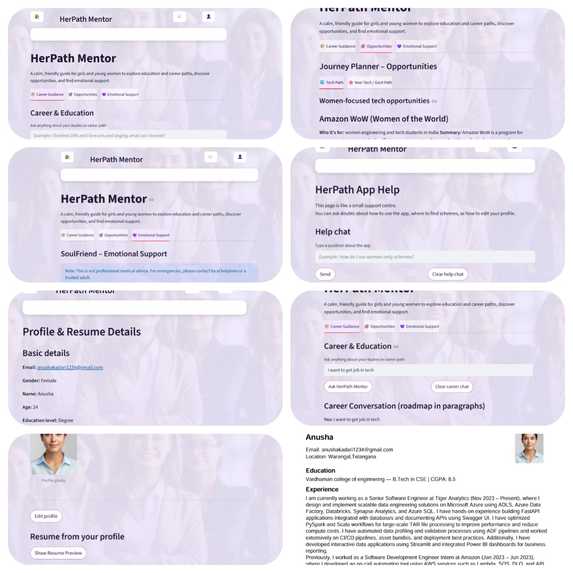
Overall view for HerPath Mentor

Inspiration
Growing up around friends and cousins who had big dreams but limited guidance, I saw how confusing it can be for girls to balance education, careers, and finances at the same time. Many depended on random YouTube videos or relatives' advice, which often did not match their real goals or family situation. This is even harder for girls from non‑metro areas, where proper counselling is rare. HerPath Mentor grew from a simple idea: one calm, non‑judgmental place where a girl can ask “What should I do next?” and get clear roadmaps, women‑focused opportunities, and emotional support in one app.
What the project does
HerPath Mentor is a Streamlit web app that works as a three‑in‑one companion for girls and young women:
- A Career Guide where a user can ask any study or career question, from tech to non‑tech, and get a personalised roadmap written in clear paragraphs. Along with the text answer, the app also shows a simple visual roadmap, where each stage of the journey appears as a separate blocks.
- An Opportunities Explorer that surfaces scholarships, programs, and communities specifically for women, separated into Tech and Non‑Tech / Government paths. The underlying data is stored with simple categories like
"tech"or"non-tech"so filtering stays transparent and easy to extend. - An Emotional Support space called SoulFriend, where users can talk about stress, confusion, relationship issues, or self‑doubt in a gentle, empathetic chat. When a message looks related to self‑harm, the system automatically adds a safety note encouraging the user to reach out to real‑world helplines or trusted adults.
On top of this, there is a Profile & Resume section. The user fills her details once, uploads a profile photo, and the app generates a clean, downloadable PDF resume directly from those profile fields. There is also a Markdown‑style preview with headings like Name, Education, Experience, Projects, Technical Skills, Certifications & Achievements, and Additional.
How I built it
Frontend and UX
- Built as a single‑page Streamlit app with a top navigation bar for Home, Profile, and Help.
- The Home page has three tabs: Career Guidance, Opportunities, and Emotional Support.
- All important values such as login state, profile information, chat history, and the last career question are stored in
st.session_state, so the app behaves like a small product rather than a one‑time demo.
Authentication and State
- Implemented a simple Sign up → Login flow:
- First‑time users see only “Sign up”.
- After registration, they see only “Login”.
- On sign‑up, the app stores the email, name, gender, a demo password, and an empty profile in session state.
- On login, it restores the user’s profile and photo so the Profile page always shows the latest data, even after logging out and logging back in.
Career Guidance (LLM + visual roadmap)
- The Career Guidance tab uses a language model with prompts designed so every question is treated as fresh, avoiding confusing references to past chats.
- Before calling the model, the app scans the question for simple keywords that signal interests such as arts, technology, medicine, law, or government jobs, and adds these hints into the prompt to keep the answer aligned with what the user actually wrote.
- A small roadmap engine:
- Builds a structured set of stages and example colleges or training paths.
- Passes this structure as extra context to the model.
- Uses it to render a visual roadmap made of blocks (Stage 1, Stage 2, Stage 3) on the page.
Women‑only Opportunities (Tech vs Non‑Tech / Govt)
- The Opportunities tab reads from a women‑focused knowledge base file. Each entry includes fields such as
name,who,summary,focus,activities,good_for,link, and a category like"tech"or"non-tech". - A helper function filters and scores entries based on the user’s interests and education level. If nothing scores highly, the app still shows all items in that category so the tab never looks empty.
- Results are shown in two sub‑tabs:
- 💻 Tech Path for programmes like Amazon WoW, Flipkart Runway, HSBC Power2Her, and women‑in‑tech communities.
- 🌸 Non‑Tech / Govt Path for government scholarships, single‑girl‑child schemes, women entrepreneurship support, and arts or humanities‑friendly opportunities.
Emotional Support (SoulFriend)
- The Emotional Support tab uses a different system prompt that focuses on listening, empathy, and non‑judgmental guidance.
- The chat keeps its own history so replies feel continuous instead of one‑off.
- The app checks messages for strong self‑harm phrases and, when needed, appends an emergency note stating that this is not a crisis service and encouraging the user to contact local help or trusted people.
Profile & Resume (with photo and PDF)
- The Profile & Resume section collects everything needed for a basic CV: education, projects, work experience, skills, certifications, goals, financial situation, and extra activities.
- The user can upload a profile photo, which appears on the Profile page and is placed neatly in the top‑right corner of the PDF header.
- The resume is first shown as a Markdown‑style preview with headings like
NameandEducationfor quick checking. - Using ReportLab, the app creates an A4 PDF with the name, contact details, and clearly separated sections. Long text is wrapped to fit within margins, and page breaks are handled cleanly.
- A Download Resume (PDF) button lets the user export the resume at any time.
Help Page
- The Help page includes a small in‑app guide bot.
- It only describes features that actually exist in this web app, such as where to find schemes, how to edit the profile, and how to open the emotional support chat.
Challenges and what I learned
Repetitive LLM answers
Early career answers were generic and reused similar examples. I fixed this by tightening prompts, adding interest‑based hints, and passing structured roadmap context so responses became more concrete and varied.Separating Tech and Non‑Tech opportunities
In the beginning, the Opportunities tab often showed “No women‑only opportunities found”. Normalising category labels and adding a scoring plus fallback strategy ensured each tab always displays useful content.State management in Streamlit
Because Streamlit reruns the script on every interaction, I had to usest.session_statecarefully so profile and photo data stay persistent while chat histories reset on logout.PDF resume quality
Creating a neat PDF with an optional photo required careful control over layout, text wrapping, and page breaks using ReportLab.
Overall, I learned how to turn a simple Streamlit prototype into a small, focused product that brings together career guidance, women‑specific opportunities, and emotional support in a way that feels safe and practical for young women.

Log in or sign up for Devpost to join the conversation.