-
-
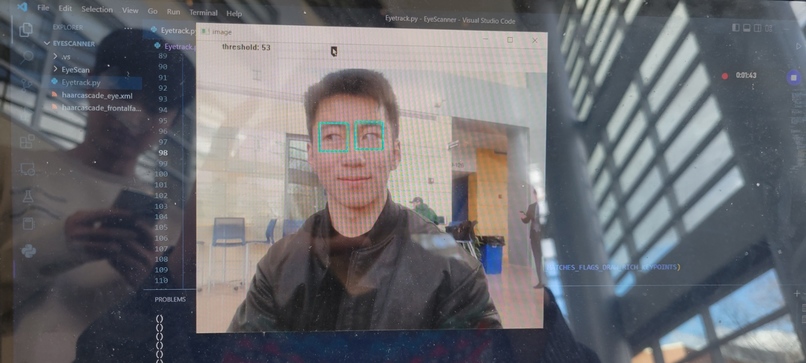
Isolation of eyes from the rest of the image

Inspiration
One of our group members mother had an unfortunate accident that left her unable to move. We created this project in the hopes that it would enable her and other people with motor disabilities a way to communicate with those around them.
What it does
Using Pupil Tracking and rudimentary Gaze Estimation, we could move a mouse or/and select and option from a dashboard.
How we built it
When planning out this project we realized that it would consist of three major components: Pupil Tracking, Translation to Mouse Movement, and communication dashboard. Unfortunately we were only able to create Pupil tracking and a Dashboard.
When tackling the issue of pupil tracking we decided to use Python and OpenCV. OpenCV is an open source library created by Intel for the development of Computer Vision Software and was incredible useful for this task. When we began we realized really quickly that we needed to isolate elements from an image like a face and eyes. Through the use of pre-existing models for facial identification and eye isolation we could then track our pupil. So what we did is we first used the facial identification to verify that there existed a face in our input image. After confirming this we would then isolate the eye frame and convert it to grayscale. After conversion to grayscale we turned all pixels below a threshold to white and all pixels above that threshold to black. After this, we could use the built in Blob detection in OpenCV to isolate the pupil and place a circle around it. With this we were able to successfully track eye movement through a live webcam feed.
Challenges we ran into
Our major issue was time management. It took the entirety of the first day and the morning of the 2nd day to successfully create the pupil tracking program. Additionally even with the working Pupil tracking, there was still a lot of noise that would cause jumps in the pupil following this.
Accomplishments that we're proud of
We're proud that for our first image processing software experience ended in at least the partial success of our pupil tracker.
What we learned
We had a great experience researching and looking into all the computer vision and machine learning libraries that existed in python. Additionally it was fun looking through the theory behind image process and seeing how to successfully use some of the isolation techniques.
What's next for Eye Tracker Communicator
Given more time, we were planning to use PyTorch to create a convolution neural network to create the eye movement to mouse movement part of our project. We could see this feasibly happen by taking images using our pupil tracking and correlating them to a cursor position on our screen. After this, we would then focus on tailoring our communication dashboard for real world users.
Thank you for the opportunity and advise
It was fun being with both old friends and new and creating a project that had the potential to help the world. Thank you again!
Log in or sign up for Devpost to join the conversation.