-
-
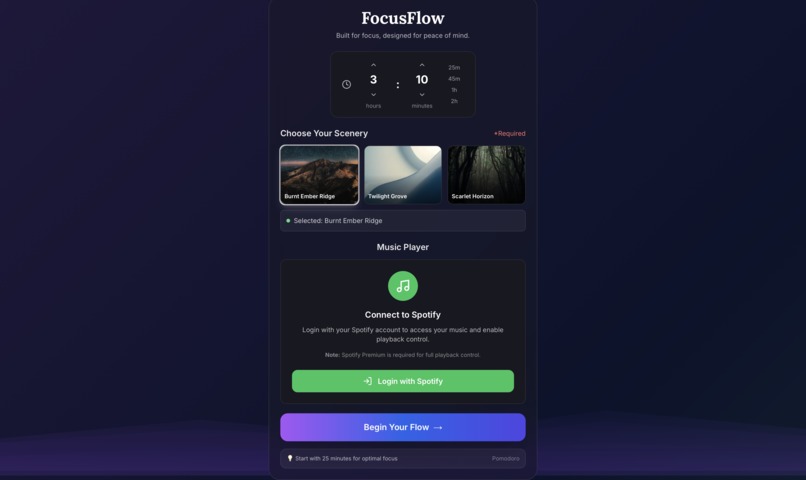
FocusFlow Main Page

My Inspiration
In a world of constant digital noise, finding a deep, uninterrupted state of focus can feel almost impossible. I tried a bunch of standard productivity timers, but they all felt so sterile and uninspired—just another task on a to-do list.
I was inspired to build something different. I didn't just want a tool; I wanted an experience. What if a timer didn't just track your time, but rewarded you for it in a beautiful, calming way? That’s where the idea for FocusFlow was born: a timer that transforms your focused minutes into a serene, generative piece of art. It’s for anyone who wants to make productivity peaceful, not punishing.
What I Learned
This project was a huge learning curve for me, both technically and conceptually.
On the technical side, I dove deep into a modern web stack. I learned how to structure a full application with Next.js and manage complex component states with React Hooks like useState and useEffect. My biggest takeaway was learning Framer Motion for animations; I went from basic CSS transitions to creating a fully orchestrated, time-synced animated landscape, which was incredibly challenging and rewarding.
But the most valuable lesson came from debugging. I spent hours wrestling with a bizarre npm error (ERR_INVALID_PROTOCOL). Going through the process of checking my configuration, ruling out issues one by one, and using diagnostic flags taught me more about how development environments and networks actually work than any tutorial could.
Conceptually, I learned that user experience is everything. My first version was functional but ugly. Redesigning the UI with a Glassmorphism aesthetic taught me that the feel of an application can be just as important as its features.
How I Built It
FocusFlow is built on a foundation of modern, performant technologies, chosen to create a seamless and beautiful user experience.
- Framework: Next.js provides the robust React framework, handling server-side rendering and providing a great developer experience.
- Styling: The UI was built using Tailwind CSS for rapid and responsive layout development. The complex Glassmorphism and animated gradient background effects were achieved with custom CSS.
- Animation: Framer Motion is the star of the show. It powers every animation, from the fluid modal pop-ups and interactive button effects to the core logic of the procedurally generated landscapes that sync with the timer.
- Music & Media: To add another layer to the immersive experience, I integrated the Spotify API. This allows users to stream tracks and playlists directly within the app, providing a seamless audio backdrop for their focus sessions without having to leave the application.
Challenges I Faced
- The Great NPM Debacle: My single biggest challenge was an
npm installcommand that failed with a crypticERR_INVALID_PROTOCOLerror. After confirming my Node/npm versions and registry configs were correct, I had to learn to debug the problem systematically. This involved clearing proxies, cleaning the cache, and finally using the--verboseflag to isolate the issue. The experience taught me the importance of resilience and methodical problem-solving. - Animation Synchronization: Getting the scenery to build perfectly in sync with the timer was tricky. The animations needed to progress smoothly regardless of whether the user set a 5-minute timer or a 90-minute one. This required careful state management and mathematical calculations to tie the animation's progress directly to the percentage of elapsed time.
- API Integration & CORS: Integrating the Spotify API came with its own set of hurdles. Handling authentication with OAuth 2.0, managing API rate limits, and dealing with cross-origin resource sharing (CORS) policies required a careful implementation. Ensuring that the music playback was smooth and error-free, even with user-provided URLs, was a significant challenge that taught me a lot about working with complex, third-party services.
Built With
- framermotion
- next.js
- react
- spotifyapi
- tailwind.css
Log in or sign up for Devpost to join the conversation.