-
-
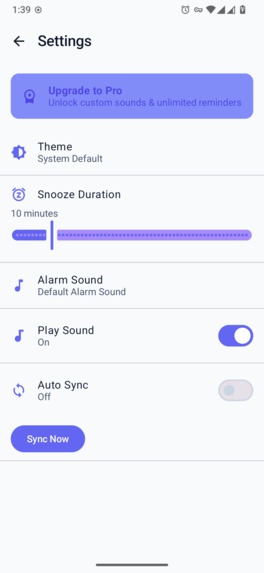
settings screen
-
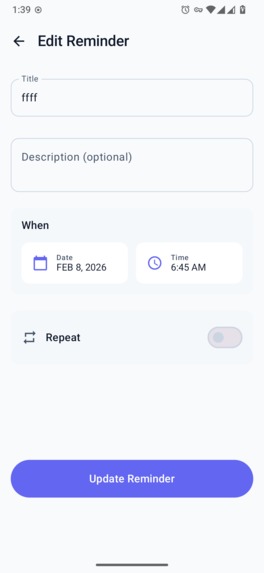
add reminder screen
-
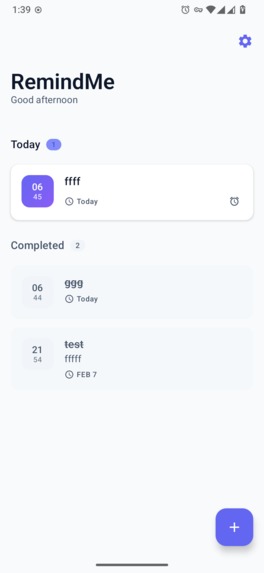
reminder list screen
-
splash screen


RemindMe - Project Story
Inspiration
We've all been there—forgetting important tasks, missing deadlines, or losing track of recurring responsibilities. Existing reminder apps often feel fragmented, locked to a single platform, or lack the flexibility power users need. We wanted to build something different: a truly cross-platform reminder solution that syncs seamlessly across Android, iOS, Desktop, and Web, with modern features like customizable snooze durations, rich recurrence patterns, and premium capabilities through a fair subscription model.
The rise of Kotlin Multiplatform (KMP) gave us the perfect opportunity to share 90%+ of our codebase across all platforms while still delivering native experiences.
What it does
RemindMe is a feature-rich, cross-platform reminder application that helps users:
- 📅 Create reminders with flexible scheduling—one-time, daily, weekly, monthly, or custom recurrence patterns (RFC 5545 compliant)
- ⏰ Smart snoozing with customizable durations (5 min, 15 min, 30 min, 1 hour, or custom)
- 🔔 Native notifications with actionable buttons (Complete, Snooze) on all platforms
- ☁️ Cloud sync via Firestore REST API—your reminders follow you everywhere
- 💎 Premium features powered by RevenueCat for IAP management
- 🎨 Beautiful Material 3 UI with dark mode, adaptive layouts, and smooth animations
How we built it
| Layer | Technology |
|---|---|
| Shared Logic | Kotlin Multiplatform (KMP) |
| UI Framework | Compose Multiplatform |
| Database | SQLDelight (local) + Firestore REST API (cloud) |
| Networking | Ktor Client |
| DI | Koin |
| Monetization | RevenueCat KMP SDK |
| Architecture | Clean Architecture (Domain/Data/UI layers) |
| CI/CD | GitHub Actions for Android, iOS, Desktop builds |
We structured the entire codebase around expect/actual declarations, allowing platform-specific implementations for:
- Notification scheduling (AlarmManager on Android, UNNotification on iOS)
- Background sync (WorkManager on Android, BGTaskScheduler on iOS)
- Platform authentication (Google Sign-In, Firebase Auth)
Challenges we ran into
RevenueCat KMP API Changes — The SDK evolved rapidly;
Purchases.sharedbecamePurchases.sharedInstance, andproductbecamestoreProduct. We adapted our implementation to match the latest API surface.Serialization with
kotlinx.datetime.Instant— The@Contextualannotation was required for proper Instant serialization across all platforms.iOS-Specific Paywall UI — RevenueCat's Paywall UI components had different APIs on iOS vs Android, requiring platform-specific implementations.
CI/CD for Multiplatform — Setting up GitHub Actions for Android, iOS (macOS runners), and Desktop builds required careful orchestration of secrets and build steps.
Accomplishments that we're proud of
- ✅ 90%+ shared code across Android, iOS, Desktop, and Web
- ✅ Fully functional cloud sync using Firestore REST API (no Firebase SDK dependency in shared code)
- ✅ Native-feeling notifications with actionable buttons on all platforms
- ✅ RevenueCat integration for subscription management across platforms
- ✅ Clean Architecture that's testable, maintainable, and extensible
- ✅ Automated CI/CD that builds and tests all platforms on every push
What we learned
- KMP is production-ready — With careful dependency management, you can ship real apps
- Compose Multiplatform rocks — Sharing UI code dramatically accelerates development
- Platform abstractions are key — The
expect/actualpattern is powerful but requires thoughtful API design - Version management matters — A solid
libs.versions.tomlprevents dependency hell - CI catches regressions early — Automated builds across all platforms saved us countless hours
What's next for RemindMe
- 🌐 Web app with WebAssembly (wasmJs target is already set up!)
- 🤖 AI-powered reminder suggestions based on calendar and habits
- 🔗 Calendar integrations (Google Calendar, Apple Calendar)
- 🎙️ Voice input for creating reminders hands-free
- 👥 Shared reminders for families and teams
- 🧩 Widgets for Android and iOS home screens
- 🌍 Localization for global reach

Log in or sign up for Devpost to join the conversation.