-
-
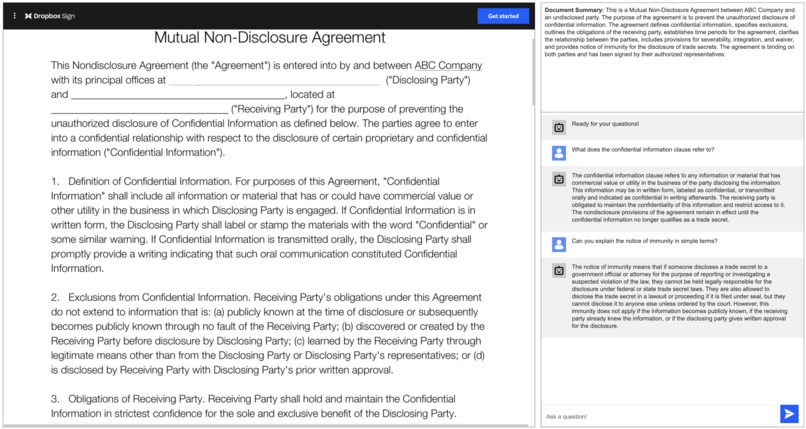
DSign Copilot dashboard
-
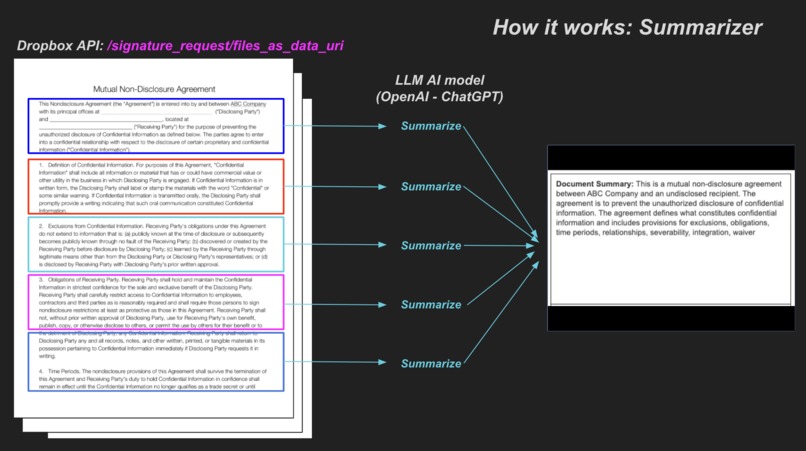
How the summarizer works
-
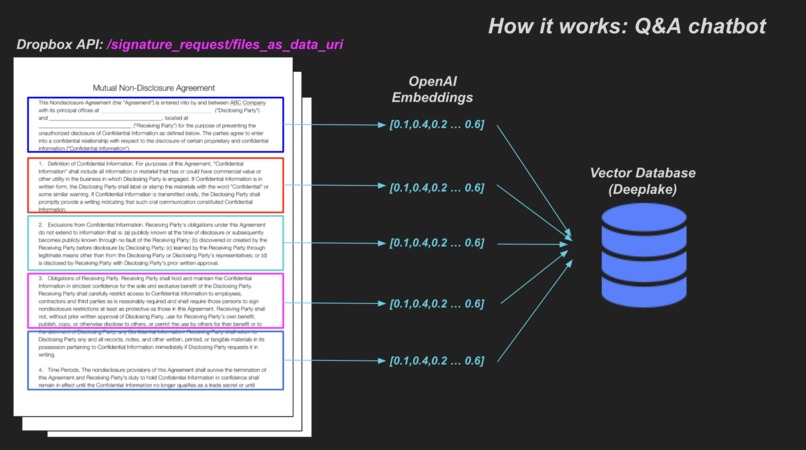
How the Q&A GPT works (part 1)
-
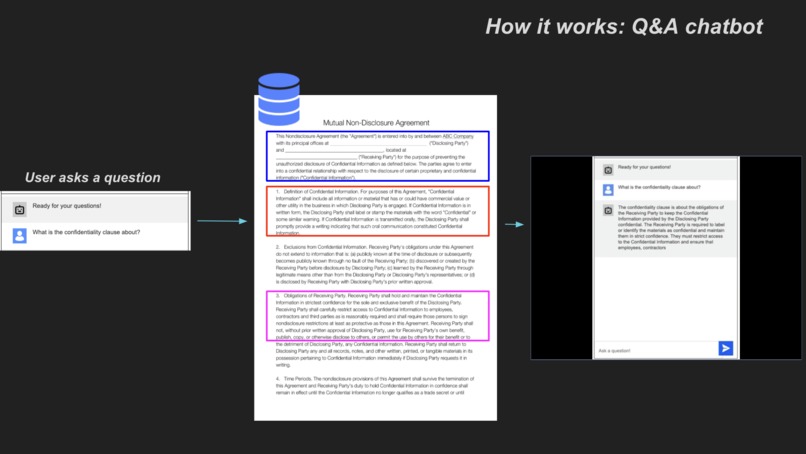
How the Q&A GPT works (part 2)


Overview
DSign Copilot uses generative AI plus the Dropbox Sign APIs to enhance the agreement signing experience by helping signers (1) understand the overall agreement in simple terms, and (2) get their important quetsions answered quickly without the back-and-forth usually necessary when signing documents.

The app consists of 2 AI features:
- Agreement Summarizer: We extract the underlying PDF files from the
signature_requestand provide a high-level summary of the entire document. This helps signers understand what they're looking at, and it especially helps when agreements number in the hundreds of pages. - Copilot Q&A assistant: We start with a baseline generative AI model (ChatGPT) and enhance it with agreement-specific data for the bot to answer important questions about the document quickly. Users can ask the bot questions like (1) how to understand pieces of the agreement in simplified language, (2) specific details about terms used in the agreement, and (3) even logistics about who needs to sign the agreement and by what date.
Our goal with the app is to make it extremely simple and delightful to combine cutting-edge AI technologies with a legacy industry like agreement signing (upgraded by using Dropbox Sign's API) to create a magical experience for signers worldwide.
Problems we're solving: End-parties signing agreements have to deal with (sometimes) hundreds of pages to parse through, and inevitably have questions as they go through this. Worse, some people might just try avoiding reading through the entire agreement and sign without fully knowing what they're signing. We're addressing these problems by showing the summary of the document upfront and allowing the user to ask questions in natural language.
How it works (technical overview)
Creating embedded signature requests
First, we use the /signature_requests endpoint to create a new embedded signature request and an email integration to send the email to the signer.
Agreement Summarizer
When the signer opens the link in the email, they're taken to the DSign Copilot dashboard where they'll first see the app generating a summary of the document in real-time.

To accomplish this:
- We use the
/signature_requests/files_as_data_uriDropbox endpoint to retrieve the underlying PDF files of the signature requests. - Then we split the entire agreement into chunks to make it easier to process for the AI downstream.
- We use an LLM AI model to summarize each of the chunks, and then combine them together to provide the full summary to the user in the UI.
Copilot Q&A assistant
The real heart of our app is the Copilot Q&A bot that is able to use the agreement itself as context to help signers get their important questions answered qucikly as they're scrolling through the agreement.

To accomplish this:
- We again use the
/signature_requests/files_as_data_uriDropbox endpoint to retrieve the underlying PDF files for the signature request. - Then we split the agreement into chunks again, but this time we use OpenAI Embeddings to represent those chunks of text as a series of numbers that the AI can understand.
- We store these embedding vectors in a vector store (Deeplake).
- When the user asks a question, the bot finds the relevant chunks of context necessary to answer the question and generates an answer using this context.

What's next / Feedback
We loved using the Dropbox Sign API as part of this hackathon. We found a few feature requests that we'd love to see addressed to be able to build the app out fully in production:
- Ability to retrieve underlying files from the app sign URL Right now we're only able to get the underlying files of an agreement through the
signature_requestbut it would be a lot easier to process if we could retrieve those files from the app sign url instead. This way DSign Copilot can be used only for the viewing and signing of the document rather than needing to create the signature request in the app. - Ability to access the user's position within the agreement as they scroll We wanted to summarize the page the user is looking at in real-time side-by-side but we don't have access to the iframe that holds the Dropbox Sign agreement, so we have no context on what the user is looking at in the document. If we could have this, we can react to events fired from the iframe and position our AI appropriately.
Built With
- javascript
- openai
- python
- react


Log in or sign up for Devpost to join the conversation.