-
-
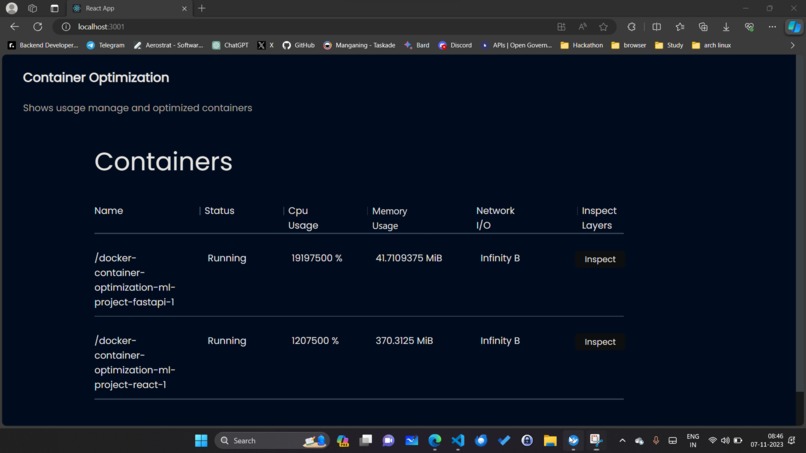
Experience real-time monitoring with Docker Image Optimizer’s Home Screen. Keep track of your running containers
-
-


Inspiration
The inspiration behind Docker Image Optimizer sprouted from the intersection of necessity and creativity in the fast-paced tech world. As developers grappled with the ever-increasing demands of bandwidth-hungry and resource-intensive applications, a lightbulb moment occurred. We realized that optimizing container images, though essential, had become a mundane chore. The idea was to infuse the process with humour, creativity, and an engaging user experience. Inspired by the desire to make container optimization an entertaining and seamless endeavour, DiveVision was born. This project is a testament to the belief that even in the realm of technology, a touch of playfulness can lead to groundbreaking innovations. It's the story of transforming the ordinary into the extraordinary, one container at a time.
What it does
The project Docker Image Optimizer is a comprehensive solution aimed at addressing the growing need for efficient Docker container management. In a world where containerization has become a fundamental aspect of software development and deployment, ensuring that Docker containers are both lean and high-performing is paramount. Our project leverages the power of Docker Dive and Docker Slim to achieve this goal.
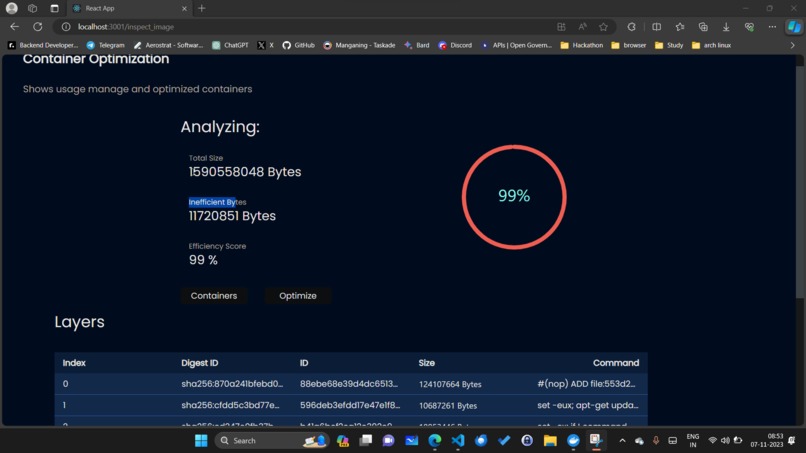
Docker Dive, a powerful image analysis tool, allows developers to delve deep into Docker images, inspecting each layer and pinpointing areas of inefficiency. Docker Slim, on the other hand, provides the means to create smaller and more efficient Docker images by analyzing application binaries and dependencies, stripping away unnecessary components.
Through this project, we empower developers and teams to optimize their Docker containers for reduced image size and faster deployment. The project's user-friendly interface makes it easy to identify bottlenecks, implement improvements, and witness substantial enhancements in container efficiency. By providing real-world case studies and measurable results, we aim to showcase the tangible benefits of our container optimization solution, ultimately contributing to more agile, resource-efficient, and scalable containerized applications.
How we built it
Frontend Technologies
HTML (Hypertext Markup Language): HTML is the fundamental building block of web pages. It serves as a markup language used to structure and present content on the internet. In your project, HTML is responsible for defining the structure and layout of the user interface (UI). It uses tags to create elements like headings, paragraphs, buttons, forms, links, and images. These elements provide the basic structure of your web application. HTML ensures that content is organized in a semantically meaningful way, making it accessible and easily navigable for both users and search engines. As the foundation of web development, HTML is crucial for creating the visual and structural components of your project's user interface.
*Tailwind CSS: * Tailwind CSS is a utility-first CSS framework that simplifies and streamlines the process of styling web applications. It provides a set of pre-defined utility classes that allow developers to apply styling to UI components with ease. Tailwind CSS promotes a more consistent and visually appealing design by making it simple to define styles for elements like buttons, inputs, and containers. The utility classes are designed to be expressive, and they cover a wide range of styling options, such as spacing, typography, colours, and responsive design. Tailwind CSS's approach minimizes the need for writing custom CSS, making it a valuable tool for creating a well-designed and efficient user interface for your project.
React with TypeScript: React is a powerful and widely used JavaScript library for building user interfaces. When combined with TypeScript, it enhances the development process by adding static typing to JavaScript. In your project, React is responsible for creating interactive and dynamic user interfaces. It employs a component-based architecture, allowing you to break down your UI into reusable and modular components. These components can be easily composed to construct complex user interfaces. React promotes efficient rendering by updating only the parts of the UI that have changed, resulting in improved performance. TypeScript, as a statically typed language, helps catch potential errors during development and provides better tooling and documentation.
Backend Technologies
FastAPI: FastAPI is a modern and efficient web framework for building APIs with Python. it is designed to simplify and accelerate the development of web applications by offering a combination of performance and ease of use. In your project, FastAPI plays a pivotal role in the backend, where it manages the application's core logic and serves as the bridge between the front and other technologies like docker dive and docker slim.
- Python Shell: The term "Python shell" in this context refers to the use of Python scripts and the Python language for managing various aspects of your project's backend. python is a versatile and widely used programming language known for its simplicity and readability. it is employed to create scripts and commands that interact with docker dive, docker slim, and other backend functionalities. python scripts running in the shell provide a flexible way to control and manage container-related tasks. these tasks may include starting and stopping docker containers, handling the analysis of docker images with docker dive, and optimizing container images with docker slim.
Docker Dive: Docker Dive is a powerful and indispensable tool in the realm of containerization and docker image optimization. it stands as an open-source, command-line utility designed to provide developers with deep insights into their docker images. what sets docker dive apart is its unique ability to allow users to explore docker images layer by layer, providing a granular view into the composition of an image.
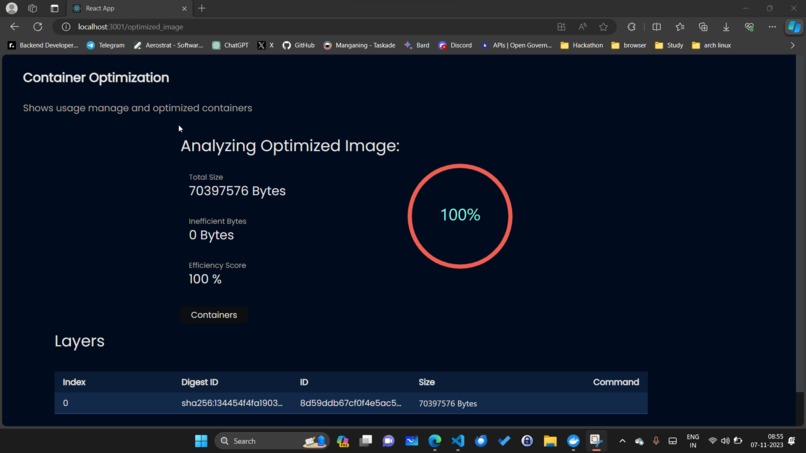
Docker slim: Docker Slim is a remarkable tool that addresses the challenge of creating lean and efficient Docker images. As a command-line utility, Docker Slim stands out for its ability to analyze application binaries and dependencies, stripping away unnecessary components and ensuring that the resulting Docker image is both smaller and more optimized. This is particularly crucial for developers aiming to reduce image size and improve the performance of their containerized applications.
This tool is invaluable for those looking to enhance the efficiency of Docker containers, resulting in faster deployment, reduced resource consumption, and a more streamlined containerized development process. Docker Slim simplifies the process of creating optimized Docker images, making it an essential tool for developers and teams aiming for greater container efficiency.
Challenges we ran into
Technical Complexities: The integration of various technologies, such as Docker Dive, Docker Slim, and FastAPI, posed technical challenges. Coordinating these components and ensuring they functioned seamlessly was a meticulous process.
User-Friendly Design: Balancing a user-friendly design with the technical complexities of container optimization was a challenge. We wanted the project to be approachable for users of varying technical backgrounds.
Optimization Precision: Achieving optimal container image reduction without compromising functionality was a delicate balance. Ensuring that
Docker Image Optimizerconsistently delivered efficient containers that required rigorous testing and fine-tuning.Documentation Clarity: Crafting comprehensive yet accessible documentation was crucial. We encountered the challenge of conveying complex technical information in a clear and user-friendly manner.
*Resource Efficiency: *
Docker Image Optimizerneeded to be resource-efficient itself. We worked to ensure that the project's performance was optimized, keeping memory and CPU usage in check.
Despite these challenges, the team's dedication, problem-solving skills, and collaborative spirit allowed us to overcome them and create a Docker Image Optimizer —a powerful, user-friendly, and efficient container optimization solution. These challenges ultimately pushed us to grow and innovate, resulting in a project we're proud of.
Accomplishments that we're proud of
What we learned
Technical Mastery: We deepened our understanding of a range of technologies, including Docker Dive, Docker Slim, FastAPI, and Python Shell. We gained hands-on experience in optimizing container images and streamlining backend operations.
UI/UX Expertise: Crafting a user-friendly and visually engaging interface taught us the importance of balancing aesthetics and functionality. We honed our design and UI/UX skills, making us better at creating intuitive user experiences.
Effective Collaboration: Building DiveVision requires seamless teamwork. We improved our collaboration and communication skills, understanding the significance of each team member's role in creating a cohesive project.
Problem-Solving: Challenges such as optimization precision and resource efficiency pushed us to develop innovative solutions. We learned to think creatively and critically to overcome obstacles.
Documentation Clarity: Preparing comprehensive and user-friendly documentation taught us the importance of clear communication. We gained skills in simplifying complex concepts for users.
Resource Efficiency: Ensuring DiveVision was resource-efficient reinforced our understanding of performance optimization and the impact it has on the overall user experience.
In summary, the Docker Image Optimizer project provided us with a wealth of technical expertise, design skills, teamwork, problem-solving abilities, and effective communication. These lessons will continue to serve us well in future projects and endeavours.
What's next for Docker Image Optimizer
Moving forward, the next step for Docker Image Optimizer is to expand its capabilities by creating a Docker extension. This extension will allow users to optimize their Docker images directly within the Docker environment, enhancing the user experience and streamlining the optimization process. By integrating Docker Image Optimizer as an extension, we aim to make Docker Image Optimization a seamless part of the Docker workflow, thereby saving resources and improving efficiency for all Docker users.
Built With
- docker
- fastapi
- python
- react
- typescript


Log in or sign up for Devpost to join the conversation.