-
-
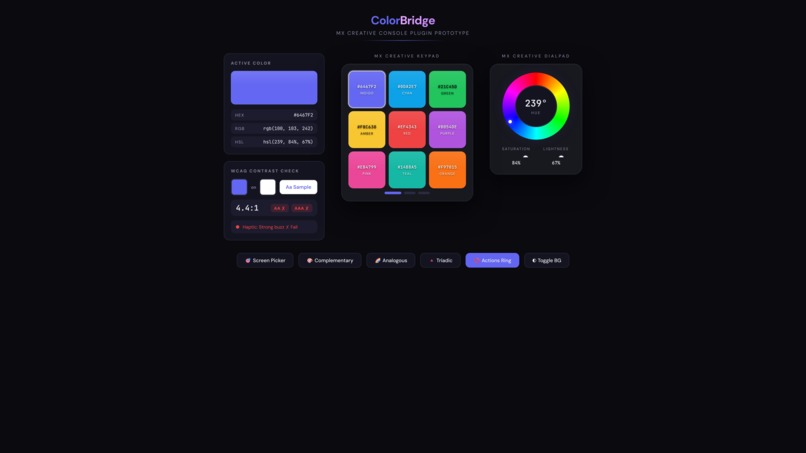
Interactive Prototype

Inspiration
Designers and developers constantly juggle multiple tools for color work—browser extensions for picking colors, separate apps for contrast checking, online converters for HEX/RGB/HSL formats, and scattered palette managers. We realized the MX Creative Console's physical dials and LCD buttons could unify this entire workflow into a single, tactile interface—something that doesn't exist today.
What it does
ColorBridge is a Logi Actions SDK plugin concept that would transform the MX Creative Console into a complete color management workstation:
- 9 LCD Keypad Buttons would display live color swatches with HEX values—press to copy
- Main Dial would control Hue (0-360°) like a physical color wheel
- Sub-Dial would adjust Saturation and Lightness with real-time LCD feedback
- MX Master 4 Actions Ring would provide 8 quick actions: Screen Picker, Format Paste (HEX/RGB/HSL/CMYK), Contrast Checker, Palette Generator
- Haptic Feedback would signal WCAG AA/AAA compliance—feel accessibility through your mouse
It would work universally across ALL apps—Figma, Photoshop, VS Code, browsers—without requiring individual plugins.
How we plan to build it
Our technical approach uses the Logi Actions SDK (C#):
PluginDynamicCommandfor button actions and color copyingPluginDynamicAdjustmentfor dial-based HSL controls- Dynamic LCD image generation for real-time color swatches
- Haptics API for tactile accessibility feedback
- WCAG contrast calculation algorithms
- Palette generation algorithms (Complementary, Analogous, Triadic)
- System-wide clipboard integration for multi-format output
Target audience
- UI/UX Designers managing brand colors and design systems
- Front-end Developers working with CSS and color variables
- Brand Managers ensuring accessibility compliance
- Digital Artists requiring precise color control
- Anyone who works with colors across multiple applications daily
Next steps
If selected for the Semi-Finals phase, we plan to:
- Develop the core color picker and dial integration
- Implement dynamic LCD swatch rendering
- Build the haptic feedback system for accessibility
- Create palette generation algorithms
- Test across multiple operating systems and applications
- Refine the user experience based on real-world testing
Built With
- c#
- mxcreativecloud

Log in or sign up for Devpost to join the conversation.