-
-
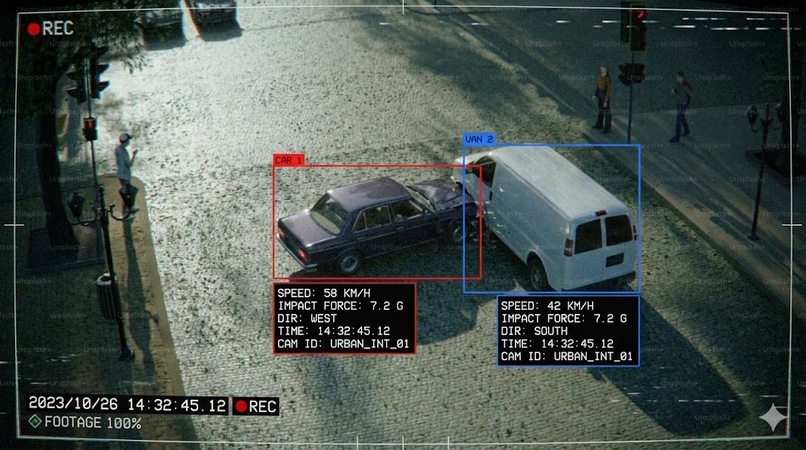
Detection
-
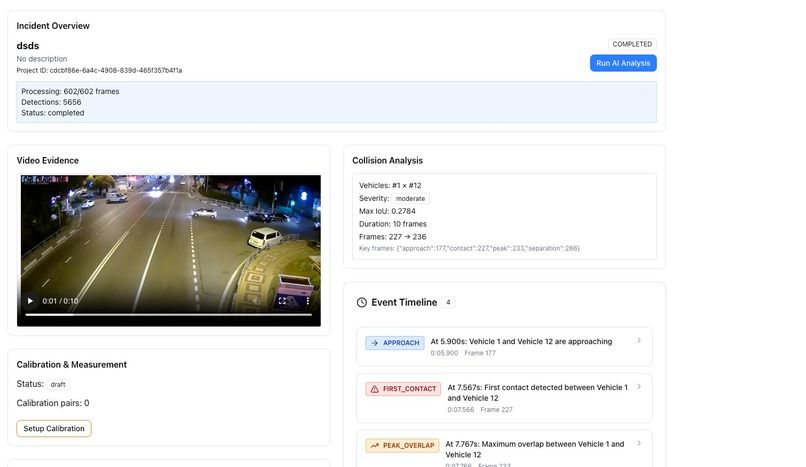
Final result
-
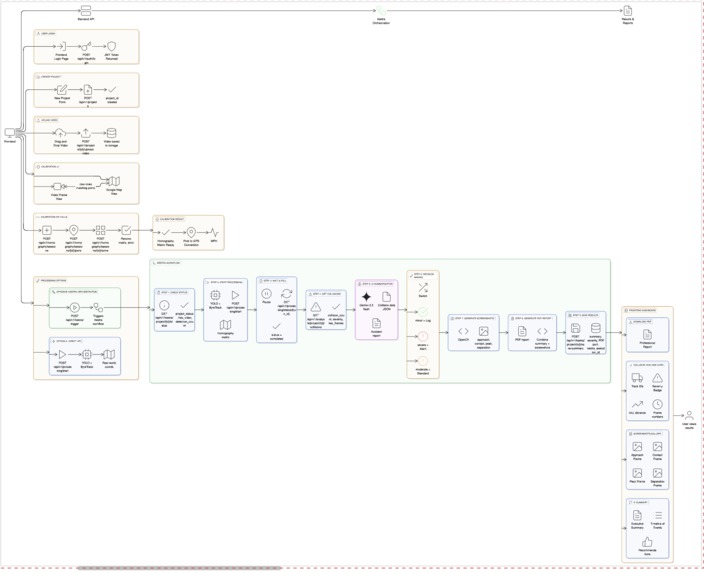
Flow architecture


🚗 CollisionCloud
A calm, clear journey from raw CCTV footage to a complete accident reconstruction report

🌍 The Problem CollisionCloud Addresses
Every day, road accidents are recorded by CCTV cameras placed at intersections, highways, toll booths, and public roads. These videos often become the primary source of evidence when authorities, insurance providers, or courts attempt to understand what truly happened.
However, a video by itself does not answer critical questions:
- Who was moving faster?
- Which vehicle entered the intersection first?
- When exactly did the collision occur?
- What happened just before and just after the impact?
Today, answering these questions requires investigators to manually inspect footage frame by frame. This process is slow, subjective, and highly dependent on individual interpretation.
CollisionCloud was built to change this experience entirely.
🧠 The Core Idea Behind CollisionCloud
CollisionCloud transforms raw CCTV footage into clear, explainable accident intelligence.
Instead of forcing humans to manually decode videos, CollisionCloud:
- Watches the video like an investigator
- Understands vehicle motion over time
- Detects collisions automatically
- Converts pixel movement into real-world measurements
- Explains the accident in simple language
- Generates professional, shareable reports
The goal is not just automation — it is clarity, trust, and accessibility.
🏗️ How CollisionCloud Thinks (Big Picture)
CollisionCloud follows a simple, logical story:
- A user uploads a CCTV video
- The system understands the scene
- Vehicles are detected and tracked
- Movement is converted into real-world motion
- Collisions are identified
- AI explains what happened
- A complete report is delivered
Each system component exists to support one of these steps.
The whole flow of CollisionCloud looks like this:

🔐 Step 1: Entering CollisionCloud (User & Case Setup)
The journey begins when a user logs into CollisionCloud.

Authentication ensures that only authorized users can upload evidence and generate reports. Once logged in, the user creates a project, which represents a single accident case.
Think of a project as a digital case file.
Each project securely contains:
- The CCTV video
- Calibration data
- Analysis outputs
- Final reports
This keeps accident cases clearly separated and traceable.
🎥 Step 2: Uploading CCTV Evidence
The user uploads the CCTV video associated with the accident.

At this stage:
- No analysis is performed yet
- The video is securely stored
- Metadata is recorded and linked to the project
CollisionCloud intentionally separates evidence storage from evidence analysis to preserve data integrity.
📐 Step 3: Teaching CollisionCloud About the Real World (Calibration)
CCTV footage exists in pixels, but accident reconstruction requires real-world units like meters and seconds.
Calibration bridges this gap.
The user selects a reference video frame and marks known real-world distances, such as:
- Lane width
- Road markings
- Distance between fixed objects
A map view can assist in aligning these points accurately.
From this process, CollisionCloud learns how pixel movement corresponds to real-world distance.
This enables accurate speed, distance, and timing calculations later.
🚦 Step 4: CollisionCloud Observes the Scene
Once calibration is complete, CollisionCloud begins analyzing the video.
Vehicle Detection
Each frame is scanned to identify vehicles:
- Cars
- Bikes
- Trucks
Each detected vehicle is temporarily identified.
Vehicle Tracking
As frames progress:
- Vehicles are followed consistently
- Their paths are recorded
- Continuous motion trajectories are formed
CollisionCloud now understands who moved where and when.
⚠️ Step 5: Detecting the Collision
With motion trajectories available, CollisionCloud looks for abnormal patterns such as:
- Sudden deceleration
- Overlapping paths
- Abrupt motion changes
When these signals align, a collision event is detected.
For each collision, CollisionCloud records:
- Exact timestamp
- Vehicles involved
- Pre-impact and post-impact motion
This removes guesswork and replaces it with measurable evidence.
🔁 Step 6: Reliable Processing Through Automation
Behind the scenes, CollisionCloud uses an automated workflow engine to ensure:
- Each step runs in the correct order
- Failures can be retried safely
- Processing is logged and reproducible
To the user, this appears as a simple processing status.
Internally, a carefully orchestrated pipeline ensures reliability.
⚙️ How CollisionCloud Uses Kestra (Workflow Orchestration)
CollisionCloud uses Kestra as the backbone of its processing pipeline.
Rather than running everything as one long script, Kestra breaks the system into clear, repeatable tasks. Each task runs only when the previous one completes successfully.
This ensures:
- Predictable execution
- Safe retries
- Clear logs and observability
What Kestra Controls
- Video processing execution
- Collision detection pipeline
- AI narrative generation
- PDF and audio report generation
Simplified Kestra Workflow Example
id: accident-analysis-pipeline
namespace: accident.reconstruction
description: |
Complete accident analysis workflow with multi-modal output:
- AI-powered collision analysis (Gemini)
- Collision screenshot extraction
- Professional PDF reports with images
- Audio summaries in English & Hindi (ElevenLabs)
labels:
project: accident-reconstruction
hackathon: ai-agent-hack
track: kestra
features: ai,pdf,screenshot,audio,multilingual
inputs:
- id: project_id
type: STRING
description: "UUID of the project to analyze"
- id: api_base_url
type: STRING
description: "Base URL of the FastAPI backend"
defaults: "http://host.docker.internal:8000"
- id: auth_token
type: STRING
description: "JWT token for API authentication"
tasks:
- id: check_status
type: io.kestra.plugin.core.http.Request
description: "Check if project is ready for analysis"
uri: "{{inputs.api_base_url}}/api/v1/kestra/project/{{inputs.project_id}}/status"
method: GET
contentType: application/json
headers:
Authorization: "Bearer {{inputs.auth_token}}"
Accept: "application/json"
- id: log_status
type: io.kestra.plugin.core.log.Log
message: |
📊 Project Status:
- Project ID: {{inputs.project_id}}
- Status: {{json(outputs.check_status.body).project_status}}
- Has Video: {{json(outputs.check_status.body).has_video}}
- Detection Count: {{json(outputs.check_status.body).detection_count}}
- id: get_collisions
type: io.kestra.plugin.core.http.Request
description: "Fetch collision data for AI analysis"
uri: "{{inputs.api_base_url}}/api/v1/kestra/project/{{inputs.project_id}}/collision-data"
method: GET
contentType: application/json
headers:
Authorization: "Bearer {{inputs.auth_token}}"
- id: log_collisions
type: io.kestra.plugin.core.log.Log
message: |
🚗 Collision Analysis Results:
- Has Collisions: {{json(outputs.get_collisions.body).has_collisions}}
- Collision Count: {{json(outputs.get_collisions.body).collision_count}}
- id: get_screenshot
type: io.kestra.plugin.core.http.Request
description: "Get collision frame screenshot from video"
uri: "{{inputs.api_base_url}}/api/v1/kestra/project/{{inputs.project_id}}/collision-screenshot?frame={{json(outputs.get_collisions.body).top_collision.peak_overlap_frame}}"
method: GET
contentType: application/json
headers:
Authorization: "Bearer {{inputs.auth_token}}"
- id: log_screenshot
type: io.kestra.plugin.core.log.Log
message: |
📸 Screenshot Generation:
- Success: {{json(outputs.get_screenshot.body).success}}
- Collision Frame: {{json(outputs.get_screenshot.body).collision_frame}}
- Timestamp: {{json(outputs.get_screenshot.body).timestamp_seconds}}s
- id: check_has_collisions
type: io.kestra.plugin.core.flow.If
description: "Only run AI analysis if collisions were detected"
condition: "{{json(outputs.get_collisions.body).has_collisions == true}}"
then:
- id: ai_analysis
type: io.kestra.plugin.core.http.Request
description: "AI analyzes collision data using Google Gemini"
uri: "https://generativelanguage.googleapis.com/v1beta/models/gemini-2.5-flash:generateContent?key={{kv('GEMINI_API_KEY')}}"
method: POST
contentType: application/json
headers:
Content-Type: "application/json"
body: |
{
"contents": [{
"parts": [{
"text": "You are an expert accident reconstruction analyst. Analyze the collision data and provide a comprehensive detailed report. Project ID: {{inputs.project_id}}. Number of collisions: {{json(outputs.get_collisions.body).collision_count}}. Collision frame: {{json(outputs.get_screenshot.body).collision_frame}}. Provide a thorough analysis with: 1) Executive Summary, 2) Detailed Collision Analysis with vehicle trajectories and impact dynamics, 3) Severity Assessment with justification, 4) Frame-by-frame Timeline of events, 5) Root Cause Analysis, 6) Detailed Safety Recommendations. Be comprehensive and technical."
}]
}],
"generationConfig": {
"temperature": 0.3
}
}
- id: log_ai_response
type: io.kestra.plugin.core.log.Log
message: "🤖 AI Analysis Complete!"
- id: save_summary
type: io.kestra.plugin.core.http.Request
description: "Save AI-generated summary to backend"
uri: "{{inputs.api_base_url}}/api/v1/kestra/project/{{inputs.project_id}}/save-summary"
method: POST
contentType: application/json
headers:
Authorization: "Bearer {{inputs.auth_token}}"
Content-Type: "application/json"
body: |
{
"project_id": "{{inputs.project_id}}",
"summary_text": {{json(outputs.ai_analysis.body).candidates[0].content.parts[0].text | json}},
"severity_assessment": "moderate",
"recommendations": "See full report",
"collision_data": {},
"ai_model": "gemini-2.5-flash",
"kestra_execution_id": "{{execution.id}}"
}
- id: log_saved
type: io.kestra.plugin.core.log.Log
message: "✅ Summary saved to database!"
- id: generate_pdf
type: io.kestra.plugin.scripts.python.Script
description: "Generate professional PDF report and upload to Cloudinary"
containerImage: python:3.11-slim
beforeCommands:
- pip install reportlab pillow cloudinary kestra requests
inputFiles:
summary.txt: "{{json(outputs.ai_analysis.body).candidates[0].content.parts[0].text}}"
env:
PROJECT_ID: "{{inputs.project_id}}"
COLLISION_FRAME: "{{json(outputs.get_screenshot.body).collision_frame}}"
COLLISION_COUNT: "{{json(outputs.get_collisions.body).collision_count}}"
SCREENSHOT_SUCCESS: "{{json(outputs.get_screenshot.body).success}}"
API_BASE_URL: "{{inputs.api_base_url}}"
AUTH_TOKEN: "{{inputs.auth_token}}"
CLOUDINARY_CLOUD_NAME: "{{kv('CLOUDINARY_CLOUD_NAME')}}"
CLOUDINARY_API_KEY: "{{kv('CLOUDINARY_API_KEY')}}"
CLOUDINARY_API_SECRET: "{{kv('CLOUDINARY_API_SECRET')}}"
script: |
import os
import base64
import re
import requests
from io import BytesIO
from datetime import datetime
from reportlab.lib import colors
from reportlab.lib.pagesizes import A4
from reportlab.lib.units import inch
from reportlab.lib.styles import getSampleStyleSheet, ParagraphStyle
from reportlab.platypus import SimpleDocTemplate, Paragraph, Spacer, Table, TableStyle, Image
# Get environment variables
project_id = os.environ.get('PROJECT_ID', 'Unknown')
collision_frame = os.environ.get('COLLISION_FRAME', '0')
collision_count = os.environ.get('COLLISION_COUNT', '0')
screenshot_success = os.environ.get('SCREENSHOT_SUCCESS', 'false')
api_base_url = os.environ.get('API_BASE_URL', '')
auth_token = os.environ.get('AUTH_TOKEN', '')
# Fetch screenshot directly from API (to avoid env var size limit)
screenshot_b64 = ''
if screenshot_success == 'true' or screenshot_success == 'True':
print("Fetching screenshot from API...")
try:
resp = requests.get(
f"{api_base_url}/api/v1/kestra/project/{project_id}/collision-screenshot?frame={collision_frame}",
headers={"Authorization": f"Bearer {auth_token}"},
timeout=120
)
if resp.status_code == 200:
data = resp.json()
if data.get('success') and data.get('image_base64'):
screenshot_b64 = data['image_base64']
print(f"Screenshot fetched: {len(screenshot_b64)} bytes")
else:
print(f"Screenshot failed: {data.get('error')}")
else:
print(f"Screenshot API error: {resp.status_code}")
except Exception as e:
print(f"Screenshot fetch error: {e}")
else:
print("Screenshot was not successful, skipping")
# Read AI summary
with open('summary.txt', 'r') as f:
summary_text = f.read()
# Create PDF
pdf_path = "/tmp/accident_report.pdf"
doc = SimpleDocTemplate(pdf_path, pagesize=A4, topMargin=0.5*inch, bottomMargin=0.5*inch)
styles = getSampleStyleSheet()
# Custom styles
title_style = ParagraphStyle(
'CustomTitle',
parent=styles['Heading1'],
fontSize=24,
spaceAfter=20,
textColor=colors.darkblue,
alignment=1
)
header_style = ParagraphStyle(
'CustomHeader',
parent=styles['Heading2'],
fontSize=14,
spaceAfter=10,
textColor=colors.darkred
)
story = []
# Title
story.append(Paragraph("ACCIDENT RECONSTRUCTION REPORT", title_style))
story.append(Spacer(1, 10))
# Project Info Table
timestamp = datetime.now().strftime("%Y-%m-%d %H:%M:%S")
project_data = [
["Project ID:", project_id],
["Collisions Detected:", collision_count],
["Collision Frame:", collision_frame],
["AI Model:", "Google Gemini 2.5 Flash"],
["Generated By:", "Kestra Workflow Engine"],
["Report Date:", timestamp]
]
t = Table(project_data, colWidths=[2*inch, 4*inch])
t.setStyle(TableStyle([
('BACKGROUND', (0, 0), (0, -1), colors.lightgrey),
('TEXTCOLOR', (0, 0), (-1, -1), colors.black),
('ALIGN', (0, 0), (-1, -1), 'LEFT'),
('FONTNAME', (0, 0), (0, -1), 'Helvetica-Bold'),
('FONTSIZE', (0, 0), (-1, -1), 10),
('BOTTOMPADDING', (0, 0), (-1, -1), 6),
('TOPPADDING', (0, 0), (-1, -1), 6),
('GRID', (0, 0), (-1, -1), 1, colors.black)
]))
story.append(t)
story.append(Spacer(1, 20))
# Collision Screenshot (if available)
if screenshot_b64 and len(screenshot_b64) > 100:
story.append(Paragraph("COLLISION SCREENSHOT", header_style))
story.append(Spacer(1, 5))
try:
img_data = base64.b64decode(screenshot_b64)
img_buffer = BytesIO(img_data)
img = Image(img_buffer, width=5.5*inch, height=3.5*inch)
story.append(img)
story.append(Paragraph(f"Frame {collision_frame} - Collision detected", styles['Normal']))
except Exception as e:
story.append(Paragraph(f"Screenshot unavailable: {str(e)}", styles['Normal']))
story.append(Spacer(1, 15))
# AI Analysis Section
story.append(Paragraph("AI ANALYSIS REPORT", header_style))
story.append(Spacer(1, 5))
# Process markdown-style text
for line in summary_text.split('\n'):
line = line.strip()
if not line:
story.append(Spacer(1, 5))
elif line.startswith('##'):
story.append(Paragraph(line.replace('#', '').strip(), styles['Heading3']))
elif line.startswith('#'):
story.append(Paragraph(line.replace('#', '').strip(), styles['Heading2']))
elif line.startswith('- ') or line.startswith('* '):
story.append(Paragraph(f"- {line[2:]}", styles['Normal']))
else:
formatted = re.sub(r'\*\*(.*?)\*\*', r'<b>\1</b>', line)
story.append(Paragraph(formatted, styles['Normal']))
story.append(Spacer(1, 20))
# Footer
footer_style = ParagraphStyle(
'Footer',
parent=styles['Normal'],
fontSize=9,
textColor=colors.grey,
alignment=1
)
story.append(Paragraph("-" * 60, footer_style))
story.append(Paragraph("Generated by Accident Reconstruction AI System", footer_style))
story.append(Paragraph("Powered by Kestra Workflow Engine + Google Gemini", footer_style))
# Build PDF
doc.build(story)
print(f"PDF generated: {pdf_path}")
# Upload to Cloudinary
import cloudinary
import cloudinary.uploader
cloudinary.config(
cloud_name=os.environ.get('CLOUDINARY_CLOUD_NAME'),
api_key=os.environ.get('CLOUDINARY_API_KEY'),
api_secret=os.environ.get('CLOUDINARY_API_SECRET')
)
result = cloudinary.uploader.upload(
pdf_path,
resource_type="raw",
folder="accident-reports",
public_id=f"report_{project_id}_{datetime.now().strftime('%Y%m%d_%H%M%S')}"
)
pdf_url = result['secure_url']
print(f"PDF uploaded to Cloudinary: {pdf_url}")
# Output for Kestra
from kestra import Kestra
Kestra.outputs({"pdf_url": pdf_url, "pdf_generated": True})
- id: log_pdf
type: io.kestra.plugin.core.log.Log
message: |
📄 PDF Report Generated and Uploaded!
URL: {{outputs.generate_pdf.vars.pdf_url}}
- id: generate_audio
type: io.kestra.plugin.scripts.python.Script
description: "Generate English and Hindi audio using ElevenLabs and upload to Cloudinary"
containerImage: python:3.11-slim
beforeCommands:
- pip install requests cloudinary kestra
inputFiles:
summary.txt: "{{json(outputs.ai_analysis.body).candidates[0].content.parts[0].text}}"
env:
PROJECT_ID: "{{inputs.project_id}}"
COLLISION_COUNT: "{{json(outputs.get_collisions.body).collision_count}}"
COLLISION_FRAME: "{{json(outputs.get_screenshot.body).collision_frame}}"
ELEVENLABS_API_KEY: "{{kv('ELEVENLABS_API_KEY')}}"
GEMINI_API_KEY: "{{kv('GEMINI_API_KEY')}}"
CLOUDINARY_CLOUD_NAME: "{{kv('CLOUDINARY_CLOUD_NAME')}}"
CLOUDINARY_API_KEY: "{{kv('CLOUDINARY_API_KEY')}}"
CLOUDINARY_API_SECRET: "{{kv('CLOUDINARY_API_SECRET')}}"
script: |
import os
import requests
import cloudinary
import cloudinary.uploader
from datetime import datetime
from kestra import Kestra
audio_urls = {"english": None, "hindi": None}
project_id = os.environ.get('PROJECT_ID', 'Unknown')
collision_count = os.environ.get('COLLISION_COUNT', '0')
collision_frame = os.environ.get('COLLISION_FRAME', '0')
elevenlabs_key = os.environ.get('ELEVENLABS_API_KEY')
gemini_key = os.environ.get('GEMINI_API_KEY')
# Configure Cloudinary
cloudinary.config(
cloud_name=os.environ.get('CLOUDINARY_CLOUD_NAME'),
api_key=os.environ.get('CLOUDINARY_API_KEY'),
api_secret=os.environ.get('CLOUDINARY_API_SECRET')
)
# Read the FULL AI summary from input file
with open('summary.txt', 'r') as f:
full_summary = f.read()
print(f"Full summary length: {len(full_summary)} characters")
# Clean up summary for audio - use the actual report directly
print("Preparing audio script from full report...")
import re
english_text = full_summary
# Remove markdown formatting for clean speech
english_text = re.sub(r'[#*_`]', '', english_text)
english_text = re.sub(r'\n+', '. ', english_text)
english_text = re.sub(r'\.+', '.', english_text)
english_text = re.sub(r'\s+', ' ', english_text)
english_text = english_text.strip()
# Truncate to save ElevenLabs credits (keep it short - ~2 min audio max)
# 3000 chars ≈ 2.5 minutes of audio
if len(english_text) > 3000:
english_text = english_text[:3000] + ". For complete details, please refer to the full PDF report."
print(f"Audio script prepared: {len(english_text)} characters (approx {len(english_text)//20} seconds)")
# Generate English Audio
print("Generating English audio...")
try:
response = requests.post(
"https://api.elevenlabs.io/v1/text-to-speech/21m00Tcm4TlvDq8ikWAM",
headers={
"xi-api-key": elevenlabs_key,
"Content-Type": "application/json",
"Accept": "audio/mpeg"
},
json={
"text": english_text,
"model_id": "eleven_monolingual_v1",
"voice_settings": {"stability": 0.5, "similarity_boost": 0.75}
}
)
if response.status_code == 200:
audio_path = "/tmp/audio_english.mp3"
with open(audio_path, "wb") as f:
f.write(response.content)
print(f"English audio saved: {audio_path}")
# Upload to Cloudinary
result = cloudinary.uploader.upload(
audio_path,
resource_type="video",
folder="accident-audio",
public_id=f"audio_en_{project_id}_{datetime.now().strftime('%Y%m%d_%H%M%S')}"
)
audio_urls["english"] = result['secure_url']
print(f"English audio uploaded: {audio_urls['english']}")
else:
print(f"English audio failed: {response.status_code} - {response.text}")
except Exception as e:
print(f"English audio error: {e}")
# Translate to Hindi using Gemini
print("Translating to Hindi...")
hindi_text = None
try:
response = requests.post(
f"https://generativelanguage.googleapis.com/v1beta/models/gemini-2.5-flash:generateContent?key={gemini_key}",
headers={"Content-Type": "application/json"},
json={
"contents": [{"parts": [{"text": f"Translate this to Hindi (Devanagari script): {english_text}"}]}],
"generationConfig": {"temperature": 0.1}
}
)
if response.status_code == 200:
hindi_text = response.json()['candidates'][0]['content']['parts'][0]['text']
print(f"Hindi translation: {hindi_text[:100]}...")
except Exception as e:
print(f"Translation error: {e}")
# Generate Hindi Audio
if hindi_text:
print("Generating Hindi audio...")
try:
response = requests.post(
"https://api.elevenlabs.io/v1/text-to-speech/trxRCYtDC6qFREKq6Ek2",
headers={
"xi-api-key": elevenlabs_key,
"Content-Type": "application/json",
"Accept": "audio/mpeg"
},
json={
"text": hindi_text,
"model_id": "eleven_multilingual_v2",
"voice_settings": {"stability": 0.5, "similarity_boost": 0.75}
}
)
if response.status_code == 200:
audio_path = "/tmp/audio_hindi.mp3"
with open(audio_path, "wb") as f:
f.write(response.content)
print(f"Hindi audio saved: {audio_path}")
# Upload to Cloudinary
result = cloudinary.uploader.upload(
audio_path,
resource_type="video",
folder="accident-audio",
public_id=f"audio_hi_{project_id}_{datetime.now().strftime('%Y%m%d_%H%M%S')}"
)
audio_urls["hindi"] = result['secure_url']
print(f"Hindi audio uploaded: {audio_urls['hindi']}")
else:
print(f"Hindi audio failed: {response.status_code}")
except Exception as e:
print(f"Hindi audio error: {e}")
print(f"Audio generation complete!")
print(f"English: {audio_urls['english']}")
print(f"Hindi: {audio_urls['hindi']}")
# Always output results (with fallbacks for any failures)
Kestra.outputs({
"audio_english_url": audio_urls.get("english") or "FAILED",
"audio_hindi_url": audio_urls.get("hindi") or "FAILED",
"audio_generated": audio_urls.get("english") is not None
})
- id: log_audio
type: io.kestra.plugin.core.log.Log
message: |
🔊 Audio Generated and Uploaded to Cloudinary!
English: {{outputs.generate_audio.vars.audio_english_url}}
Hindi: {{outputs.generate_audio.vars.audio_hindi_url}}
else:
- id: log_no_collisions
type: io.kestra.plugin.core.log.Log
message: |
ℹ️ No collisions detected in this video.
Project ID: {{inputs.project_id}}
- id: complete
type: io.kestra.plugin.core.log.Log
message: |
========================================================================
WORKFLOW COMPLETE
========================================================================
Project ID: {{inputs.project_id}}
Collisions Found: {{json(outputs.get_collisions.body).collision_count}}
Collision Frame: {{json(outputs.get_screenshot.body).collision_frame}}
Generated Outputs:
- AI Analysis (Gemini)
- Collision Screenshot
- Database Record Saved
- PDF Report (Cloudinary)
- English Audio (Cloudinary)
- Hindi Audio (Cloudinary)
========================================================================
outputs:
- id: project_id
type: STRING
value: "{{inputs.project_id}}"
- id: collision_count
type: STRING
value: "{{json(outputs.get_collisions.body).collision_count}}"
- id: collision_frame
type: STRING
value: "{{json(outputs.get_screenshot.body).collision_frame}}"
triggers:
- id: user_trigger
type: io.kestra.plugin.core.trigger.Webhook
key: "user-trigger"
Kestra allows CollisionCloud to behave like a real production system, even within a hackathon environment.
Execution Results :


🤖 Step 7: Explaining the Accident in Human Language
Numbers, graphs, and coordinates alone are not enough for real-world accident investigation. Most decision-makers need clear explanations, not raw data.
After collision detection is complete, CollisionCloud sends structured accident data to an AI reasoning layer. This layer converts technical outputs into plain-language narratives that describe what happened during the incident.
The explanation focuses on:
- Vehicle behavior before impact
- The exact moment of collision
- Vehicle movement immediately after impact
These explanations are strictly grounded in detected facts. The AI does not invent events — it only explains what the system has observed.
Example: AI Input Payload
{
  "collision_time": "00:01:23",
  "vehicles_involved": ["Vehicle A", "Vehicle B"],
  "pre_impact_motion": "Vehicle A maintained speed while Vehicle B decelerated",
  "impact_description": "Vehicles intersected at the center of the junction",
  "post_impact_motion": "Both vehicles came to a sudden stop"
}
Example: AI-Generated Explanation
“Vehicle A approached the intersection at a steady speed while Vehicle B slowed sharply moments before impact. Despite braking, the distance between the vehicles was insufficient to prevent a collision at the junction.”
This step ensures CollisionCloud remains accessible to investigators, insurance teams, and legal professionals — not just engineers.
🗣️ Step 8: Audio Narration for Accessibility
To make insights easier to consume, CollisionCloud also produces spoken summaries of each accident.
These narrations:
- Verbally describe the accident sequence
- Are generated from the same verified data as the written explanation
- Improve accessibility for users who prefer listening
Audio outputs are especially useful during quick reviews or presentations.
English Audio Report Sample
Hindi Audio Report Sample
📄 Step 9: The CollisionCloud Report
Once analysis and explanations are complete, CollisionCloud compiles everything into a professional PDF report.
📄 Project Report
View PDF
The report acts as a single source of truth and includes:
- Case overview and metadata
- Collision timeline
- Key frames before, during, and after impact
- Vehicle trajectories and motion paths
- Real-world distance and speed estimates
- AI-generated narrative explanation
This report can be:
- Downloaded by the user
- Shared with stakeholders
- Submitted to authorities or insurers
- Used as supporting legal documentation
📊 Step 10: Visual Evidence Produced by CollisionCloud
Transparency is a core principle of CollisionCloud. For this reason, the system generates multiple visual artifacts that support the final conclusions.

Vehicle Trajectories
Visual paths show how each vehicle moved through the scene before and after impact.
<!-- IMAGE PLACEHOLDER --> <!--  -->
-->
Collision Frames
The system automatically extracts key frames:
- Moments before impact
- Exact collision frame
- Moments after impact
<!-- IMAGE PLACEHOLDER --> <!--  -->
-->
Timeline Visualization
A timeline view presents events in sequence, helping reviewers understand cause and effect.
<!-- IMAGE PLACEHOLDER --> <!--  -->
-->
These visuals ensure that conclusions are visible, verifiable, and explainable.
👥 Team Behind CollisionCloud
CollisionCloud was built by a two-member team with a clear division of responsibilities, ensuring focus, ownership, and depth in each part of the system.

Team Members
Anuj Kumar — Backend Architecture & Workflow Orchestration
Designed and implemented the complete backend system, including API design, authentication, video processing pipelines, collision detection logic, AI integration, and end-to-end workflow orchestration using Kestra. This role ensured that CollisionCloud operates as a reliable, scalable, and production-ready system.Kshitij Akarsh — Frontend Engineering & User Experience
Designed and built the frontend interface that allows users to interact with CollisionCloud seamlessly. This included project creation, video upload, calibration workflows, visualization of analysis results, and presentation of reports and outputs in a clear, intuitive manner.
Together, the team focused on building a system that is not only technically sound, but also easy to understand and use for non-technical stakeholders.
🌟 Why CollisionCloud Matters
CollisionCloud reduces:
- Manual investigation effort
- Human bias
- Time required to reach conclusions
And increases:
- Consistency
- Transparency
- Accessibility
- Trust in accident reconstruction
By turning raw CCTV footage into structured insights, CollisionCloud bridges the gap between evidence and understanding.
🧭 Final Thought
CollisionCloud is not just a system that detects accidents.
It is a system that tells the story of what truly happened, using technology quietly in the background while delivering clarity to humans who need answers.
Built With
- cloudinary
- elevanlabs
- fastapi
- gemini
- kestra
- postgress
- yolo
Log in or sign up for Devpost to join the conversation.