-
-
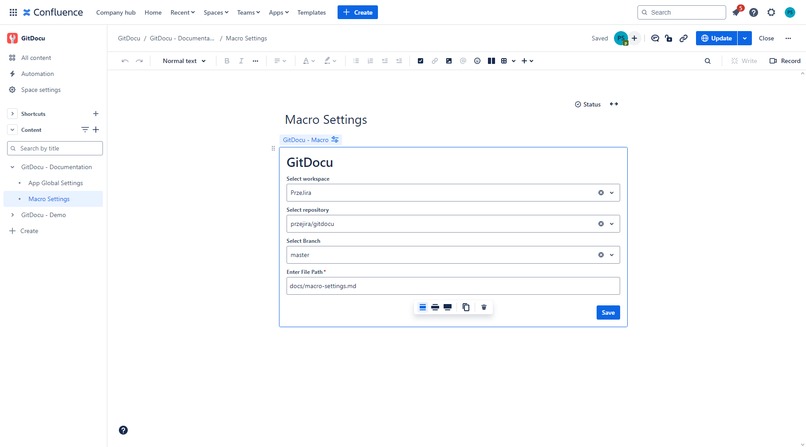
Macro edit view
-
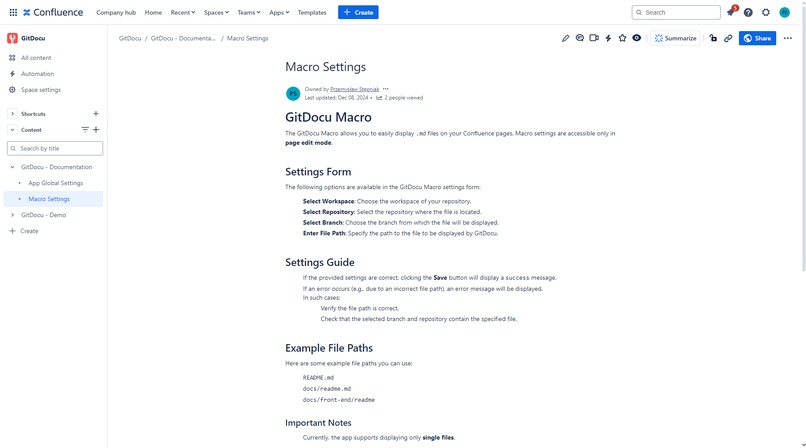
Macro render view
-
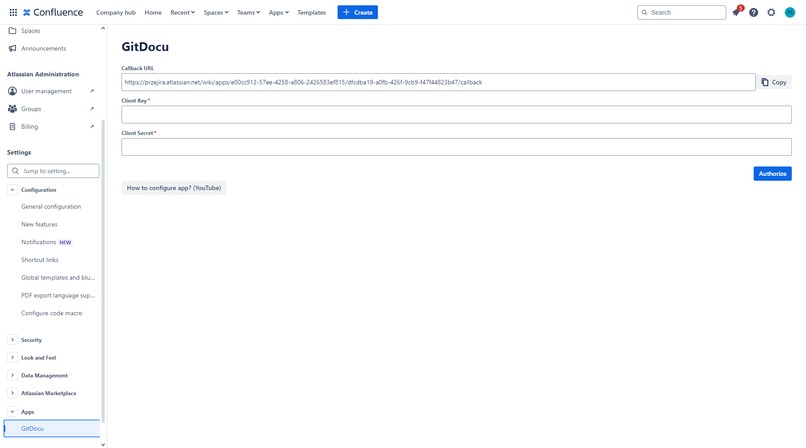
Global configuration view


💡 Inspiration
Building software documentation directly within the repository is a common practice in modern development workflows. This approach offers several advantages, such as streamlined processes 🛠️, where developers can effortlessly manage both code and documentation in a unified environment. This practice ensures efficiency and consistency while fostering up-to-date, detailed documentation 📚 that evolves alongside the codebase.
However, this method isn’t without its challenges. Synchronizing in-repo documentation with external platforms like Confluence can become a significant hurdle 🔄. Despite this, Confluence remains an invaluable tool, offering powerful features such as collaboration tools, version control, and advanced formatting options 📋✨. These capabilities make it a preferred choice for managing team documentation effectively.
This realization inspired me to create a solution that bridges the gap between these two worlds. My tool empowers teams to seamlessly connect repository-based documentation with Confluence, combining the best of both environments: the agility of in-repo updates and the robust functionality of Confluence. This approach promises to enhance workflows, boost collaboration, and simplify documentation management for developers and teams alike. 🚀
💭 What it does
For this iteration, I focused on implementing a core feature of the application: the File Preview Macro 🖼️.
This feature is both simple and impactful, designed to seamlessly bridge Bitbucket and Confluence:
1️⃣ Connect with Bitbucket 🔗
Effortlessly integrate with your Bitbucket account, enabling direct access to your repositories.
2️⃣ Navigate Through Options 🗂️
Quickly select the desired workspace, repository, and branch through an intuitive interface.
3️⃣ Specify the File Path 📁
Easily provide the path to the markdown file you want to preview, ensuring flexibility and precision.
4️⃣ Dynamic Live Updates ✨
Experience real-time rendering of the selected file’s content, automatically reflecting any updates.
This foundational feature transforms the way teams view and manage repository files within Confluence. It prioritizes efficiency, convenience, and up-to-date content, paving the way for seamless collaboration and documentation workflows. 🚀
🏗️ How I built it
The application is built on the Forge platform 🚀, offering a robust and secure ecosystem to deliver a seamless experience. Here’s a breakdown of how the project was created:
Core Technologies at Play 🛠️
- OAuth 2.0 🔑: Ensures secure communication between the application and Bitbucket, managing authentication and token exchanges.
- Forge Storage 🔐: Provides a reliable, secure mechanism for storing data, ensuring everything is safe and accessible.
- Custom UI 🎨: Enables the creation of a user-friendly interface for handling complex forms and file previews with ease.
Communication Between Platforms 🌐
The primary challenge was establishing a secure and continuous connection between Bitbucket and the application.
- OAuth 2.0 handles the authentication process, with Bitbucket providing consumer keys and secrets while the app manages token requests and usage.
- Bitbucket tokens expire after two hours, so I implemented a recurring job based on Forge periodic events to refresh tokens automatically.
- This approach ensures uninterrupted communication, enabling seamless and reliable integration between the two platforms.
Front-End Development 💻
The front end was developed using Atlaskit and Custom UI, ensuring a responsive and intuitive user experience.
- Atlaskit: Used to provide a cohesive design language that integrates naturally with the Atlassian ecosystem.
- Custom UI: Designed to simplify interactions, whether for modifying forms or navigating file previews.
By leveraging these technologies and focusing on secure integration, I built an application that is functional, user-friendly, and capable of meeting the demands of repository-content management within external tools. 🚧✨
🔧 Challenges I ran into
Building the application was a rewarding experience, but it came with its fair share of challenges. Here are the key hurdles I faced:
Connecting Atlassian Platforms 🚧
Establishing secure communication between Atlassian platforms within the Forge ecosystem was a significant challenge. Forge doesn’t provide out-of-the-box tools for seamless integration, requiring a meticulous approach to securely connect the platforms. This process demanded a deeper understanding of Forge’s capabilities and the implementation of custom solutions to ensure reliability and security.
Macro Editing Limitations ✏️
The Macro configuration form in Forge relies heavily on the UI Kit, which can be restrictive for creating dynamic and intricate interfaces. For example:
- I had to develop a custom solution to dynamically fetch data based on input changes.
- Maintaining clean, consistent source code was a priority. Mixing technologies for the same functionality often risks cluttering the codebase.
Although Atlassian introduced new Macro features just days before the submission deadline, these challenges highlight the current complexities of developing dynamic interfaces with the Forge platform.
Custom UI and Forge Lambda Communication 🔄
Ensuring reliable communication between Custom UI components and Forge Lambda functions was another complex issue, especially when maintaining type safety.
- To tackle this, I implemented a custom solution for type enforcement, which streamlined development by making it faster, clearer, and less prone to bugs.
Each of these challenges pushed me to think creatively and devise robust solutions, ultimately resulting in a more polished and reliable application. 🚀
🌟 Accomplishments that I'm proud of
The journey of creating this application was both challenging and rewarding. Here are the key accomplishments that stand out:
Seamless Integration Between Bitbucket and Confluence 🔗
I successfully established a secure and functional connection between these two platforms, enabling smooth communication and efficient data synchronization.
Automated Token Refreshing 🔄
To overcome OAuth 2.0’s token expiration limitations, I designed and implemented a reliable token refresh job. This automation ensures uninterrupted functionality without requiring any manual intervention.
Custom UI Integration for Macro Editing 🎨
I overcame the limitations of the Forge UI Kit by implementing Custom UI for the Macro configuration form in page edit mode.
- The form dynamically retrieves and updates data in real-time, significantly enhancing the user experience.
- This dynamic interface ensures better usability while maintaining a clean and consistent design.
Meeting Initial Requirements with Precision ✅
Every planned feature and functionality was delivered as intended, ensuring that the application met its initial objectives with precision and reliability.
These accomplishments reflect not only technical achievements but also a dedication to thoughtful design, problem-solving, and delivering a tool that provides genuine value to users. 🚀✨
🚀 What’s Next for GitDocu?
GitDocu’s journey is just beginning, and there’s a wealth of exciting plans to make it even more powerful and versatile. Here’s what’s on the horizon:
Advanced Features at the Application Level 🛠️
Continuously enhancing the app’s capabilities to improve usability and efficiency for all users.
Enhanced Macro Features ✨
Introducing advanced options, such as the ability to view specific lines of a file, enabling users to focus on the most relevant content with ease.
File Comparison Tools 🔍
Adding functionality to compare files across commits, making it simple to track changes and understand the evolution of documentation.
Broader Git Integration 🌐
Expanding support to integrate with additional Git platforms, providing users with greater flexibility and choice.
Bitbucket Server Support 🖥️
Bringing GitDocu to more teams and environments by extending compatibility to Bitbucket Server.
Marketplace Release 🌟
Preparing for an official release on the Atlassian Marketplace to make GitDocu widely accessible to developers everywhere.
These features are aimed at transforming GitDocu into an indispensable tool for developers, streamlining documentation workflows and repository management like never before. Stay tuned—there’s much more to come! 🎉
How to install
App ID: e00cc912-57ee-4258-a806-2426583ef815
For test purposes, you can use this repository: https://bitbucket.org/przejira/gitdocudemo/src/master/.
It's open and contains some .md files. If you encounter any issues, feel free to reach out to me. I also can add you to my confluence with configured app (:
Here is video with configuration: https://www.youtube.com/watch?v=ObXoRZyUuOg
Built With
- atlaskit
- atlassian
- atlassianforge
- confluence
- javascript
- love
- pain
- passion
- react
- scss
- ts
- webpack


Log in or sign up for Devpost to join the conversation.