-
-
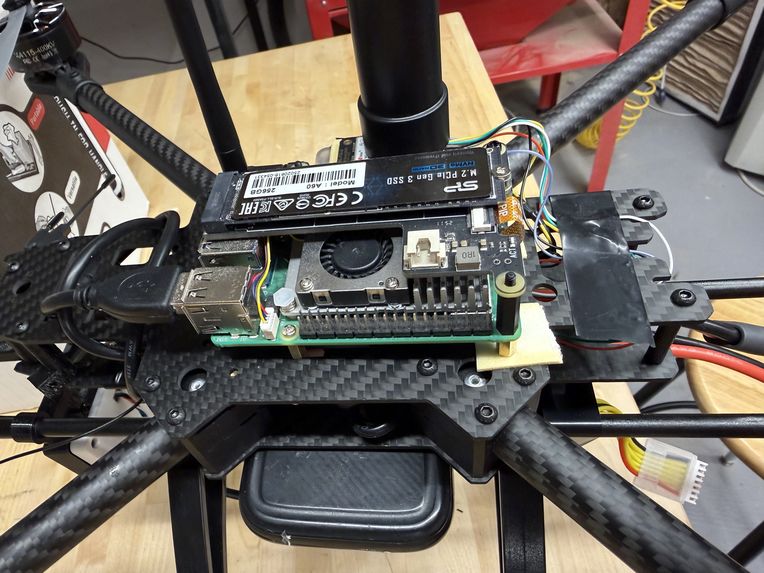
Raspberry Pi mounted on Drone
-
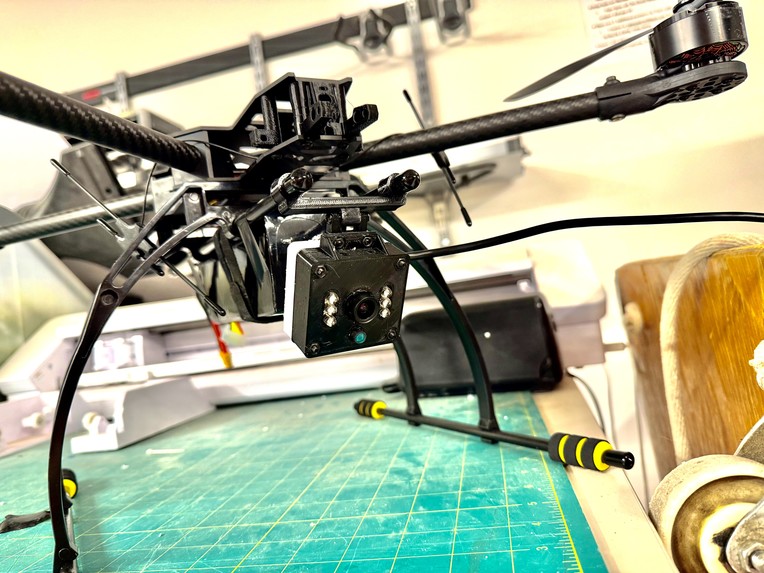
Camera Mount
-
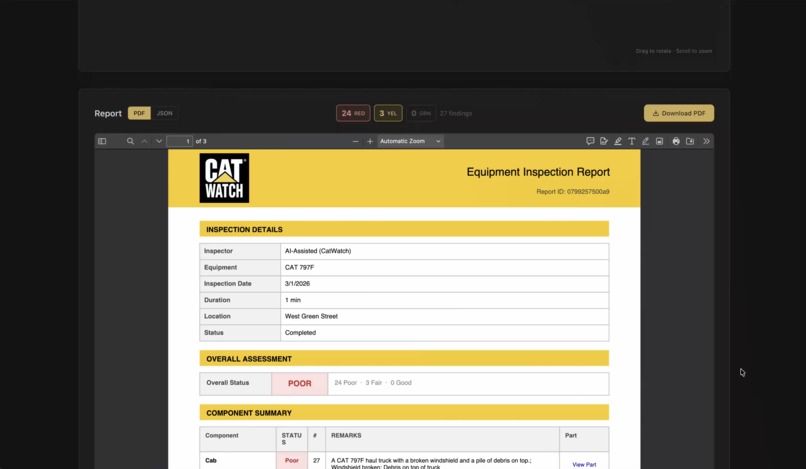
Inspection Report
-
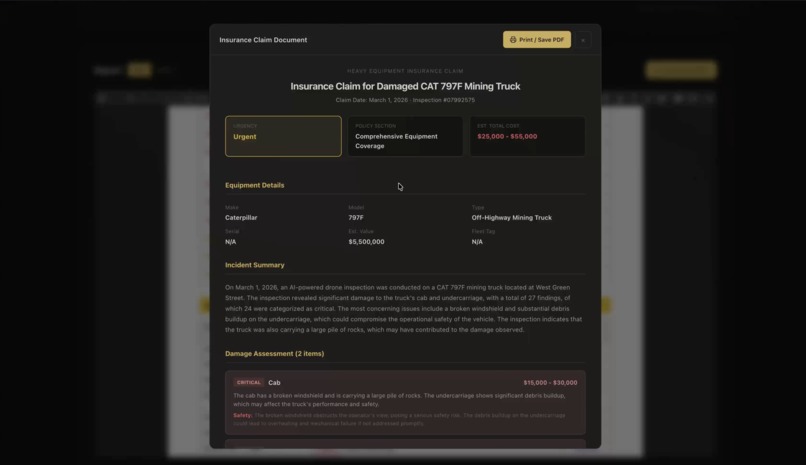
Insurance Claim
-
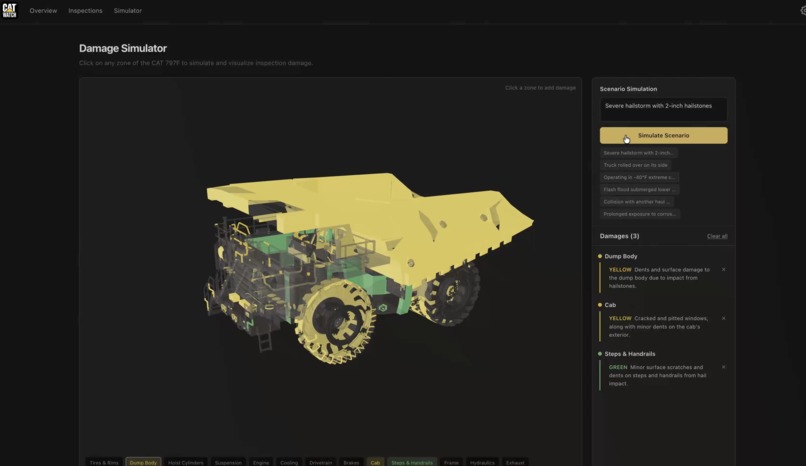
Damage Simulator
-
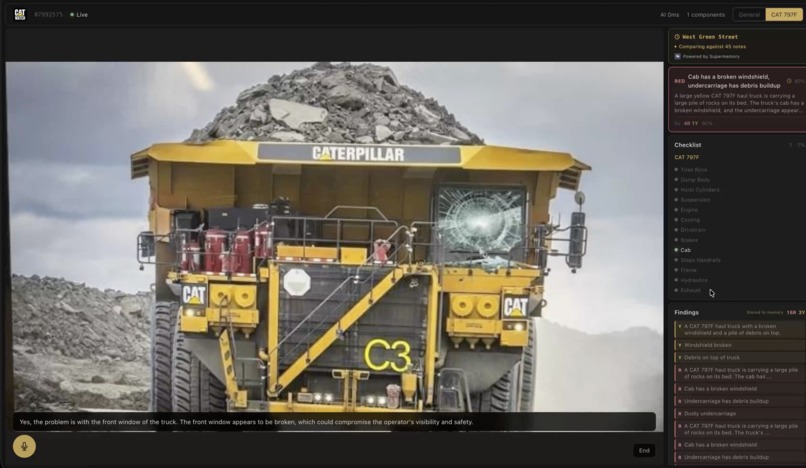
Inspection In Progress


Inspiration
Heavy equipment inspections are dangerous, slow, and expensive. A pre-shift inspection on a CAT 797F, a haul truck the size of a house weighing over 600 tons when loaded, takes a trained technician 30 to 45 minutes on foot, working around live machinery on a mine site. Miss a cracked hydraulic hose or an underinflated tire, and you're looking at a catastrophic failure mid-shift.
We kept asking: what if a drone could do the walk-around? Not just stream video to a human, but actually inspect, knowing what it's looking at, flagging damage in real time, and building a report automatically. That question became CatWatch.
What We Built
CatWatch is an AI-powered inspection infrastructure platform. A camera (webcam, drone, or Raspberry Pi mounted to a UAV) streams video over WebSocket to a cloud GPU running Qwen2-VL on a Modal A100. Every 3 seconds, the VLM analyzes the current frame, describes what it sees, assigns a RED/YELLOW/GREEN severity, and generates structured findings. No object detection gate needed since analysis fires on cadence.
Camera (SDK) -- WebSocket --> Qwen2-VL (A100) -- WebSocket --> Dashboard
                              FastAPI orchestrator
                                     |
                              findings + zone tracking + report
We built two inspection modes. The first is general, which handles workplace safety monitoring and flags hazards, PPE violations, and unsafe conditions. The second is 797, which is built specifically for CAT 797F defect inspection. It finds mechanical defects, wear, leaks, and structural damage specific to the haul truck, auto-identifies the equipment type on session start, and builds a dynamic zone checklist.
The SDK is a pure Python package published on PyPi (pip install catwatch) that handles frame capture, quality gating through blur and motion scoring, and WebSocket reconnection. It works with USB webcams, RTSP streams, video files, and Raspberry Pi CSI cameras, so the same code runs on a laptop demo and on a Pi 5 mounted to a drone. During the hackathon we also built and partially assembled a drone from scratch, mounting a Raspberry Pi 5 with a camera to test real inspection runs firsthand.
The dashboard is Next.js on Vercel. During a live session it shows real-time VLM analysis, zone coverage, zone severity trend tracking, voice Q&A, and a cross-inspection memory panel with historical findings for the same unit through context saved. After a session ends, the inspection detail page shows a PDF report with part links, a 3D model view with findings mapped to zones, and an insurance claim document via OpenAI GPT-4o-mini, ready to file. Inspection history is stored in Supermemory and surfaced on subsequent runs of the same unit using semantic search.
How We Built It
The backend is a FastAPI orchestrator deployed on Modal. Modal's serverless GPU infrastructure lets the A100 cold-start only when a dashboard viewer connects, so GPU inference is gated behind a viewer check and never runs idle. Frame processing uses a non-blocking pipeline where VLM inference runs via asyncio.create_task so the WebSocket loop never stalls.
Findings go through a hard keyword filter before hitting the database. If the VLM output mentions blur, motion blur, poor lighting, overexposed, or similar image quality language, the finding gets dropped. This handles the cases where the model ignores prompt constraints and starts reporting on the frame instead of the equipment.
Location is resolved via the browser Geolocation API and Nominatim reverse geocoding, then persisted directly via a REST PATCH call rather than through the WebSocket. This avoids the timing problem where geo might resolve after the WebSocket has already closed.
The database is PostgreSQL on Railway managed by Prisma on the web side, with direct asyncpg queries from Modal to avoid ORM overhead in serverless containers. Sessions, findings, reports, and API keys are all persisted from day one.
Challenges
We started with Florence-2 for zero-shot component detection. It ran at 2 FPS on a T4, which was very slow for our use-case, so we decided to not use it.
Stock YOLOv8 ran at 30 FPS on the same hardware but had no concept of mining equipment. It labeled the boom arm a "stick" and the excavator bucket a "sports ball" because it was trained on COCO. We fine-tuned it, first to recognize equipment classes like haul trucks, excavators, and dozers, then further to detect damage states directly so every detection became a finding. We also built and trained a custom YOLO model specifically for the CAT 797 with 20 component condition classes, generating 2,500+ training images from 185 originals pulled from CAT OEM parts catalogs. It worked, but not well enough to justify keeping it in the stack, so we removed it entirely.
We tried adding SigLIP2 as a middle tier between YOLO and Qwen, using fast zero-shot classification to triage frames before escalating. The transformers 4.47+ release broke AutoProcessor with a NoneType.replace error. Pinning to 4.46.3 surfaced a missing sentencepiece dependency. Fixing that then threw tokenizer load failures. After multiple failed deploys we cut SigLIP2 entirely.
Getting voice to work was harder than expected. Always-on Whisper picked up everything on a noisy job site, so the AI was constantly responding to background noise. We tried an activation word next, but the triggering was inconsistent and the latency made it feel broken. We eventually landed on push-to-talk, which worked reliably once we sorted out some macOS permission issues and wired it into the existing SDK loop.
The dashboard worked fine locally but was basically unusable in production due to latency. It turned out to be a bunch of small inefficiencies stacking up: frames were being dropped too aggressively, the processing pipeline had several bottlenecks, and the GPU was running even when nobody was watching. Once we worked through all of them, performance was solid.
Every reconnect after a crash was creating a new session instead of resuming the old one, so the database kept filling up with dead sessions. We fixed it by cleaning up any existing sessions for a user before creating a new one.
What We Learned
Generalist VLMs beat specialized pipelines. We expected to build a cascade: fast detector, classifier, then VLM for the hard cases. We tried Florence-2 (too slow) and SigLIP2 (kept breaking in deployment). Cutting everything down to just Qwen firing on cadence was faster to ship, cheaper to run, and actually more accurate. For tasks where the output is a natural language assessment, a capable generalist beats a narrow specialist with a handoff layer.
Model choice is mostly an infrastructure decision. Qwen2-VL and a GPT-4-class model would produce similar inspection outputs. The real decision was latency, cost per call, and deployment flexibility. Running Qwen on a cold-start A100 through Modal and only paying when viewers were connected completely changed the economics. A hosted API with per-token billing at 30 frames per second would have been unusable.
The prompt is the spec. The biggest quality improvements came not from switching models but from switching vocabulary. Using actual pre-shift inspection language produced dramatically better outputs than anything we came up with ourselves. Domain experts write better prompts than engineers because they know what to look for.
Semantic search matters more than storage for fleet memory. Supermemory matched "seal wear" from one inspection to "line degradation" and "fitting seepage" from previous ones, patterns that exact keyword search would have missed. The value is not just remembering past findings, it is recognizing the same underlying failure described in different words across different sessions.
Simple state machines beat clever ones. Every optimization we added to session management introduced a race condition. The version that works is the simple one: one session per user, GPU inference gated on a single boolean, state stored in the database rather than in memory.
Built With
- llm
- modal
- postgresql
- python
- railway
- supermemory
- typescript
- vercel
- yolo
Log in or sign up for Devpost to join the conversation.