-
-
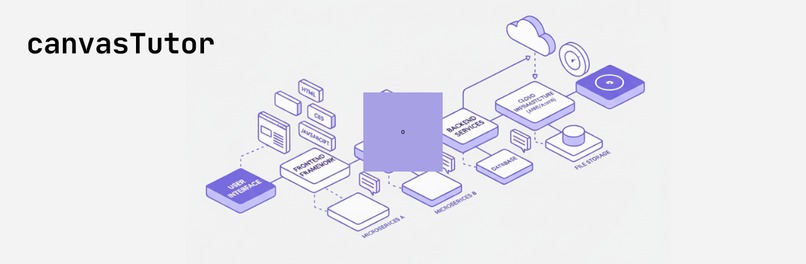
canvasTutor

Inspiration
We wanted to make system design approachable for vibe coders and beginners who feel lost in jargon. Tools like Eraser inspired us — simple input, visual output. We asked: what if building an app could feel like playing a game of SimCity, but instead of roads and buildings, you connect databases, APIs, and web apps? That spark became CanvasTutor.
What it does
CanvasTutor is a 2D, game-like canvas that turns vague app ideas into living system designs. Users describe their app in plain language, and CanvasTutor generates Cards (Web App, Database, Auth, Storage). Dragging and connecting them animates data flows, shows costs, and provides plain-English explanations. Every change updates a friendly spec sheet that coding agents can use to scaffold real code.
It provides a comprehensive environment for system architects and developers to:
- Visually Design: Build system architectures using a drag-and-drop canvas with customizable nodes and animated edges.
- AI-Assisted Creation: Interact with an integrated chatbot to generate components, ask design questions, and receive intelligent suggestions.
- Real-time Cost Estimation: Get immediate cost feedback as components are added and configured, helping optimize budgets.
- Dynamic Simulation: Simulate system behavior and performance to identify bottlenecks and validate architectural choices.
- Component Management: Utilize a rich palette of pre-defined components and manage custom ones.
- Export & Share: Export designs for documentation, collaboration, or further development.
How we built it
- gpt-oss-20b powers component generation, explanations, and full spec exports, handles lightweight narration like lever change explanations.
- Frontend: React with TypeScript for a robust and scalable user interface.
- Visual Canvas: React Flow for the interactive node-based diagramming capabilities, allowing for custom nodes and animated edges.
- Styling: Tailwind CSS and Shadcn UI components for a sleek, responsive, and accessible design. -Core Logic: Custom services (CostEstimatorService, SimulationService, ExportService) handle the real-time cost calculations, system simulations, and various export functionalities.
Challenges we ran into
Developing canvasTutor presented several exciting challenges:
- Integrating Diverse Systems: Seamlessly combining a complex visual editor (React Flow) with real-time AI interactions, dynamic cost calculations, and performance simulations required careful architectural planning.
- Performance Optimization: Ensuring a smooth and responsive user experience, especially with potentially large and intricate diagrams, demanded significant attention to rendering performance and state management.
- AI Context & Accuracy: Training and fine-tuning the AI chatbot to understand domain-specific system design concepts and provide accurate, helpful responses was a continuous effort.
- Flexible Data Modeling: Designing a data model that could represent a wide variety of system components, their properties, and interconnections in a scalable manner was crucial.
Accomplishments that we're proud of
We are particularly proud of:
- Creating an Intuitive UX: Despite the underlying complexity, we've managed to build a user interface that feels natural and easy to use for both novice and experienced architects.
- Seamless AI Integration: The AI chatbot isn't just a gimmick; it genuinely enhances the design process by providing on-demand insights and component generation.
- Real-time Feedback Loop: The immediate cost estimation and simulation capabilities provide invaluable feedback, allowing users to iterate rapidly and make informed decisions.
- Robust Foundation: We've established a modular and extensible codebase that can easily accommodate future features and integrations.
What we learned
- Beginners learn fastest when explanations are visual, playful, and story-driven.
- Open models like gpt-oss can be orchestrated into roles: heavy architect, lightweight tutor, cost estimator.
- Designing for vibe coders requires empathy — start from their feelings about coding, not assumptions of knowledge.
- The Power of Visual Programming: How visual tools can dramatically simplify complex technical tasks and improve understanding.
- Effective AI Prompt Engineering: The art of crafting prompts and managing context to get the most out of large language models for specific applications.
- Frontend Architecture for Complex Apps: Best practices for managing state, optimizing rendering, and structuring large React applications.
- Interdisciplinary Integration: The challenges and rewards of bringing together UI/UX design, AI, and domain-specific engineering logic into a cohesive product.
What's next for CanvasTutor
For canvasTutor, our future plans include:
- Expanding Component Libraries: Adding more pre-built components for various cloud providers (AWS, Azure, GCP) and popular technologies.
- Advanced Simulation Models: Implementing more sophisticated simulation parameters and scenarios for deeper performance analysis.
- Collaboration Features: Introducing multi-user editing, version control, and sharing capabilities to facilitate team-based design.
- Code Generation: Exploring the generation of infrastructure-as-code (IaC) directly from SysXPlay designs (e.g., Terraform, CloudFormation).
- Community Engagement: Fostering an active open-source community to gather feedback, contributions, and drive future development.
CanvasTutor is our attempt to make system design feel fun, visual, and empowering — not intimidating.
Built With
- animate
- authority
- autoprefixer
- class
- css
- dagre
- dom
- eslint
- framer
- lucide
- merge
- motion
- playwright
- postcss
- radix
- react
- router
- tailwind
- tailwindcss
- tw
- typescript
- ui
- variance
- vite
- xyflow

Log in or sign up for Devpost to join the conversation.