-
-
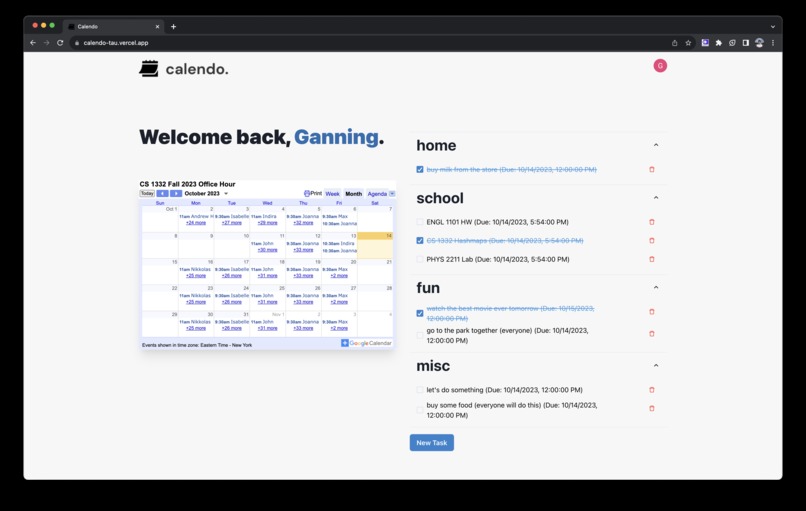
Calendo Home Page
-
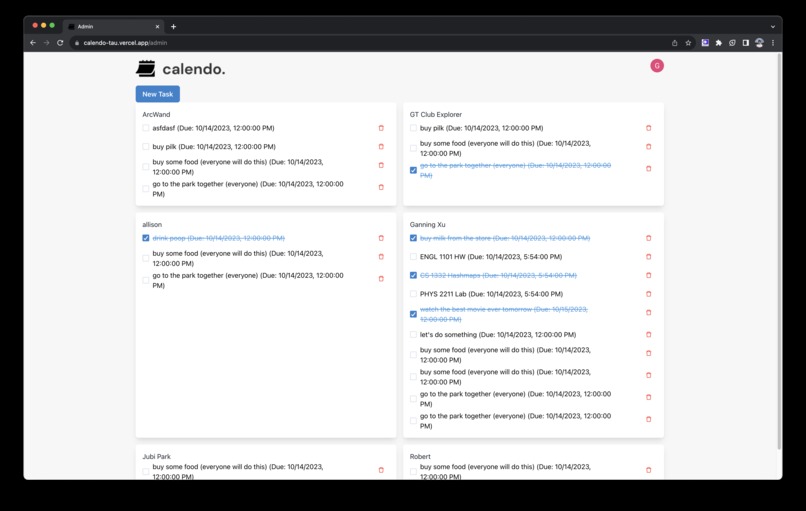
Calendo Admin Page


Inspiration
Todoist x Duolingo.
Todoist: To-do list, third-party calendar integration, cloud syncing.
Duolingo: Social component, accountability buddies, visualize progress, share your progress with your friends and on social media!
What it does
Calendo gamifies assignment tracking. See where you stand against your friends. Share your progress on social media! Behind the scenes, Calendo helps teachers see which student is on track and which student needs a little extra help. While there are other to-do lists on the market, they lack the social component and gamification that keeps the user’s attention.
How we built it
We started with an idea. The team collaborated on making the vision a reality through Figma. We did competitive analysis on existing products in order to find issues and noticed how cluttered our learning management system’s calendar was. This makes it unappealing to use, affecting time management. By combining a social media aspect, gamification, and appealing visuals, Calendo invites users back again and again. After we had a rough design, we began implementing the minimum viable product.
Challenges we ran into
While coding Calendo, we faced many challenges. First, this was many of our members’ first time at a hackathon, and had never built a project like this before. It was difficult creating the login system, and being able to allow users to create tasks that are associated with them (so each user isn’t flooded with the total tasks in the database). Additionally, it was difficult creating the admin page, which allows teachers to view the task lists and add tasks for everyone in their class, such as a homework assignment.
Accomplishments that we're proud of
While building calendo, we are proud of these main accomplishments:
- Calendo has a full login system, which allows for users to sign up/login with Google, GitHub, LinkedIn, Slack, Apple.
- Calendo allows users to add new tasks with an automatic date parsing feature. For example, if users type “buy milk tomorrow”, Calendo will automatically parse the “tomorrow” and set the due date on the task to be the next day.
- Calendo allows for different labels and categories. Tasks can be categorized as whatever category the user wants them to be. If the user leaves the category field blank, “misc” is set as the default category.
- Calendo features an admin page, where teachers can manage tasks for all of their students (add, delete, view).
- Calendo can be accessed on any device, and all data will be synced across them.
What we learned
In the process of building Calendo, we learned a lot about the software development lifecycle. When coming up with the idea of Calendo, we realized that taking a high level approach and figuring out which problems we had in our daily lives was good for figuring out app solutions. Additionally, we created a Figma design before we began coding our app, which allowed us to visualize the app before we started diving into the code, making changes a lot easier. Next, while coding, we utilized re-usable coding design, using components wherever we can. This way, if some piece of code had a bug, we would only need to fix it in one place, instead of in multiple places across the app. Lastly, we tested Calendo heavily, making sure we caught edge cases, and users who try to abuse our app and use it not as intended.
What's next for calendo.
We’re not stopping here! After this hackathon, we’ll go on to implement the features that we did not have time to do; in particular, the score tracking leaderboard and the friend network. Once we’re happy with our feature set, we’ll try to take our site to market. If there’s any interest, we’ll also develop a corresponding mobile app; our idea is particularly well-suited as a mobile-oriented learning management system.

Log in or sign up for Devpost to join the conversation.