-
App Demo
-
Our Flowchart


Inspiration
The idea for bldr was born out of frustration. Our university’s only scheduling tool was deprecated right before enrollment opened. We were left navigating spreadsheets and broken systems to build our course schedules. We knew there had to be a better way—so we created one.
What it Does
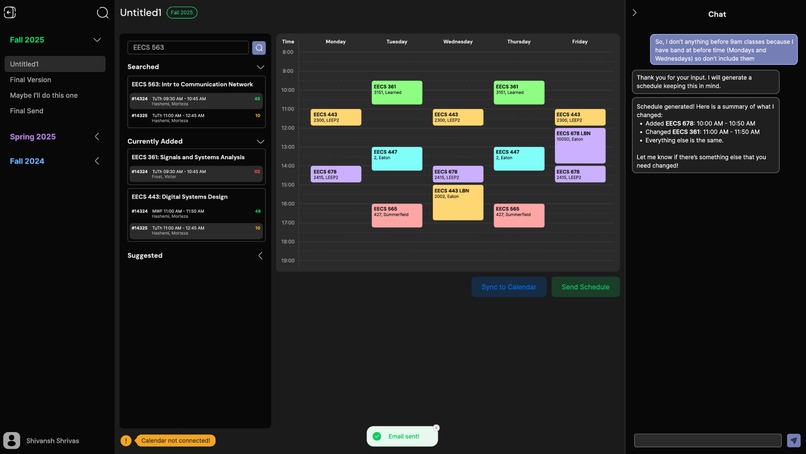
bldr is a fully integrated scheduling assistant designed to simplify course planning for college students. Upload your academic advising report or unofficial transcript, and bldr will parse your completed classes and suggest the optimal set of courses for your degree path. Our built-in chatbot, powered by the Gemini API, lets you build or refine your schedule through natural conversation—whether you're asking for classes that fulfill core requirements or telling it to avoid 9 AMs on Mondays and Wednesdays.
Key Features
- Transcript Parsing – Upload your academic advising report to automatically detect completed courses.
- Gemini-Powered Chatbot – Talk to bldr like you would an advisor. Ask for suggestions, impose constraints, or build a full schedule in one sentence.
- Google Calendar Integration – Sync your finalized schedule with your personal calendar in one click.
- Live Class Data Scraping – Real-time course section availability scraped from our university portal using Selenium and BeautifulSoup.
- Multi-Schedule Management – Build and compare multiple schedules side-by-side.
- Schedule Sharing – Email a schedule to yourself or a friend instantly.
- Constraint-Based Planning – Avoid specific times, days, or credit limits by simply telling the chatbot your preferences.
How We Built It
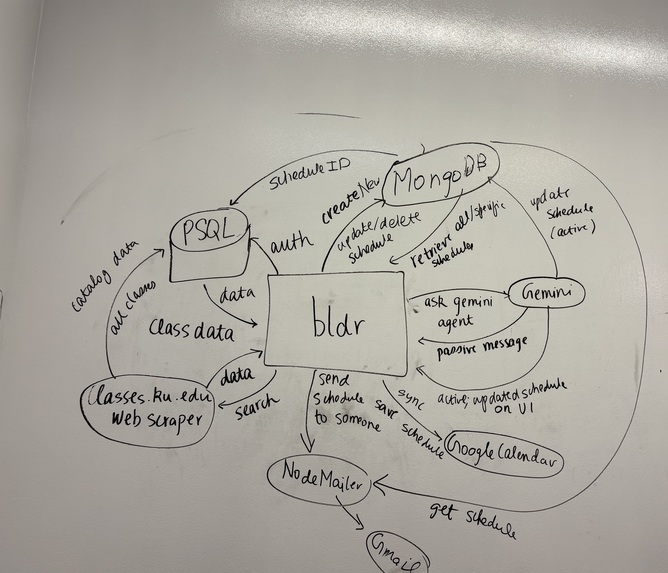
- Frontend: Built using Next.js, styled with Tailwind CSS and Shadcn UI, and designed to be responsive, clean, and intuitive across all devices.
- Backend: Developed with Express.js, using PostgreSQL for structured relational data and MongoDB Atlas for flexible schedule storage.
- Parsing & Automation: We used Selenium and BeautifulSoup to scrape live course availability data and cleaned it for real-time search and conflict detection.
- LLM Integration: The chatbot uses Google's Gemini API to interpret user input, understand context (like previously taken classes and major requirements), and return dynamic, contextual responses.
- Calendar & Email APIs: Integrated with Google Calendar and email services to let users export or share schedules directly.
Challenges We Ran Into
- Web Scraping – Handling inconsistent HTML structures while ensuring scraping doesn’t break with minor frontend changes on the school’s site.
- Conflict Detection – Creating a reliable scheduling engine that supports preferences, constraints, and avoids overlapping class times was non-trivial.
- Chatbot Contextuality – Training the chatbot to not only respond accurately, but act agentically based on user history and current schedule state.
- Agentic Features - It was definitely a workout to figure out how to make Gemini API dynamically change our MongoDB Atlas database as per user's requests.
Using MongoDB Atlas
- Used for storing dynamic, nested schedule data that evolves over time.
- Each user’s schedule is saved as a document with fields like
schedID,semester,scheduleName, and an array ofclasses. - Enabled flexibility in schedule structures—ideal for multiple sections, temporary changes, or chatbot-generated suggestions.
- Complemented our PostgreSQL database, which handled structured data like the course catalog and user profiles.
- Allowed quick updates to individual schedules without complex joins or rigid schema constraints.
Using Google Gemini API
- Powered our intelligent chatbot assistant, enabling natural language interactions for schedule creation and modification.
- Gemini receives full user context including:
- Completed classes (
classAlreadyTaken) - Major and catalog year
- Current schedule
- Class catalog and availability
- Completed classes (
- Determines whether a user prompt is:
- Passive (e.g., “What classes should I take?”) — responds with helpful suggestions
- Active (e.g., “Make me a schedule”) — builds or edits the schedule automatically
- Dynamically calls backend API endpoints like:
suggestedClasses()searchClasses()addClassToSchedule()removeClassFromSchedule()replaceClassInSchedule()
- Gemini acts as an agentic AI, not just responding with data, but modifying the schedule, applying constraints, and asking for missing info when needed.
Accomplishments That We’re Proud Of
- Building a chatbot that doesn’t just talk—it builds your schedule for you based on logic and your unique constraints.
- Achieving real-time class data scraping and merging it with past course data and major requirements.
- Seamlessly syncing schedules with Google Calendar and enabling instant email sharing.
What We Learned
- The power of good design and UX: small details can significantly improve the overall experience.
- Handling large amounts of data efficiently requires careful architecture and optimization.
- Real-time user feedback is invaluable for iterative design and feature prioritization.
- Integrating an LLM effectively requires careful contextual planning and a clear definition of passive vs. active intent.
What's Next for bldr
We plan to refine our recommendation engine to factor in more personal data—like workload, commute times, or extracurricular activities. We’d also love to explore collaborative features where students can compare schedules with friends, plus expand the chatbot’s capabilities for more personalized academic advice.
Built With
- beautiful-soup
- express.js
- flask
- framer-motion
- gemini
- google-calendar
- mongodb-atlas
- next.js
- node.js
- postgresql
- selenium
- shadcn


Log in or sign up for Devpost to join the conversation.