-
-
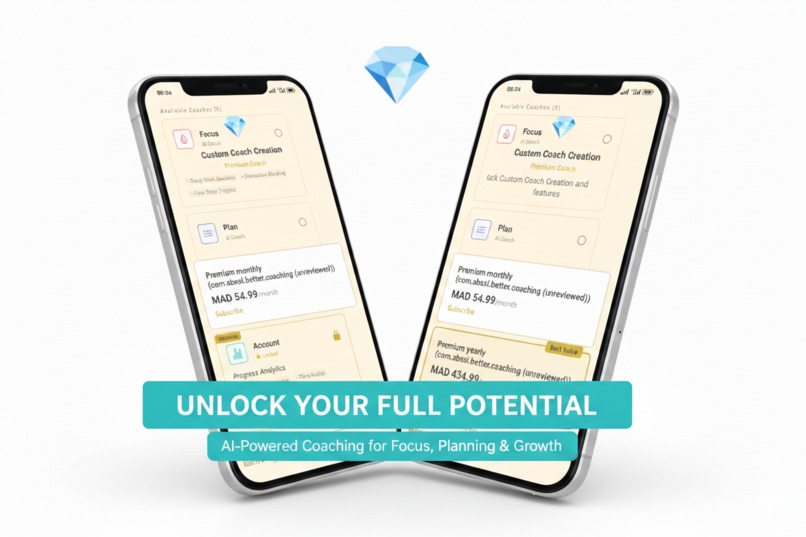
Better Coaching
-
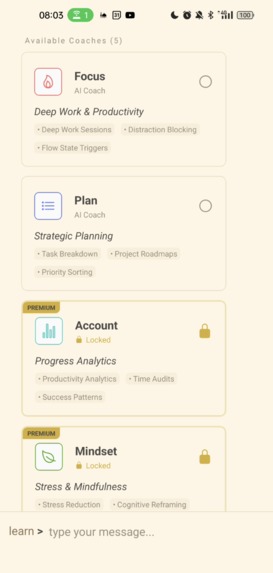
Coachs list
-
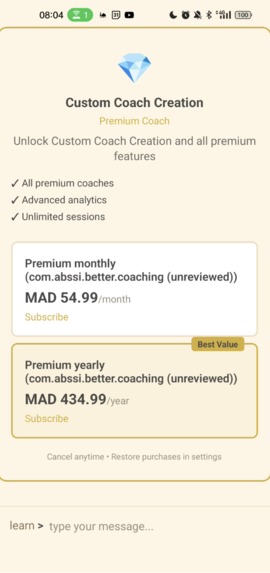
Paywall


BetterCoaching: Where Notion Meets Terminal
Inspiration
The insight was simple: The best productivity tool isn't the one with the most features. It's the one that disappears while you work.
We realized that modern productivity apps have become a paradox: you open them to focus, but spend 3 minutes navigating menus, dismissing "log your mood" notifications, and configuring settings. 40% of apps are abandoned not because they don't work, but because they get in the way.
We requested a different reality: What if we built the anti-app app? A tool with Notion's elegance and Terminal's speed, powered by an AI that actually understands context. No fluff. No motivational quotes. Just high-agency input and immediate action.
What it does
BetterCoaching is the "Operating System for Human Performance"—a minimalist interface where one input rules everything.
- Terminal Speed, Notion Beauty: A CLI-inspired interface that feels fast enough for a developer but looks polished enough for a designer.
- Invisible Complexity: Five specialized AI coaches (Focus, Planning, Accountability, Mindset, Learning) live behind a single text input. You don't choose them; the system routes you automatically based on your need.
- Actions, Not Advice: If you say "I'm overwhelmed," the AI doesn't just give advice—it spawns an interactive 4-7-8 breathing animation directly in the chat. If you say "Time to focus," it renders a tappable timer.
- Slash Commands: Power users can type
/to access a Notion-style command palette for instant access to deep work sessions, stats, or custom coach creation.
How we built it
We married the raw power of Gemini 2.5 Flash with a highly responsive native mobile core.
- Core: Built with React Native and Expo (SDK 54). We used NativeWind (Tailwind) for that "clean beige" aesthetic and Reanimated for the 60fps physics-based animations.
- The AI Engine: We didn't just hook up an API. We engineered a custom Action Parsing Layer. When the AI decides you need a timer, it outputs a proprietary token (e.g.,
[TIMER:25]). Our frontend intercepts this token and hydrates it into a fully functional React component in milliseconds. - Monetization: We integrated RevenueCat to handle cross-platform subscriptions. The paywall isn't a jarring gate; it's a natural "upgrade" that appears contextually when you try to access advanced coaches or analytics.
- Quality Assurance: We used Maestro to build a robust end-to-end test suite that actually "sees" the screen, ensuring our AI interactions and purchase flows work flawlessly before every release.
Challenges we ran into
- The "Uncanny Valley" of Chat: Making a terminal feel "human" without being annoying was tough. We spent days refining our
TypewriterTextcomponent to include dynamic pauses—speeding up for easy words, pausing for "thinking" at punctuation—to mimic how a real coach texts. - Testing the Nondeterministic: Testing an app where the interface is an unpredictable AI is a nightmare. We had to build "invisible hooks" (
testIDs hidden in the render layer) so our Maestro scripts could reliably track the AI's "thinking" state without breaking the visual immersion for the user. - Action Latency: To make the app feel like a "Terminal," responses had to be instant. We optimized the Gemini prompt structure to prioritize short, token-heavy responses that our parser could render immediately, avoiding the dreaded "typing..." spinner.
Accomplishments that we're proud of
- The "Breathing" Message: We built a custom message bubble that actually breathes. Using Reanimated, the bubble expands and contracts in a rhythmic 4-7-8 pattern when the AI guides you through stress relief. It's a small detail that users love.
- Seamless E2E Automation: We achieved a fully automated release pipeline. Our Maestro scripts can spin up a fresh install, onboard a user ("Simon"), have a conversation, and simulate a Google Play purchase—all without human intervention.
- Production Readiness: This isn't a hackathon prototype. It's a shipping product with restored purchases, analytics, and a polished onboarding flow, currently live in an internal production track.
What we learned
- Context is King: The differentiation isn't the AI model; it's the interface. Everyone has access to LLMs, but not everyone can make them feel like a cohesive part of the UI.
- Less is More: We initially built complex dashboard screens. We killed them all. We learned that users value the absence of UI more than the presence of features.
- Invisible Accessibility: Adding accessibility labels for our automated tests actually made the app significantly better for screen readers, a happy accident that we're now doubling down on.
What's next for Better Creating
- Health Integration: Connecting with Apple Health/Google Fit to let the "Body Coach" give advice based on real sleep and step data.
- Multiplayer Capabilities: "Squad Focus" sessions where teams can commit to deep work blocks together in a shared terminal.
- Voice Mode: A true "OS" experience where you can talk to your terminal while driving, with the AI whispering productivity cues in your ear.
Built With
- android
- eas-build
- expo.io
- google-gemini-api
- maestro
- nativewind
- react-native
- react-native-reanimated
- revenuecat
- tailwind-css
- typescript
- zustand


Log in or sign up for Devpost to join the conversation.