-
-
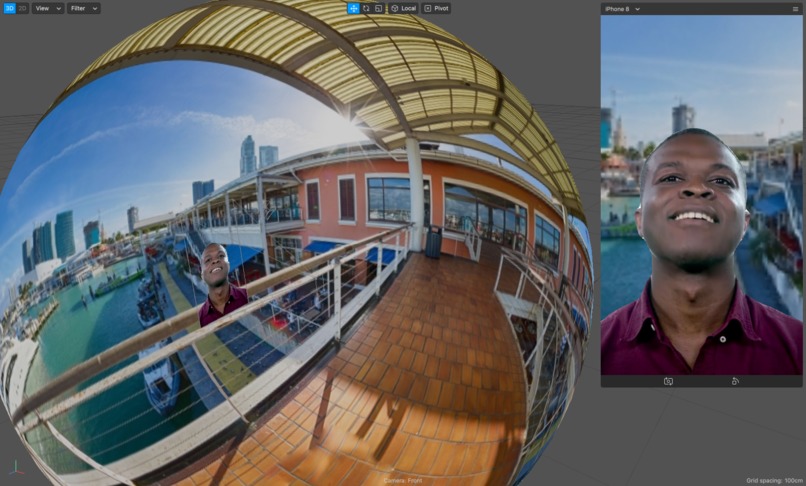
Spark AR Studio showing effect
-
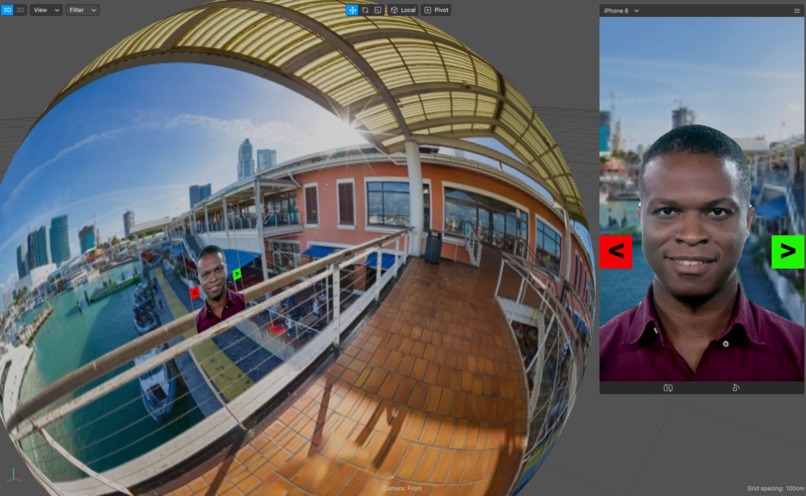
Spark AR Studio showing effect and change background controls


Inspiration
Traveling to and recording at locations is now a risky proposition. Video meetings with virtual backgrounds have replaced many in-person meetings. I wanted to re-create that experience for social video recordings.
What it does
Backdrop comes with many built-in virtual 360-degree backgrounds. Tapping the screen brings up controls to change the background and adjust your lighting to more closely match the lighting in the background scene. The controls fade away after a few seconds of non-use so they don't interfere with the recording. Backdrop cuts out your outline from your physical background and replaces the background with the 360-degree virtual image, so that it appears like you're at that location. You can move around and adjust the camera to get the just the right look for your video shoot. Backdrop comes with a wide-variety of virtual backgrounds.
How I built it
I used Spark AR Studio to create the app. It uses segmentation to extract your image from the rest of the video. Your image is shown on a plane. I created a sphere around the plane, and project the 360-degree virtual background onto the sphere. Initial instructions to use the rear camera and to tap the screen for controls are initially displayed. When the screen is tapped, I initiate an animation to dismiss the instructions and display the on-screen controls for changing the background with a forward and back button, and a slider to adjust the lighting level that is applied to you. The forward and back buttons will cycle through all the available backgrounds and wrap around the sequence. I also created logic to fade out the controls after several seconds of inactivity. All of the logic for Backdrop was created in the patch editor.
Challenges I ran into
The platform was new to me, so I had a lot to learn. Getting the spherical display of a 360-degree panorama took a lot of work to figure out. Getting familiar with the patch editor to create effects and interactive elements was also a learning process.
Accomplishments that I'm proud of
The app works exactly like I planned, and I think it will be useful for many people to create interesting videos.
What I learned
I learned a lot about creating an AR app in Spark AR Studio and getting it ready for deployment. The patch editor took a lot of experimentation to achieve the logic and effects for the app, but I'm getting more comfortable with it. Several elements went through numerous attempts using different methods to get right.
What's next for Backdrop
I'd like to find a way for people to load their own 360-degree backdrops and save them for future use.
Built With
- sparkar

Log in or sign up for Devpost to join the conversation.