-
-
-
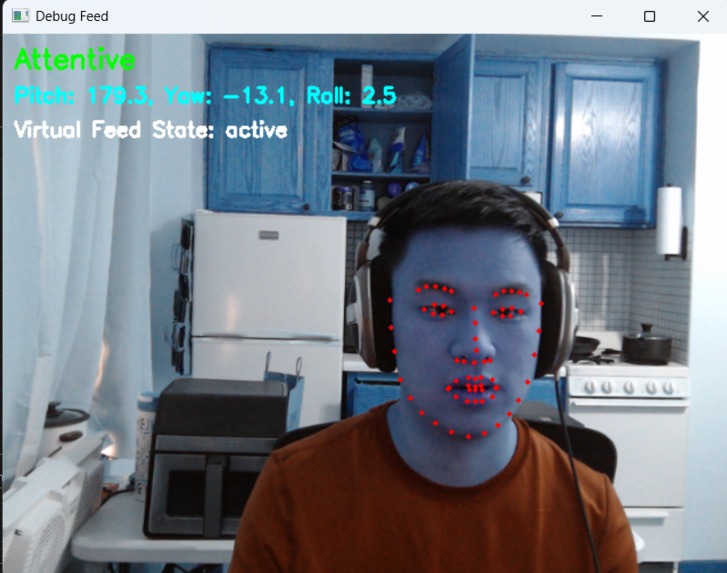
Processing user attentiveness


Inspiration
Working remotely has become the norm, but with it comes unexpected and embarrassing webcam moments. From forgetting to turn on your camera in a meeting to accidentally exposing yourself in pajama pants, webcams can be ruthless. The demand for privacy solutions is skyrocketing—physical webcam shutters are selling in huge numbers, and even laptop manufacturers are now including them as a standard feature. Inspired by real-life WFH blunders, AI Shutter was created to take webcam privacy to the next level—ensuring that users stay visible when they need to and invisible when they don’t.
What it does
AI Shutter is an intelligent webcam manager that detects user presence and attention to control the camera feed automatically, leveraging the on-device NPU to efficiently run in the background during video calls.
Auto Blackout: If the user becomes inattentive for a set period, the webcam feed automatically turns black.
Auto Resume: Once the user re-engages, the camera seamlessly turns back on.
Virtual Webcam Integration: AI Shutter runs as a virtual camera, allowing users to use it across video conferencing platforms like Zoom, Teams, and Google Meet.
Adjustable Timeouts: Users can set independent thresholds for when the camera turns off due to inattention and when it turns back on after regaining focus.
How we built it
This application was built using the Qualcomm AI Hub models, specifically leveraging FaceMap_3DMM, the system analyzes facial orientation and gaze tracking to determine user attentiveness.
Challenges we ran into
Balancing Sensitivity: Tuning the attention detection algorithm to avoid false positives (e.g., webcam turning off when a user slightly shifts) while ensuring responsiveness.
Webcam Latency: Managing seamless transitions between states without introducing lag in video conferencing applications.
Multi-Platform Compatibility: Ensuring that AI Shutter works reliably across different video conferencing tools and operating systems.
Debugging Virtual Webcam Output: PyVirtualCam integration had quirks that required tweaking frame formats and optimizing FPS to ensure smooth performance.
Accomplishments that we're proud of
✅ Successfully implemented real-time facial attention tracking using 3D landmark models.
✅ Built a fully functional virtual webcam that integrates seamlessly with popular video conferencing tools.
✅ Created adjustable timeouts for both inattention-based blackout and automatic resume, giving users complete control.
✅ Designed a debugging mode that provides real-time insights into camera state changes and tracking behavior.
✅ Built a system that can save users from embarrassing moments—which is priceless! 😆
What we learned
How to integrate machine learning models for real-time face tracking using Qualcomm AI Hub. Optimizing video processing for low-latency applications. The importance of human-centered design—users want privacy automation, but also control over their webcam behavior. People really don’t want to be seen on camera when they’re distracted.
What's next for AI Shutter
Smart Context Awareness: Future updates could use audio cues and gesture recognition to determine whether the user is actively engaged in a conversation.
AI Mute - Auto mute when a participant isn't talking to the camera. This will eliminate any distracting background audio coming from an unsuspecting user.



Log in or sign up for Devpost to join the conversation.