-
-
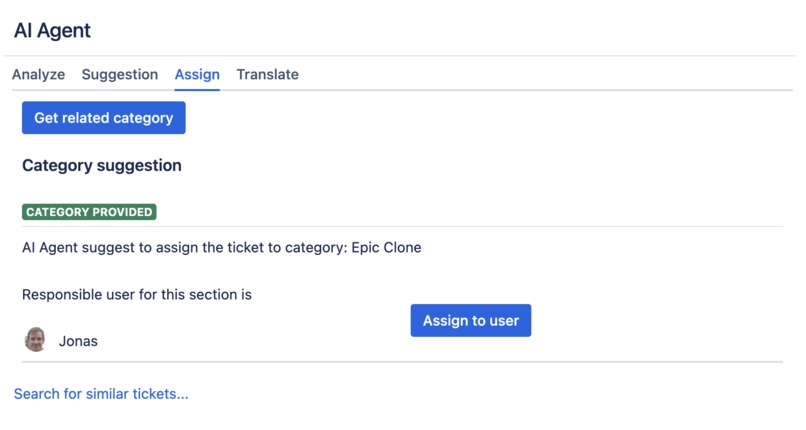
Assignment suggestion based on issue summary and description
-
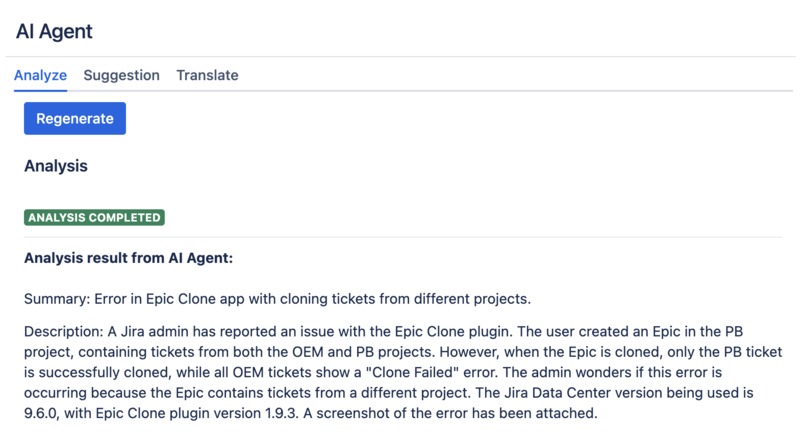
AI-driven analysis of a service management request
-
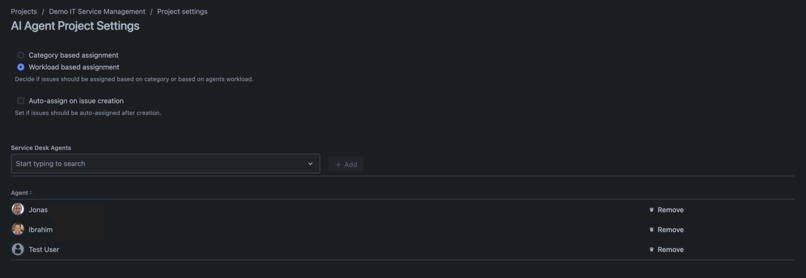
Project settings to define agents for workload based assignment
-
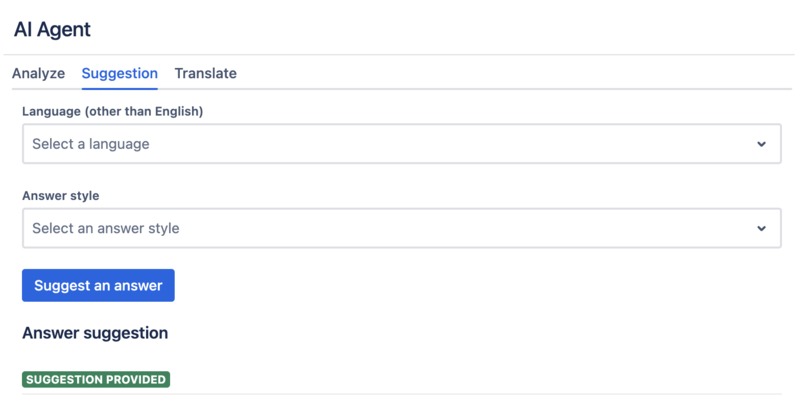
AI-driven answer suggestion - select language and tone
-
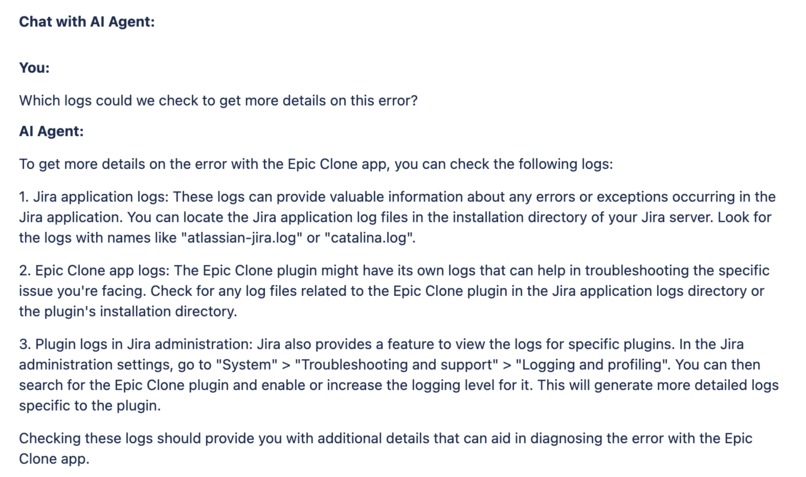
Chat with AI based on analysis
-
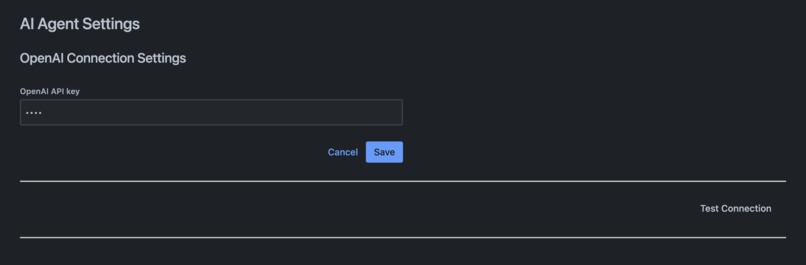
System administration settings to connect to OpenAI
-
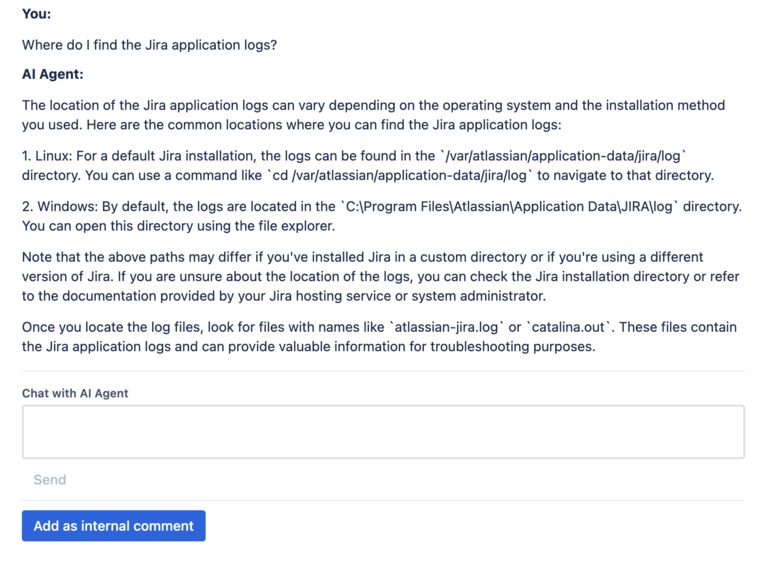
Ask follow-up question
-
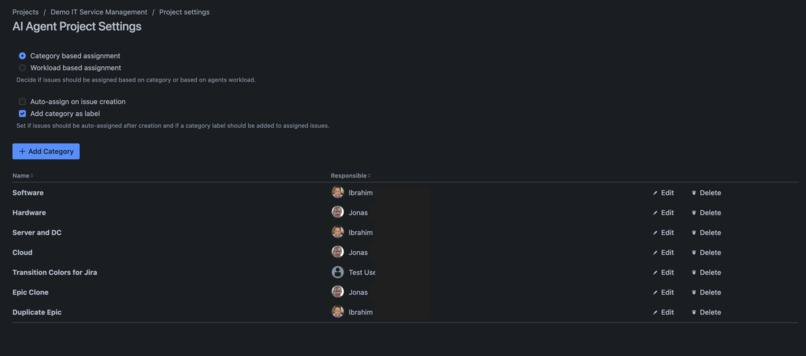
Project settings to define service request categories
-
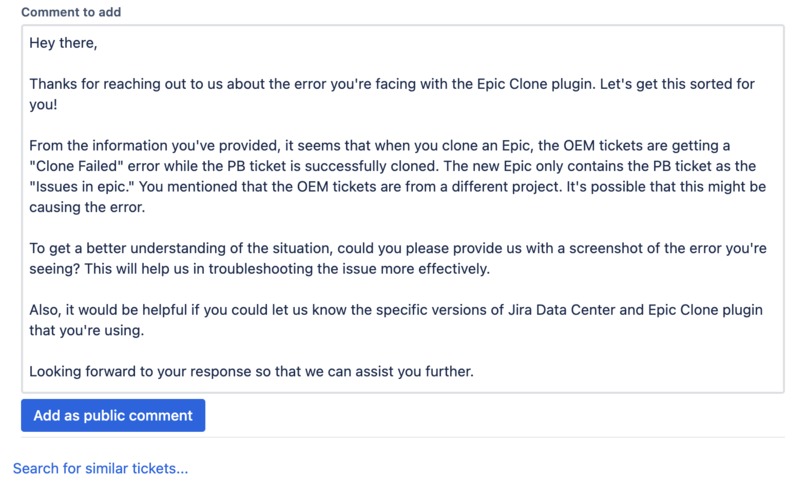
Edit a suggested answer before publishing as public comment
-
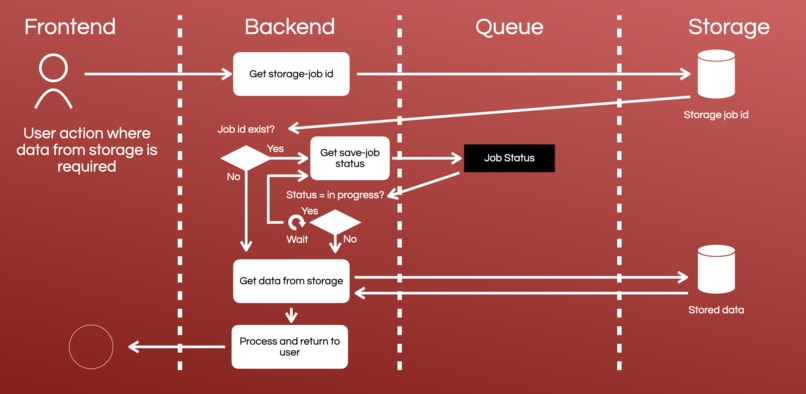
Schema used for reading data from storage or properties
-
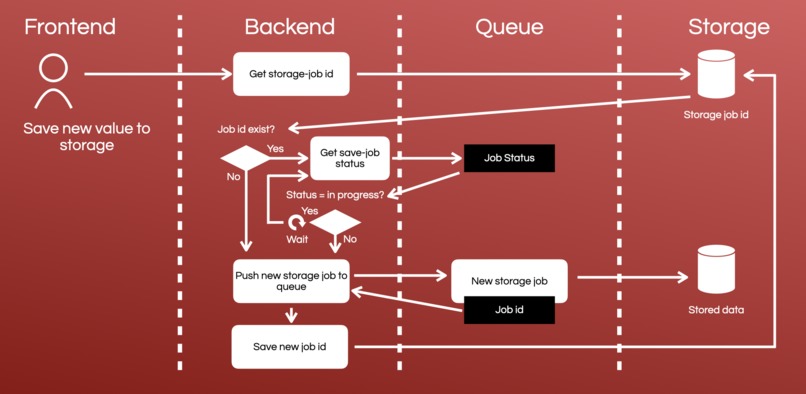
Schema used for writing data to storage or properties
-
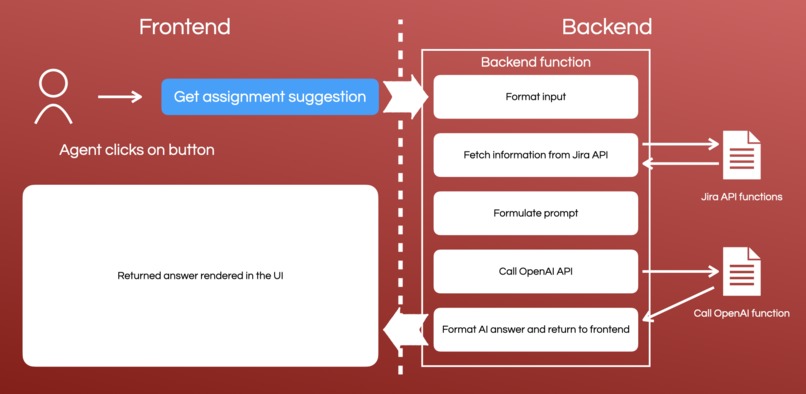
Frontend-Backend interaction for getting results from the AI


Inspiration
Our inspiration for creating the AI Agent for Jira Service Management stemmed from a vision to revolutionise the service management experience. We recognised the daily challenges encountered by service agents, from data overload to the complexity of problem-solving. This ignited the idea of harnessing the capabilities of OpenAI to provide invaluable support to service management professionals.
Our mission was to seamlessly integrate AI with Jira Service Management, offering a suite of AI-driven features to enhance their workflow. Our aim was clear: empower service agents to make faster, more informed decisions, raise the bar for customer satisfaction, and ultimately redefine excellence in the realm of service management.
What it does
AI Agent Features: A Fusion of AI and User Empowerment
The AI Agent app, designed to enhance the efficacy and efficiency of Jira Service Management agents, brings together a myriad of features that transform the way support requests and tickets are managed. As we tread the development path, the evolution of these features was a mix of pre-planned strategies and insights garnered during the development process. Here's an in-depth look at the core features that AI Agent provides.
1. Project Settings:
Issue Categories: Jira project administrators can define distinct categories for issues and assign responsible persons for each, ensuring a targeted approach to issue assignment, categorisation and resolution.
AI Assignment Settings: Opt between issue assignments based on pre-defined categories or current workload assessment of each agent.
Automatic vs Manual Assignments: Choose if issues should be auto-assigned on issue creation or if agents should be able to manually assign them via the issue action menu based on a suggestion provided by AI.
Label Integration: Decide if AI Agent should automatically append a category label to issues upon assignment.
2. Issue-Level AI Integration:
The issue action module unveils an interactive dialog for service desk agents, incorporating AI for analysis, communication, assignment suggestion, and translation:
AI Analysis & Chat: Service desk agents can employ AI to analyse requests, drawing insights from issue summary and description. A chat interface allows agents to engage with the AI for deeper insights, with the option to add the conversation as an internal comment.
AI-Powered Response Suggestion: Agents can retrieve an AI-crafted response suggestion, customisable before posting as public comment. The flexibility in language and tone selection ensures tailored communication.
AI Issue Assignment: In scenarios where auto-assignment is disabled, agents can use AI to receive an assignment suggestion based on the preset criteria of category or agent workload.
AI Translation: Enhance global communication by translating request summary and description into English, German, Italian, French, or Spanish, courtesy of AI.
Similar Issues Query: AI provides keywords derived from request summary and description, and offers a link to a JQL search to identify similar existing issues, facilitating efficient issue handling.
How we built it
We designed the AI Agent for Jira Service Management by harnessing the power of Atlassian Forge (Custom UI) and integrating OpenAI APIs for AI tasks. Below is a list of the Forge modules and components we leveraged during our development process:
Forge Modules:
- Jira administration page
- Project settings page
- Issue action
- Issue create listener
Forge APIs:
- Async Event API
- Properties API
- Storage API
- Fetch API
We adhered to best practices throughout the development journey, including agile methodologies and iterative testing. This ensured a smooth integration with Jira Service Management and a final version of the app that provides a thought-out user experience and well performing app functionalities.
We used AI not only as a feature in our app, but throughout the entire development process:
- Idea Conception: The initial brainstorming was augmented by AI's capability to generate and formulate ideas.
- Demo Data Generation: AI streamlined the creation of demo data in our Jira service management test instance.
- Visual Demonstrations: Our demo video was seamlessly crafted with AI's aid.
- Coding Assistance: GitHub Copilot was our coding companion, accelerating our coding process and fulfilling simple programming tasks.
Challenges we ran into
Every development journey is punctuated with challenges that demand innovative solutions. Our venture into the Codegeist 2023 competition was no exception. Integrating an AI API, especially in an environment as robust as Atlassian's Forge, presented its unique set of technical considerations, one of it being the invocation timeout.
The Challenge of Invocation Timeout
Forge's conventional 25-second invocation timeout is a strict limitation that ensures efficiency, but it can pose significant hurdles for apps like ours that lean heavily on external API integrations. During this years Codegeist, however, the timeout was extended to 55 seconds, hinting that we weren't the only developers grappling with this constraint. While the increased limit offered some breathing room, it was essential for our app to function effectively even within tighter boundaries.
Why We Never Hit the Timeout
Our app’s inherent design played a pivotal role in ensuring we didn't hit the invocation timeout. Given the nature of our application, operating predominantly at the issue level with AI integrations, the data payload was relatively limited. Our prompts, though meticulously crafted, were concise enough to ensure prompt responses from the AI. Throughout our rigorous testing phase, we consistently observed responses that comfortably nestled within the timeout window.
The Strength of Custom UI with Backend Integration
Choosing to use custom UI, complemented by backend functions, proved to be the right strategic decision. Unlike UI kit, which relies heavily on frontend operations, our approach allowed for a seamless data transition from the user interface to the backend. This architecture ensured that, upon user initiation, data could be restructured, modified, or even enhanced with supplementary information before making its final journey to the OpenAI API.
The Challenge of Redundancy
In the dance of building a sophisticated, AI-integrated app, challenges arise not just in the lines of code but in the conceptual framework that houses them. One such challenge we encountered was ensuring efficiency in the use of AI analysis and answer suggestion. Every invocation to the AI is a dance of time and cost; hence, avoiding redundancy was paramount.
As the app serves a collaborative environment, multiple users might necessitate AI analyses or answer suggestions for the same issue. Given the cost associated with each AI request and the time it consumes, a system that indiscriminately allows repeated requests would neither be economically nor operationally efficient.
The Conceptional Shift
Our solution was rooted in foresight and efficiency - a mechanism to ‘cache’ AI-generated data. The concept was straightforward yet profoundly impactful. Why repeat a dance that’s already been gracefully executed?
Technical Execution
We turned to the robust capabilities of Forge’s Properties API to bring this concept to life. Every time an AI analysis or answer suggestion is successfully conducted, the results are stored directly on the issue. This isn’t just a technical operation but a strategic conservation of resources.
When a user (or another user) invokes the AI Agent dialog, an initial check is performed on this ‘cache’. If prior AI-generated data is found, it’s directly rendered on the dialog, eliminating the need for a redundant AI request. This not only conserves resources but significantly enhances the user experience, offering immediate insights without the wait.
The Impact
This system ensures that each AI invocation is as unique as the issue it caters to, avoiding unnecessary repetition. It’s an elegant dance of conceptional foresight and technical execution that ensures each step, each AI invocation, is purposeful and unique.
The Challenge of Data Inconsistencies in Storage
When handling storage operations in an app, especially within a multi-user environment, concurrency can pose significant challenges.
In a collaborative environment, simultaneous operations on storage values by different users can lead to data inconsistencies. Specifically, if one user is attempting to update a storage value while another is fetching it, there’s a potential risk of reverting the value to its previous state instead of saving the new one.
The Asynchronous Solution
Instead of directly invoking storage calls when data needs an update, we integrate an asynchronous event API to manage operations.
Introduction of Queues: The key was to funnel storage tasks through a queue. For the AI Agent app, we established settings and cache queues, which represent different types of data we store.
Storage Jobs: When data needs saving, we don’t immediately write it to storage. Instead, we push a new job to the relevant queue, in our case, either the settings or cache queue. Each job in the queue is assigned a unique ID and has a status indicating its progress.
Storage ID Tracking: We meticulously track the ID of every 'storage-job' using the Storage API. This ID is crucial to manage and synchronise operations.
Status Checks: Before any storage operation (fetch or save), the app checks the job's status. If the status indicates ongoing progress, the operation waits (a timeout of 500ms is added) and rechecks the status. We built this loop to retry up to five times if the status remains ‘in progress’.
The Challenge of Data Security and Privacy
In the rapidly evolving digital landscape, data security and privacy stand paramount. When integrating external tools into familiar systems, like Jira in our case, apprehensions about data handling are valid. With the AI Agent app, we took proactive measures to ensure the utmost security of user data while also preserving the app's functionality.
Individual OpenAI Accounts for Data Transparency
The primary concern was the transmission of data from Jira to an external API, specifically an AI-based one like OpenAI. Our solution, as already explained above, was simple yet effective: each Jira instance uses its unique API key to communicate with OpenAI. By doing so, every organisation handles its data through its own OpenAI account. This approach circumvents any potential data transfer through our account, ensuring that data remains within the boundaries of the respective organisation's purview.
GDPR Compliant Data Handling
General Data Protection Regulation (GDPR) has set strict guidelines on how user data should be managed. We've meticulously crafted our system to align with these standards:
No Direct User Data Transmission: Throughout the app, we've consciously avoided sending any direct user data to the AI. Instead, we've opted to use accountIds, which are abstract representations, concealing the user's identity. This ensures GDPR compliance and adds an extra layer of data protection.
Category Assignment and Data Minimisation: For functionalities like category assignment, only the category names are transmitted to the AI. This way, we further minimise the amount of data being sent externally. The assignment of the responsible user is handled internally within the app, eliminating the need to share user-specific data with the AI.
Acknowledging the Limitations
While we've gone to great lengths to safeguard user data, it's essential to be transparent about the app's inherent design. The nature of the AI Agent app requires sending issue-specific data, specifically the summary and description, to the OpenAI API. We understand that some data transfer is inevitable for the app to function as intended.
Accomplishments that we're proud of
Overcoming Development Challenges
The road to success is always under construction, and ours was no different. We encountered numerous hurdles, but with teamwork, dedication, and innovation, we transformed each one into stepping stones. Amongst these, the invocation timeout and request redundancy challenges were notably intricate. However, our team found robust solutions, ensuring optimal performance and seamless user experience.
Learning and Growing
Our learning curve was exponential. We dived deep into the realms of Jira Service Management and came out with enhanced knowledge and refined skills. Connecting our app to the OpenAI API was a journey of exploration and discovery. Every step presented an opportunity to learn, and we seized them all. The result is an app enriched with AI-driven features, set to revolutionize the user experience in Jira Service Management.
Mastering Forge Components and APIs
Embarking on this journey, we were novices in implementing some of the Forge components and APIs we used. But we are proud to say, not anymore! We delved into the intricacies of the fetch API, async event API, and event listeners with gusto. It was a thrilling experience, unraveling the potentials these tools harbor. We not only implemented them but optimised them to the fullest, ensuring our app is not just functional but exemplary.
What we learned
Our journey through the Codegeist project was a profound learning experience, enriched with technical insights and practical skills development. We successfully connected a Forge app to an external API, a feat that involved intricate steps and meticulous attention to detail. Ensuring the seamless integration with OpenAI was achieved by securely storing and utilizing a secret key within the Forge app, reinforcing both functionality and security.
The Async Event API became our ally in creating app storage jobs. We learned to implement it effectively to ensure that no data is stored when a storage job is in progress, ensuring data integrity and operational efficiency. Meanwhile, the Storage API served as a "cache," allowing us to store already received API answers on the issue level, enhancing the app's responsiveness and user experience.
We prioritized security and user autonomy. Users can securely store secrets in the Jira administration using the Secret Storage API, ensuring confidentiality while maintaining ease of access. Something as new to us as the project settings page, which we also implemented for the first time in an app.
We ventured into the nuanced world of prompt formulation for the first time. We learned the art of crafting prompts that are precise and tailored to elicit specific, actionable responses from AI, enhancing the app’s efficiency. This process required a balance of clarity, conciseness, and specificity to ensure the AI returned results that were not only accurate but also actionable.
What's next for AI Agent
The journey of the AI Agent, built upon the robust foundation of OpenAI APIs, has just begun and we have lots of ideas and improvements in mind:
- Advanced AI Capabilities: We are committed to continuous enhancement of AI capabilities, further refining issue analysis, prediction accuracy, and solution recommendations for more efficient and effective problem-solving.
- User-Centric Design Evolution: Our dedication to user experience remains unwavering, with an ongoing process of user interface refinement based on feedback and aligned with emerging service management trends.
- Auto Assignment Advancements: Our next significant stride is in evolving the auto assignment feature. We could work towards a system that factors in human agent expertise and historical assignments for even more precise task allocation.
- Dynamic Decision-Making Support: Empowering the AI Agent to adapt and learn from changing patterns, enabling it to provide dynamic decision-making support that evolves with the service management landscape.
Demo Video
You can find the long version of the demo video here.


Log in or sign up for Devpost to join the conversation.